
Beginner’s Guide to Kubernetes for Developers: Mastering Container Orchestration and GKE Fundamentals
Kubernetes has emerged as a pivotal technology in the realm of container orchestration, enabling developers to manage applications seamlessly across various environments. This guide aims to provide a comprehensive understanding of Kubernetes, its architecture, and its benefits for developers. By exploring the fundamentals of Kubernetes, you will learn how it automates container management, enhances deployment efficiency, and integrates with cloud services like Google Kubernetes Engine (GKE). Many developers face challenges in deploying and scaling applications effectively, and Kubernetes offers a robust solution to these issues. This article will cover the basics of Kubernetes, its architecture, setup processes, GKE features, common challenges, and resources for further learning.
What is Kubernetes and Why Should Developers Use It?
Kubernetes is an open-source platform designed to automate the deployment, scaling, and management of containerized applications. It orchestrates containers across a cluster of machines, ensuring high availability and efficient resource utilization. By abstracting the underlying infrastructure, Kubernetes allows developers to focus on writing code rather than managing servers. The primary benefit of using Kubernetes is its ability to streamline application deployment and scaling, making it easier for developers to manage complex applications.
How Does Kubernetes Automate Container Orchestration?
Kubernetes automates container orchestration through several key features. It manages the lifecycle of containers, ensuring they are deployed, scaled, and maintained according to specified configurations. Kubernetes uses a declarative approach, allowing developers to define the desired state of their applications, which the system then works to achieve. This includes automatic scaling based on demand, self-healing capabilities to replace failed containers, and rolling updates to minimize downtime during deployments.
What Are the Benefits of Kubernetes for Developers?
The benefits of Kubernetes for developers are numerous:
- Improved Deployment Speed: Kubernetes enables rapid deployment of applications, allowing developers to push updates frequently and reliably.
- Resource Efficiency: By optimizing resource allocation, Kubernetes ensures that applications run efficiently, reducing costs associated with underutilized resources.
- Scalability: Kubernetes can automatically scale applications up or down based on traffic, ensuring optimal performance during peak loads.
These advantages make Kubernetes an essential tool for modern software development.
How Does Kubernetes Architecture Work?
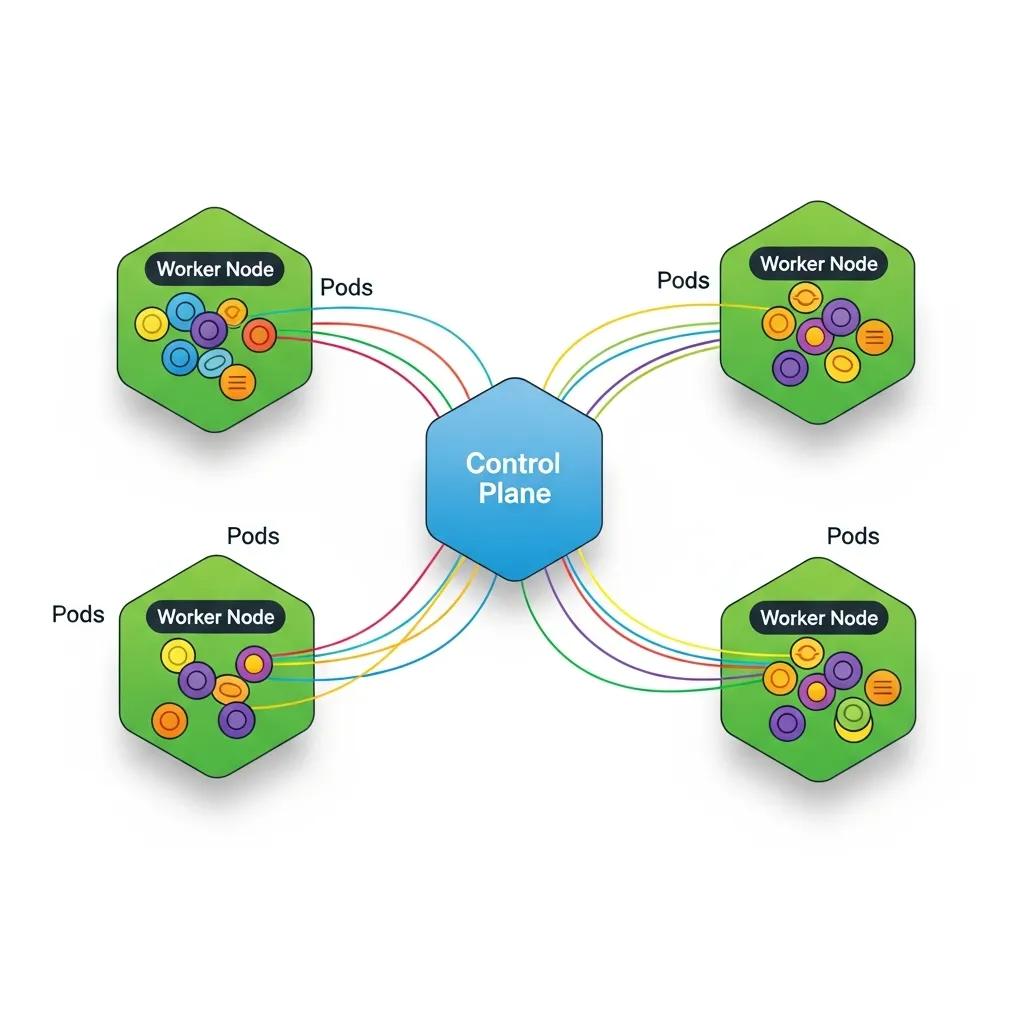
Understanding Kubernetes architecture is crucial for leveraging its full potential. The architecture consists of a control plane and worker nodes, each playing a vital role in managing containerized applications.
This architectural foundation is key to Kubernetes’ ability to provide a robust and scalable platform for container orchestration.
Kubernetes Architecture & Scalable Container Orchestration
In conclusion, this paper underscores the significance of Kubernetes as a scalable container orchestration platform, particularly in edge environments. It elucidates the architectural
Enhancing Edge Environment Scalability: Leveraging Kubernetes for Container Orchestration and Optimization, K Aruna, 2024
What Are the Roles of Control Plane and Worker Nodes?
The control plane is responsible for managing the Kubernetes cluster, making decisions about scheduling, scaling, and maintaining the desired state of applications. It includes components like the API server, etcd (a key-value store), the controller manager, and the scheduler. Worker nodes, on the other hand, run the actual applications in containers. Each worker node contains a container runtime, kubelet, and kube-proxy, which facilitate communication and management of containers.
How Do Pods, Deployments, and Services Interact in Kubernetes?
In Kubernetes, a Pod is the smallest deployable unit, representing one or more containers that share storage, network, and specifications on how to run them. Deployments manage the desired state of Pods, ensuring that the specified number of replicas is running at all times. Services provide a stable endpoint for accessing Pods, enabling load balancing and service discovery. This interaction between Pods, Deployments, and Services allows Kubernetes to manage applications effectively and ensure high availability.
How to Get Started with Kubernetes: Setup and First Deployment

Getting started with Kubernetes involves setting up a cluster and deploying your first application. There are several options available for setting up a Kubernetes cluster, each catering to different needs and environments.
What Are the Options for Setting Up a Kubernetes Cluster?
Developers can choose from various methods to set up a Kubernetes cluster:
- Minikube: Ideal for local development, Minikube runs a single-node Kubernetes cluster on your machine.
- Managed Kubernetes Services: Cloud providers like Google Cloud offer managed Kubernetes services, simplifying cluster management and maintenance.
- Kubernetes on Bare Metal: For advanced users, deploying Kubernetes on bare metal provides maximum control and performance.
Each option has its advantages, depending on the use case and resource availability.
The integration of Kubernetes with cloud platforms like Google Cloud’s managed services is a significant advantage for developers seeking simplified cluster management.
Google Kubernetes Engine (GKE) Fundamentals
In this chapter we will use the Google Compute Engine to create a virtual machine instance, except that Google Container Engine API also needs to be enabled.
Kubernetes Management Design Patterns, 2017
How to Deploy Your First Application Using kubectl and YAML?
To deploy an application in Kubernetes, you typically use , the command-line tool for interacting with the Kubernetes API. The deployment process involves creating a YAML file that defines the desired state of your application, including the container image, replicas, and service configurations. Once the YAML file is ready, you can apply it using the command:
This method of deployment using and declarative YAML files is central to Kubernetes’ powerful container orchestration capabilities.
Kubernetes Container Orchestration & Deployment with Kubectl
kubernetes is for orchestration of containers. We can deploy containers using kubectl as well deploying
Building modern clouds: using docker, kubernetes &
Google cloud platform, J Shah, 2019
Frequently Asked Questions
What are the common challenges developers face when using Kubernetes?
Developers often encounter several challenges when using Kubernetes, including complexity in setup and configuration, managing stateful applications, and understanding networking within clusters. Additionally, debugging issues can be difficult due to the distributed nature of Kubernetes. Resource management and cost control are also concerns, especially when scaling applications. To mitigate these challenges, developers can leverage community resources, documentation, and tools designed to simplify Kubernetes management and enhance observability.
How does Kubernetes handle security for containerized applications?
Kubernetes employs multiple layers of security to protect containerized applications. It uses Role-Based Access Control (RBAC) to manage permissions and restrict access to resources. Network policies can be implemented to control traffic between Pods, enhancing security. Additionally, Kubernetes supports secrets management, allowing sensitive information like passwords and API keys to be stored securely. Regular updates and security patches are essential to maintain a secure Kubernetes environment, as vulnerabilities can arise over time.
Can Kubernetes be used for both microservices and monolithic applications?
Yes, Kubernetes is versatile enough to support both microservices and monolithic applications. For microservices, Kubernetes excels in managing multiple, independently deployable services, allowing for efficient scaling and resource allocation. Monolithic applications can also benefit from Kubernetes by simplifying deployment and management, although they may not fully utilize Kubernetes’ capabilities for scaling individual components. Developers can gradually refactor monolithic applications into microservices as needed, leveraging Kubernetes throughout the transition.
What is the role of Helm in Kubernetes?
Helm is a package manager for Kubernetes that simplifies the deployment and management of applications. It allows developers to define, install, and upgrade even the most complex Kubernetes applications using Helm charts, which are pre-configured packages of Kubernetes resources. Helm streamlines the process of managing application dependencies and configurations, making it easier to deploy applications consistently across different environments. This tool is particularly useful for managing applications with multiple components and configurations.
How can I monitor and troubleshoot applications running on Kubernetes?
Monitoring and troubleshooting applications in Kubernetes can be achieved through various tools and practices. Popular monitoring solutions include Prometheus and Grafana, which provide insights into application performance and resource usage. For troubleshooting, developers can use Kubernetes’ built-in commands like and to gather information about Pods and deployments. Additionally, integrating logging solutions like ELK Stack or Fluentd can help centralize logs for easier analysis and debugging.
What are the best practices for managing Kubernetes resources?
Managing Kubernetes resources effectively involves several best practices. First, use namespaces to organize resources and isolate environments. Implement resource requests and limits to ensure fair resource allocation among Pods. Regularly review and clean up unused resources to optimize cluster performance. Additionally, automate deployments using CI/CD pipelines to enhance consistency and reduce human error. Finally, keep your Kubernetes version up to date to benefit from the latest features and security improvements.
Conclusion
Embracing Kubernetes empowers developers to streamline application deployment and management, enhancing efficiency and scalability. By understanding its architecture and leveraging tools like GKE, you can overcome common challenges and optimize resource utilization. The insights provided in this guide reinforce the value of mastering Kubernetes for modern software development. Start your journey today by exploring our resources and tutorials to elevate your Kubernetes skills.
Leave a Reply