Blog

  • Understanding WCAG: Web Content Accessibility Guidelines

    Understanding WCAG: Web Content Accessibility Guidelines

    Diverse team collaborating on web accessibility design, showcasing tools and devices for inclusive UX

    Understanding WCAG: Web Content Accessibility Guidelines for Designers and Developers

    Web Content Accessibility Guidelines (WCAG) are a set of technical standards from the W3C’s Web Accessibility Initiative (WAI) that explain how to make digital content accessible to people with a wide range of disabilities. These guidelines are important because they translate accessibility goals into measurable success criteria that designers and developers can use to reduce legal risks, reach more people, and create inclusive user experiences. This article covers the core POUR principles that structure WCAG, how conformance levels relate to practical design actions, what’s new in WCAG 2.2, and how WCAG connects to ADA website compliance in practice. You’ll also find step-by-step, tool-focused guidance for implementing WCAG during design and for collaborating on accessibility reviews in Figma. Dive in for practical checklists, comparison tables, and plugin-driven workflows that make accessibility actionable for product teams.

    What Are the WCAG Principles and Why Do They Matter?

    WCAG offers a principle-based framework—Perceivable, Operable, Understandable, Robust (POUR)—that organizes success criteria and testing methods for accessible content. These principles matter because they establish a common language for designers, developers, testers, and policymakers to assess whether content is usable by assistive technologies and by individuals with sensory, cognitive, or motor impairments. Applying POUR helps remove barriers like unreadable text, inaccessible controls, or broken semantic structures, leading to measurable UX improvements such as faster navigation and fewer support requests. The following list briefly defines each POUR principle and links it to a clear design action you can take in your work.

    The four POUR principles detailed below directly align with WCAG success criteria and form the foundation for accessibility audits and remediation planning.

    1. Perceivable: Information and UI components must be presented in ways users can perceive, such as providing text alternatives and captions for non-text content.
    2. Operable: Interface components and navigation must be usable via multiple input methods, including keyboard-only operation and predictable focus behavior.
    3. Understandable: Content and operation should be clear and predictable, using plain language, consistent labels, and error recovery guidance.
    4. Robust: Content must remain usable as technologies evolve, relying on semantic markup and ARIA patterns that assistive technologies can interpret.

    What Are the Four POUR Principles of WCAG?
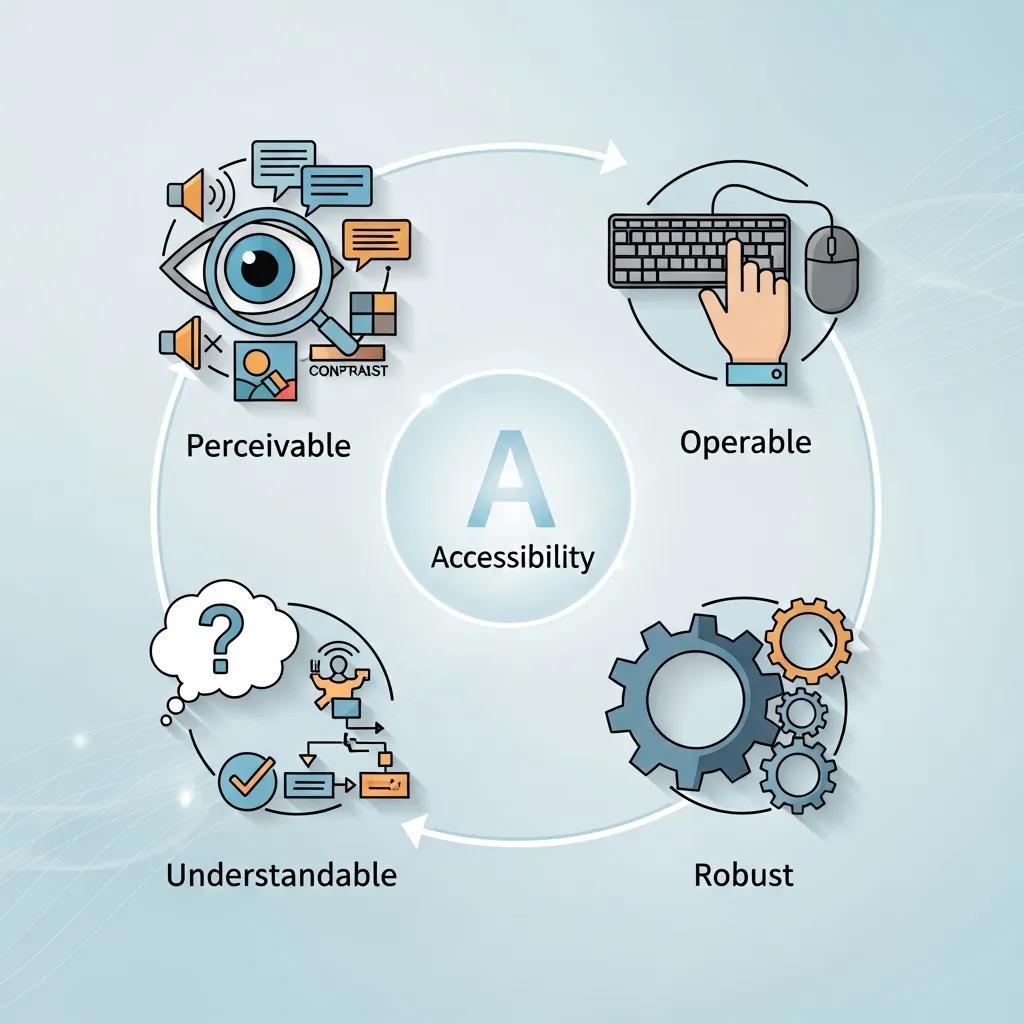
    Visual representation of the four POUR principles of WCAG: Perceivable, Operable, Understandable, Robust

    Perceivable means users must be able to sense the content through vision, hearing, or touch; for designers, this includes providing text alternatives and media captions. Operable requires that users can interact with the interface using keyboards, voice input, or switch devices; designers achieve this by implementing logical tab order and visible focus indicators. Understandable emphasizes clear language, consistent UI patterns, and helpful error messages so users can anticipate outcomes and recover from mistakes. Robust mandates semantic HTML, proper ARIA usage, and forward-compatible markup so assistive technologies can reliably interpret and present content.

    Each principle connects to specific success criteria—for instance, Perceivable relates to 1.1.1 Non-text Content and 1.4.3 Contrast, while Operable connects to 2.1.1 Keyboard and 2.4.3 Focus Order. Designers should align these principles with patterns in their component libraries to establish accessible defaults. The next section explores how following POUR leads to measurable accessibility improvements in real user journeys.

    How Do WCAG Principles Improve Web Accessibility?

    WCAG principles enhance accessibility by outlining specific methods—semantic markup, ARIA roles, keyboard patterns, and contrast thresholds—that assistive technologies and diverse users can depend on. For example, semantic headings and landmark roles streamline navigation for screen reader users, while consistent focus outlines and predictable keyboard order reduce errors for keyboard-only users. These methods yield measurable UX indicators, such as quicker task completion for assistive users and lower form abandonment rates due to inaccessible error messages. By designing with these methods in mind, teams gain more reliable QA signals and clearer scopes for engineering remediation.

    Since these improvements are testable, teams can track accessibility regressions and progress across releases, transforming WCAG compliance into a continuous quality metric that aligns with product KPIs. The next key consideration is how WCAG conformance levels translate into organizational compliance goals and daily design priorities.

    How Do WCAG Conformance Levels Define Accessibility Compliance?
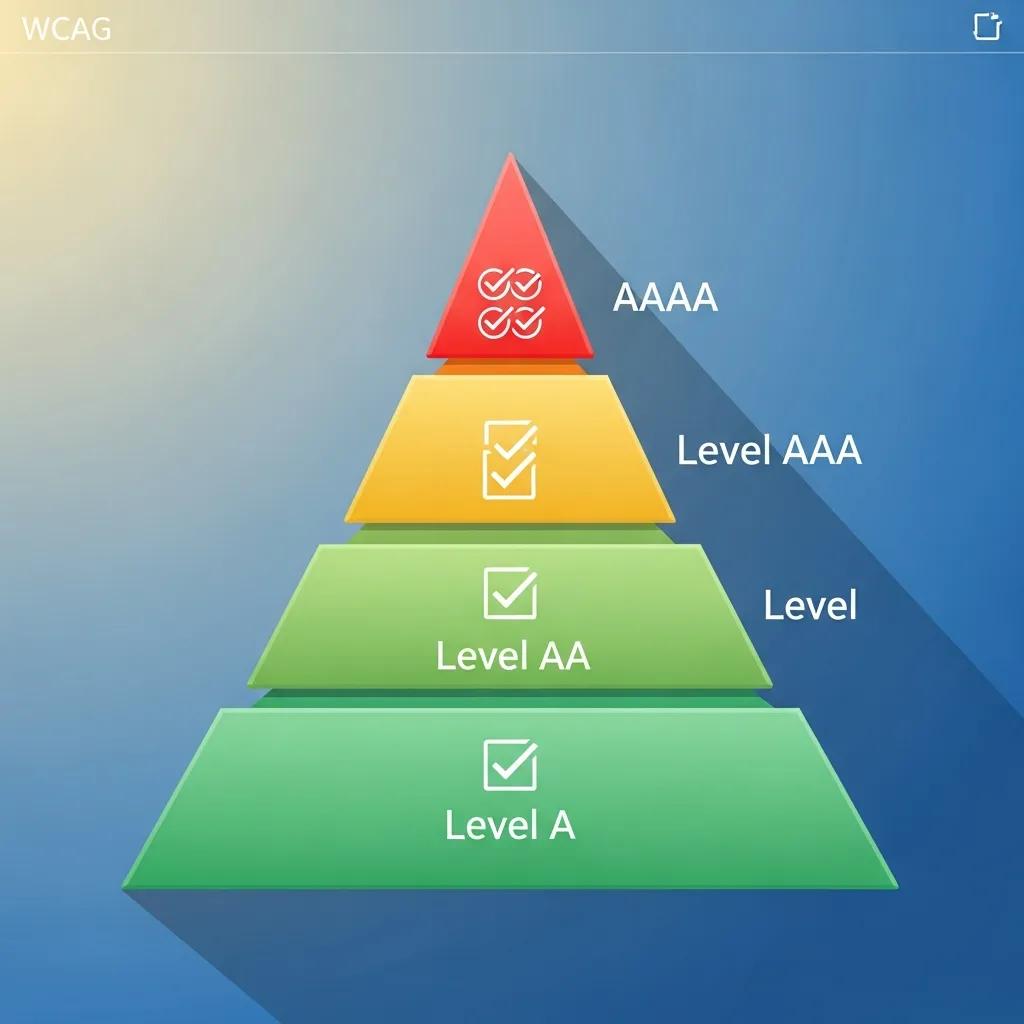
    Illustration of WCAG conformance levels A, AA, AAA, highlighting their differences in accessibility compliance

    WCAG conformance levels (A, AA, AAA) categorize success criteria based on their impact and implementation complexity, helping teams prioritize remediation and set realistic compliance targets. Level A addresses fundamental, often critical, barriers that need immediate attention, such as missing alt text and unreachable content. Level AA tackles most common barriers affecting a wide range of users, including sufficient color contrast and keyboard operability, and is the level most organizations aim for to balance legal requirements and usability. Level AAA offers the highest level of accessibility and usability enhancements but is often impractical to mandate for all content due to stricter requirements like enhanced contrast or multiple forms of alternative content.

    Below is a concise comparison that links each level to practical designer actions and typical examples, assisting teams in establishing achievable compliance roadmaps.

    This table outlines conformance-level expectations and corresponding designer actions.

    Conformance LevelTypical RequirementsDesigner Actions / Examples
    Level AAddresses fundamental access barriersProvide alt text for images, ensure focusable controls, label form fields
    Level AABroad usability improvements for many usersMeet 4.5:1 contrast for body text, ensure keyboard navigation and captions for prerecorded audio
    Level AAAEnhanced access for specific usersProvide 7:1 contrast for small text and extended alternatives; often applied selectively

    This comparison helps teams identify AA as a practical target for public-facing products, using A as a baseline and AAA for specific content segments. The following subsections delve into the differences and explain why AA is frequently chosen.

    What Are the Differences Between Levels A, AA, and AAA?

    Level A encompasses the most basic success criteria essential for avoiding outright exclusion, such as providing text alternatives and ensuring content is programmatically accessible. Level AA builds upon A by incorporating criteria that address more nuanced usability issues, like color contrast and navigation clarity, which significantly impact daily access for many users. Level AAA introduces stricter thresholds and additional content requirements that can sometimes conflict with design or content objectives, making it best suited for specific content or optional features. Therefore, designers should map remediation tasks to these levels, prioritizing A first, then AA for broad coverage, and AAA where stakeholder value justifies the effort.

    This approach translates abstract standards into concrete tasks—writing alt text, checking contrast, and documenting keyboard flows—that teams can assign and verify. The next subsection explains why Level AA has become the standard choice for many organizations.

    Why Is Level AA the Common Compliance Target?

    Level AA is the common compliance target because it strikes an effective balance between delivering significant accessibility improvements and being practical to implement across most products. AA addresses the issues that most commonly hinder users—inadequate contrast, missing captions, and problematic keyboard flows—without imposing the more stringent requirements of AAA that can be technically and operationally demanding to achieve universally. Regulatory guidance and procurement standards frequently cite WCAG 2.1 AA (and now WCAG 2.2) as a reliable, industry-recognized benchmark for public-facing digital services. Consequently, design teams should prioritize AA remediation in their roadmaps and integrate AA checks into component libraries and QA processes.

    Focusing on AA enables product teams to demonstrate tangible progress and establish processes that can later be extended to more advanced criteria if necessary. Next, we will explore the changes introduced in WCAG 2.2 and their implications for everyday design decisions.

    What’s New in WCAG 2.2 Guidelines and How Do They Impact Design?

    WCAG 2.2 introduces new success criteria focused on mobile interactions, cognitive accessibility, and predictable input methods, reflecting evolving user needs and device usage patterns. These additions address real-world challenges such as small touch targets, complex cognitive tasks, and the need for simpler authentication processes. For designers, the practical impact includes ensuring components are tested for touch target size, forms provide clearer error identification and suggestions, and dynamic content maintains sensible focus and state changes. The following table summarizes key new 2.2 criteria and their concise design implications to guide prioritization.

    New CriterionUser Group / Issue AddressedDesign Impact / Recommended Approach
    Target Size (2.5.8)Touch users on mobile devicesEnsure interactive targets meet minimum dimensions; add spacing between targets
    Focus Appearance (2.4.11)Keyboard and low-vision usersProvide visible focus indicators with sufficient contrast and clear styling
    Dragging Movements (2.5.7)Users with motor impairmentsOffer alternative ways to perform drag operations, such as move controls or attribute toggles
    Reduce Motion (2.2.2 extension)Users with vestibular or cognitive sensitivityProvide settings to reduce or disable non-essential motion in UI

    This mapping provides designers with clear action items: increase hit areas, ensure robust focus styles, offer alternative interaction methods, and provide options for reducing motion. The next subsection highlights criteria specifically addressing cognitive and mobile accessibility and the patterns designers should adopt.

    Which New Criteria Address Cognitive and Mobile Accessibility?

    WCAG 2.2 includes criteria designed to reduce cognitive load and make mobile interactions more forgiving, directly addressing real-world barriers for users with cognitive differences and those using small-screen devices. For cognitive accessibility, designers should implement clearer labels, simplified navigation, and consistent error assistance that explains required corrections rather than offering generic warnings. For mobile accessibility, larger touch target sizes, adequate spacing, and alternative input options minimize accidental activation and make controls easier to operate. Adopting these patterns means creating components that adapt to device context and offering user preferences for simplified interactions.

    Design teams can implement these changes by updating component libraries with larger default sizes, incorporating help text patterns into form components, and adding accessibility tokens for focus and motion settings. Understanding these updates also helps teams communicate priorities effectively to engineering and product leadership during planning phases.

    How Does WCAG 2.2 Align with ISO/IEC 40500:2012 Standards?

    WCAG 2.2 continues to be the authoritative technical specification referenced by accessibility frameworks and is recognized alongside ISO/IEC 40500:2012, which formalizes web accessibility requirements internationally. This alignment means that organizations referencing ISO/IEC 40500 can use WCAG success criteria as the technical basis for compliance, simplifying procurement and documentation. For designers and product teams, the practical implication is that test artifacts and conformance statements should cite specific WCAG criteria and techniques when demonstrating adherence to ISO guidelines. Maintaining traceable documentation—including design decisions, test results, and remediation tickets—ensures clarity for audits and procurement processes.

    Design teams should therefore view WCAG 2.2 criteria as the implementation details behind broader ISO references and prepare documentation that maps components and pages to specific success criteria for transparent compliance reporting.

    How Does ADA Website Compliance Relate to WCAG Standards?

    The Americans with Disabilities Act (ADA) does not specify a particular set of technical standards for web accessibility. However, courts and regulatory bodies frequently use WCAG as the benchmark to assess whether digital services offer effective communication and non-discriminatory access. In practice, organizations that adopt WCAG—typically WCAG 2.1 or WCAG 2.2 at Level AA—demonstrate a defensible, industry-accepted approach to accessibility. Designers should therefore prioritize WCAG success criteria in their workflows, document their compliance efforts, and include evidence such as accessibility test reports and design system conformance to minimize legal exposure and improve user outcomes.

    Because WCAG provides measurable criteria, it serves as a practical tool for both design decisions and legal risk management. The following subsections summarize ADA expectations and how WCAG 2.1 AA aligns with those expectations in day-to-day design work.

    What Are the ADA Requirements for Web Accessibility?

    ADA requirements for digital accessibility are outcome-oriented: covered entities must ensure effective communication and equal access, but the statute itself does not list specific technical criteria. Courts and settlement agreements commonly rely on WCAG as the de facto technical standard to determine if websites and applications are accessible. For designers, this means developing evidence-based accessibility practices—annotated designs, accessibility test results, and remediation plans—that map to specific WCAG criteria. Keeping this documentation up-to-date helps demonstrate good-faith efforts and supports procurement or legal reviews when necessary.

    Further emphasizing the practical challenges and solutions for compliance, one study highlights the ongoing efforts of institutions like libraries to meet both ADA and WCAG standards for their virtual resources.

    ADA Compliance & WCAG Standards for Web Accessibility

    As libraries continue to expand their virtual resources, they are given the task of compliance with the American Disabilities Act as well as following the web accessibility standards listed in the Revised 508 Compliance or the Web Content Accessibility Guidelines (WCAG) 2.0 Standards. One difficult part of working with the web accessibility standards is determining how to correctly update our resources to meet both these standards and also provide instruction. Each library will need to determine its answer, along with determining its library-wide expectations. I will present what current research has shown to be the most effective instructional approach for research guides and what WCAG 2.1 standards librarians can easily incorporate into their library’s research guides and tutorials. During my research process, I created a LibGuide content strategy and web accessibility checklist. While creating this checklist, I purposely designed it as a tool that any librarian could

    Virtual Resources, ADA, and Web Accessibility Compliance: Is There Help? Yes!, J Easterday, 2022

    Design teams should integrate accessibility acceptance criteria into their definition of done, include WCAG-based test scripts in QA, and maintain an accessibility backlog to demonstrate continuous improvement toward compliance goals. These operational steps connect legal expectations with practical design tasks and verification.

    How Do WCAG 2.1 AA Guidelines Support ADA Compliance?

    Adhering to WCAG 2.1 AA offers organizations a practical pathway to meet ADA expectations, as many legal cases and regulatory guidance explicitly reference WCAG 2.1 AA as the technical standard for reasonable accessibility. WCAG 2.1 AA includes specific, testable criteria—such as 1.4.3 Contrast (Minimum) and 2.1.1 Keyboard—that directly address common accessibility failures cited in legal disputes. Designers can mitigate legal risks by embedding these checks into component libraries, conducting automated and manual audits, and retaining evidence of remediation for critical items. Mapping design decisions to WCAG 2.1 AA criteria establishes a clear chain of responsibility from design to deployment.

    Documenting conformance steps and producing audit artifacts transforms WCAG compliance from a theoretical standard into operational practice that supports ADA-related inquiries and procurement requirements.

    What Are the Best Web Accessibility Practices for Designers Using Figma?

    Designers can and should identify many accessibility issues during the design phase. In Figma, practical techniques include building accessible components, documenting semantic roles in layer names, and using plugins to verify contrast and simulate assistive technology interactions. Integrating these practices early reduces engineering rework and clarifies handoff requirements. The table below maps common WCAG success criteria to concrete checks and plugin recommendations you can use directly in Figma to make designs more robust before development.

    WCAG Success CriterionFigma Design CheckHow to Implement / Plugin
    1.1.1 Non-text ContentVerify alt text placeholdersUse component notes to specify alt text and export a labels spreadsheet
    1.4.3 Contrast (4.5:1)Contrast measurementUse a contrast checker plugin to test foreground/background ratios
    2.1.1 KeyboardFocus order and visible focusDocument tab order in prototype and design distinct focus states
    4.1.2 Name, Role, ValueSemantic naming in layersUse consistent layer naming and annotate interactive component semantics

    This mapping helps designers translate WCAG items into tasks within Figma, keeping accessibility decisions visible during handoff. The following subsections provide step-by-step techniques for two high-impact activities: color contrast and keyboard navigation.

    How to Ensure Color Contrast Accessibility in Figma?

    Color contrast is a measurable requirement—WCAG 2.1 AA mandates a minimum 4.5:1 contrast ratio for body text—so designers should test and correct color choices early. Begin by measuring contrast for text and key UI elements using Figma’s color tools or a contrast checker plugin to identify failing pairs. If a color pair doesn’t meet the standard, adjust the hue, saturation, or lightness while maintaining brand identity, or provide an accessible alternative for the same component variant. Finally, document approved accessible color tokens in your design system to ensure teams consistently reuse compliant variants across products.

    1. Measure contrast: Test each text-on-background pair with a contrast checker plugin.
    2. Adjust colors: Modify color values or select alternate variants until the ratio meets 4.5:1 for body text.
    3. Document tokens: Store approved accessible colors in shared libraries to prevent regressions.

    Following these steps reduces the need for later engineering fixes and establishes accessible color foundations for components. The next section demonstrates how to design keyboard-navigable interfaces in Figma.

    How to Create Keyboard-Navigable Interfaces with Figma?

    Designing for keyboard navigation involves planning a logical tab order, visible focus states, and prototypes that simulate keyboard flows, allowing stakeholders to test interactions before development. In Figma, establish a clear layer and component naming convention that indicates interactive order, and design distinct focus styles that meet contrast and visibility requirements. Utilize prototyping features to simulate focus transitions and annotate expected keyboard behaviors in component documentation for developers. Finally, conduct manual keyboard walkthroughs against interactive prototypes to identify ordering or focus-trapping issues early.

    • Plan tab order: Define logical navigation sequences and document them in the design file.
    • Design focus states: Create high-contrast, visible focus indicators for all interactive components.
    • Prototype and test: Simulate keyboard interactions in prototypes and document expected ARIA roles.

    These practices make keyboard behavior explicit and actionable for engineers, reducing ambiguity during handoff. After covering practical techniques, it’s beneficial to explore how Figma supports team collaboration on accessibility, including its built-in features and plugin workflows.

    Figma, Inc. offers an information hub and platform that supports collaborative design and education, enabling teams to centralize accessible component libraries and streamline design-to-engineering handoffs. Teams interested in a collaborative, design-centric workflow can evaluate Figma’s free and paid plan options to determine how shared libraries and real-time collaboration align with their accessibility workflows.

    How Can Teams Collaborate Effectively on Accessibility Using Figma?

    Effective accessibility collaboration requires clear roles, defined audit cycles, and documented reviews so designers, product managers, and engineers share responsibility for WCAG conformance. Figma’s collaborative environment allows teams to annotate designs with accessibility requirements, tag issues in comments, and maintain version history for audit trails. A structured process—where designers mark components with necessary semantics, accessibility reviewers run plugin checks, and engineers verify implementation against documented success criteria—creates an integrated workflow that minimizes miscommunication and technical debt. The subsections below detail which Figma features aid auditing and how to incorporate plugins into team review cycles.

    Teams should establish review cadences and assign owners for accessibility tickets, using Figma’s collaboration tools to maintain transparent remediation status and ensure defects do not reappear across iterations.

    What Figma Features Facilitate Accessibility Auditing and Reviews?

    Figma supports accessibility audits through features like real-time commenting for focused feedback, shared component libraries for consistent accessible patterns, and version history to track accessibility-related changes. Comment threads allow reviewers to attach annotated screenshots and WCAG references directly to problem areas, while shared libraries enforce accessible defaults like focus styles and tokenized colors. Version history and branching enable the creation of an audit trail showing when accessibility fixes were implemented and who approved them, which aids compliance documentation and handoffs to engineering. Utilizing these features collectively establishes a repeatable accessibility review process integrated into design iterations.

    Documenting these practices in team playbooks ensures accessibility remains visible and actionable across releases. The next subsection describes plugin-driven workflows for automated checks and interpretation.

    How to Use Figma Plugins for Accessibility Testing?

    Figma plugins offer quick, automated checks—such as contrast analyzers, color blindness simulators, and accessibility linters—that help identify issues before handoff and integrate smoothly into review workflows. Use a contrast checker to list failing text layers, employ simulators to preview experiences for color blindness, and utilize accessibility audit plugins to flag semantic or naming issues; combine plugin output with manual keyboard walkthroughs for comprehensive coverage. When a plugin identifies an issue, add a comment with remediation guidance and link to the relevant WCAG success criterion in the design note so engineers understand both the problem and the expected solution. Escalate implementation questions to engineers when plugins highlight behaviors requiring runtime solutions, such as focus management or ARIA attributes.

    • Run automated checks: Use contrast and simulator plugins as an initial assessment.
    • Annotate issues: Attach remediation guidance and WCAG references within comments.
    • Escalate when needed: Convert complex issues into engineering tickets with clear acceptance criteria.

    These plugin-based workflows accelerate the discovery of many common failures and provide a documented starting point for engineering remediation. For teams ready to adopt collaborative accessibility tooling, evaluating available plan tiers and centralized libraries can help scale their approach.

    Figma, Inc. highlights collaborative design, education, and team workflows as core value propositions. Teams aiming to build accessible products can leverage both free and paid plan features to centralize component libraries, coordinate cross-functional reviews, and scale accessibility education within their organizations. Selecting a plan that supports shared libraries and real-time collaboration aids in operationalizing the practices described above.

    For teams that have implemented these steps and seek a sustainable path forward, consider integrating accessibility checks into your CI/CD pipeline and creating a living accessibility backlog that tracks WCAG success criteria across components and pages. This approach operationalizes continuous improvement and keeps accessibility visible as a product priority throughout releases.

    Frequently Asked Questions

    What is the significance of WCAG 2.2 updates for designers?

    WCAG 2.2 introduces new success criteria that enhance mobile and cognitive accessibility, reflecting the evolving needs of users. For designers, these updates mean they must ensure that interactive elements are appropriately sized for touch, provide clear error messages, and maintain focus during dynamic content changes. By integrating these criteria into their design processes, teams can create more user-friendly interfaces that cater to a wider audience, ultimately improving overall accessibility and user satisfaction.

    How can organizations measure their compliance with WCAG?

    Organizations can measure compliance with WCAG by conducting regular accessibility audits that assess adherence to the guidelines’ success criteria. This involves using automated tools and manual testing to evaluate aspects like color contrast, keyboard navigation, and semantic markup. Additionally, maintaining documentation of design decisions, test results, and remediation efforts helps track progress and provides evidence of compliance during audits or legal reviews. Regularly updating these assessments ensures ongoing adherence to accessibility standards.

    What role do assistive technologies play in WCAG compliance?

    Assistive technologies, such as screen readers and alternative input devices, are crucial for WCAG compliance as they enable users with disabilities to access digital content. WCAG guidelines are designed to ensure that web content is compatible with these technologies, which rely on semantic HTML and ARIA roles to interpret and present information correctly. By following WCAG principles, designers and developers can create content that is not only accessible but also usable for individuals relying on assistive technologies.

    How can teams ensure continuous improvement in accessibility?

    To ensure continuous improvement in accessibility, teams should integrate accessibility checks into their development workflows, such as CI/CD pipelines. This includes regularly updating component libraries with accessible patterns, conducting audits after each release, and maintaining an accessibility backlog that tracks WCAG success criteria. Additionally, fostering a culture of accessibility awareness through training and collaboration among designers, developers, and stakeholders can help keep accessibility at the forefront of product development.

    What are some common pitfalls to avoid when implementing WCAG?

    Common pitfalls when implementing WCAG include treating accessibility as a one-time task rather than an ongoing process, neglecting to involve users with disabilities in testing, and failing to document accessibility efforts. Additionally, overlooking the importance of user feedback can lead to missed opportunities for improvement. Teams should prioritize regular audits, user testing, and clear communication about accessibility goals to avoid these pitfalls and create truly inclusive digital experiences.

    How does WCAG relate to other accessibility standards globally?

    WCAG serves as a foundational standard for web accessibility and is often referenced in conjunction with other international standards, such as ISO/IEC 40500:2012. Many countries and organizations adopt WCAG as a benchmark for compliance with their own accessibility laws and regulations. This alignment helps create a consistent framework for evaluating accessibility across different jurisdictions, making it easier for organizations to meet diverse legal requirements while ensuring inclusive digital experiences for all users.

    Conclusion

    Implementing WCAG guidelines is essential for creating accessible digital content that meets the needs of all users, including those with disabilities. By adhering to the POUR principles and understanding conformance levels, designers and developers can significantly enhance user experience and reduce legal risks. Embrace these best practices to ensure your web content is not only compliant but also inclusive. Start optimizing your designs for accessibility today and explore our resources for further guidance.

  • Master Asynchronous Video Communication for Remote Teams

    Master Asynchronous Video Communication for Remote Teams: Strategies to Optimize Productivity and Collaboration

    Asynchronous video communication is the practice of recording and sharing video messages, screen recordings, or micro-lessons that recipients can view and respond to on their own schedule, improving productivity and collaboration across time zones. This guide explains how async video reduces meeting load, accelerates onboarding, creates durable video documentation, and supports asynchronous feedback loops for distributed teams. You will learn tool selection criteria, implementation best practices, SEO and business outcomes tied to repurposed video assets, and advanced trends like AI-driven transcription and semantic tagging. The article maps practical steps for teams to adopt an async-first approach, plus tactical advice on integrating videos into existing workflows and measuring return on investment. Throughout, we use terms like asynchronous video communication, async video messaging, and recorded video communication to keep semantic focus and practical applicability for remote work scenarios. Read on for tool comparisons, checklists, EAV tables that clarify trade-offs, and concise action items you can pilot this week.

    This flexibility, allowing recipients to engage with content on their own schedule, is a core advantage that extends beyond business, proving transformative in fields like online education.

    Asynchronous Video for Flexible Online Learning

    Asynchronous video has emerged as a powerful tool in online education, offering learners the freedom to access course materials and engage with interactive content at their own pace and convenience. This paper explores the potential of asynchronous video in revolutionizing education by unlocking new possibilities for interactive online learning.

    Revolutionizing education: unlocking the potential of asynchronous video for interactive online learning, N Bahiyah, 2023

    What is Asynchronous Video Communication and How Does It Benefit Remote Teams?

    Asynchronous video communication means sending recorded video or screen captures that teammates consume and reply to later, enabling rich context without requiring everyone to be present at the same time. The mechanism works by capturing voice, screen, and visual cues in a single asset so knowledge transfer is denser and less ambiguous than text-only updates. This reduces scheduling friction and preserves a searchable record of decisions, which increases team productivity and reduces repeated clarifications. The result is fewer synchronous meetings, faster handoffs across time zones, and more consistent onboarding materials that scale. Understanding these benefits leads naturally to how async video differs from live communication and when each mode is preferable.

    Indeed, research consistently highlights how asynchronous communication strategies are pivotal for optimizing remote team productivity and collaboration.

    Asynchronous Communication for Remote Team Productivity

    equitable participation and use asynchronous communication means, such as recorded. Optimizing agile project management for remote teams requires a strategic integration of technology, effective communication.

    Optimizing agile project management for virtual teams: Strategies for collaboration, communication, and productivity in remote settings, S Somanathan, 2023

    How teams choose between async and sync depends on urgency, need for real-time brainstorming, and the level of interactivity required; the next subsection breaks down those differences.

    How Does Asynchronous Video Differ from Synchronous Communication?

    Asynchronous video differs from synchronous communication primarily in timing, interactivity, and feedback latency, which changes expectations and workflow design. In async video, the sender packages context—tone, gestures, screen steps—into a replayable unit that recipients can pause, rewatch, and annotate; synchronous meetings prioritize immediate back-and-forth but often lack a durable artifact. This difference means async video lowers meeting fatigue and supports deep work by decoupling response schedules, while synchronous sessions remain valuable for live decision-making and rapid alignment. A practical example: a five-minute recorded demo with timestamps replaces a 30-minute status meeting for cross-time-zone teams, while a product strategy discussion may still require a live session. Choosing the right mode involves weighing the need for immediacy against the benefit of a reusable, indexable record.

    These mode distinctions set the stage for concrete productivity benefits and measurable outcomes from async adoption.

    What Are the Key Benefits of Async Video for Remote Team Productivity?

    Async video delivers measurable productivity gains by reducing repetitive meetings, improving knowledge capture, and accelerating onboarding and handoffs. The mechanism is simple: recorded messages encapsulate context that would otherwise require synchronous coordination, and that recorded context becomes a searchable asset in knowledge systems. Teams that shift routine updates to async formats reclaim time for focused work and create a library of institutional knowledge that shortens ramp time for new hires. Below are concise benefits that teams can quantify:

    • Reduced meeting overhead: fewer recurring standups and status calls for distributed teams.
    • Improved onboarding: reusable walkthroughs and tutorials shorten new-hire ramp time.
    • Clearer asynchronous feedback loops: annotated videos preserve intent and reduce revision cycles.
    • Time-zone friendliness: information flows without forcing synchronous overlap.

    By documenting examples and measuring hours saved, organizations can validate these benefits and scale async practices across functions.

    Which Top Asynchronous Video Communication Tools Empower Remote Teams?

    Choosing the right async video platform depends on recording modes, transcription quality, integrations with productivity tools, and analytics that support adoption measurement. Tools vary in whether they prioritize lightweight screen+camera captures, high-fidelity editing, or enterprise controls; the decision should align with use cases such as onboarding, customer support, or engineering handoffs. Key selection criteria include transcription accuracy, integrations with Slack/PM systems, annotation and timestamping, security and access controls, and analytics that surface engagement. Below is a practical comparison of representative tools to help triage choices based on common needs.

    ToolKey featureBenefit / Example
    LoomFast screen + camera recordingLightweight updates and quick demos for engineering and product teams
    VidyardAdvanced analytics & hostingTrack viewer engagement for customer-facing content and sales enablement
    ZightMulti-mode recording with simple editingCreate succinct tutorials and micro-lessons for onboarding

    This comparison shows how tool selection maps to use cases: lightweight recorders excel at internal status updates, while platforms with analytics support external content and lead-gen workflows.

    What Features Should You Look for in Async Video Tools Like Loom and Vidyard?

    When evaluating async video tools, prioritize features that make video discoverable, secure, and easy to integrate into workflows: high-quality automated transcription, seamless connectors (Slack, ClickUp, LMS), timestamped comments, and admin controls. Transcription creates indexable text that supports search and repurposing; connectors enable videos to be surfaced in the same places teams already work, reducing friction. Security features like domain controls, password gating, and access logs matter for sensitive demos or internal knowledge. Additionally, analytics that show view-through rates and drop-off points help teams iterate on video length and structure. For teams focused on making recorded content discoverable, pairing strong transcription with schema-ready metadata ensures videos become long-term knowledge assets and content channels.

    Integrating these technical recommendations with on-page SEO and LLM optimization improves discoverability; LinkGraph’s On-Page SEO and LLM Optimization Services can help convert tool-generated transcripts and metadata into search-friendly assets without changing platform choice.

    How to Choose the Best Async Video Platform for Your Remote Team?

    Selecting the right platform requires matching features to team personas, piloting usage, and measuring adoption metrics during a trial period. Smaller startups may prioritize ease of use and low friction recording for rapid status updates, while enterprises often require admin controls, SSO, and usage analytics for governance. Consider these decision criteria when evaluating platforms: primary use case (support vs onboarding), required integrations (ticketing, wiki, LMS), expected volume of content, and analytics needs for measuring ROI. Conduct a 30-day pilot with representative users, track adoption rate and viewer engagement, and use feedback to validate whether the tool reduces meeting load or speeds handoffs.

    A quick decision checklist:

    1. Define top 2 use cases and required integrations.
    2. Run a pilot with 5–10 users for 30 days.
    3. Measure adoption (videos created per week) and engagement (average view time).
    4. Decide based on fit and scalability rather than feature parity alone.

    This framework helps teams avoid overpaying for unused enterprise features and ensures the chosen tool aligns with workflow realities.

    What Are the Best Practices for Implementing Async Video Messaging in Remote Teams?

    Implementing async video successfully requires clear guidelines, leadership modeling, integrated templates, and measurable SLAs for response times. The mechanism of success is cultural and technical: teams must agree on when to use video vs text, how to title and tag videos for search, and what constitutes an acceptable response window. Training and leadership examples accelerate adoption; leaders who record concise updates and respect async response expectations signal permission for others to follow. Operationalizing these practices into templates, channels, and periodic reviews converts sporadic use into a durable async-first culture that reduces meeting overhead and preserves knowledge.

    PracticeImplementation detailMeasured outcome
    Response SLAsDefine 24–48 hour default reply windowReduced urgent meeting escalation
    Template useStandardized title, summary, timestampsFaster search and reuse of videos
    Leadership modelingManagers provide weekly async updatesHigher team adoption rates

    How to Establish Clear Guidelines and Foster an Async-First Culture?

    To foster an async-first culture, create a short playbook that defines use cases, response expectations, and formatting rules, and then train teams through hands-on demos and feedback loops. Guidelines should specify when to prefer a quick recorded update over a meeting, how to include a one-line summary and timestamps in the video description, and expected reply windows to reduce ambiguity. Leadership should demonstrate the model by using async updates for routine status reports and by declining unnecessary meetings in favor of recorded alternatives. Reinforce positive behavior with recognition for clear, reusable video documentation and use adoption metrics from your pilot to iterate on the playbook.

    A short checklist for rollout:

    1. Publish a one-page async video playbook.
    2. Run a live demo and record the recording as an example.
    3. Track adoption and share success stories to reinforce the norm.
    4. Iterate on guidelines from team feedback.

    These steps institutionalize norms and make asynchronous practices predictable and scalable.

    How Can Async Video Integrate Seamlessly with Existing Remote Workflows?

    Async videos integrate best when they are embedded directly into project management tickets, knowledge base articles, and chat channels where work already happens; automation can transcribe and post summaries automatically to the team wiki. Practical patterns include attaching a short demo to a task ticket, linking timestamped clips inside onboarding checklists, and configuring notifications so employees see new videos only in relevant channels. Use transcripts as the canonical knowledge artifact—extract highlights for searchable KB pages and tag entities to improve retrieval. Example automation: when a video is uploaded, an integration posts its transcript to the corresponding project doc and adds a short summary to the sprint board.

    By embedding videos into existing systems and using transcripts as long-form documentation, teams reduce context switching and make recorded communication discoverable for future reference.

    How Does Asynchronous Video Communication Impact SEO and Business Outcomes?

    Asynchronous video creates indexable assets—transcripts, summaries, and clips—that expand organic content inventory and support lead generation when repurposed externally. The mechanism is straightforward: transcripts convert spoken content into crawlable text, entity tagging improves semantic relevance, and VideoObject schema helps search engines understand and surface video content. These steps increase content velocity without proportionally increasing creation cost because the same recording yields multiple assets: blog posts, short clips, FAQs, and knowledge base articles. Measuring business impact involves tracking content-driven KPIs such as organic impressions, demo requests originating from repurposed assets, and the rate at which videos reduce support tickets or speed onboarding.

    The table below links common video-derived assets to SEO attributes and optimization actions teams can take.

    Asset typeSEO attributeOptimization action
    TranscriptIndexable textClean timestamps, tag named entities, publish as HTML
    Summary/ClipsFeatured snippets potentialCreate short answer paragraphs and timestamped clips
    Full VideoRich media resultAdd VideoObject schema and structured metadata

    This mapping shows clear, implementable steps to turn internal recordings into discoverable content that supports business outcomes.

    LinkGraph relevance: as an AI-powered SEO agency focused on Content Strategy, On-Page SEO Services, and LLM Optimization Services, LinkGraph can help teams convert tool-generated transcripts and metadata into search-optimized assets and semantic entity maps. Their approach combines AI agents with human expertise to speed optimization, often delivering fast results within a 30-day timeframe, and supports cross-functional repurposing of video assets for lead generation and content velocity.

    How Does Async Video Enhance Content Creation and Quality for SEO?

    Async video enhances content creation by supplying high-quality source material—spoken explanations, product demos, and expert interviews—that can be transcribed, semantically tagged, and repurposed as long-form posts or short-form clips. Transcripts create crawlable text; entity extraction identifies topics and people for Knowledge Graph alignment; and embedding VideoObject and HowTo schema signals structured context to search engines. Practically, teams should transcribe, clean up speaker labels, extract 3–5 key entities, and produce a short written summary for each recording to publish alongside the video. These steps turn ephemeral meetings into persistent content that improves topical depth and organic relevance.

    Converting one internal demo into multiple external assets increases content output while preserving speaker authenticity and technical accuracy.

    What Metrics Demonstrate ROI from Async Video in Remote Collaboration?

    Measuring ROI requires tracking productivity, content, and business metrics that link recordings to outcomes: hours saved per week, reduced meeting minutes, number of repurposed assets published, organic impressions, and demo or lead conversions attributed to video content. Suggested KPIs include average reduction in weekly meeting time, onboarding time to proficiency, number of published SEO assets derived from recordings per month, organic traffic uplift to repurposed pages, and support ticket reduction linked to tutorial videos. Employ A/B pilots or before/after comparisons for precise measurement: run a team pilot using async video for four weeks and measure change in meeting minutes and ticket volume.

    A short metrics checklist:

    • Track meeting minutes per team before and after pilot.
    • Record onboarding completion time for new hires.
    • Count repurposed content pieces and monitor organic impressions.
    • Attribute demo requests or leads back to repurposed video assets.

    These metrics create a defensible business case for scaling async video practices.

    What Advanced Strategies and Future Trends Are Shaping Async Video Communication?

    Advanced strategies center on AI-enhanced workflows, semantic SEO, and instrumenting video assets for continuous improvement; these trends turn recorded communication into an optimized content pipeline. AI models automate transcription, speaker separation, noise reduction, and succinct summaries, increasing usability and reducing human editing time. Semantic tagging and entity recognition map video content into topical clusters that support internal search and external discoverability. Continuous optimization cycles—publish, measure engagement, extract clips, and republish—drive content velocity while preserving knowledge quality. Teams that instrument video assets and close the analytics loop will gain both operational and content advantages in 2025 and beyond.

    These strategic shifts lead directly to practical investments in AI tooling, schema application, and workflow automation to maximize long-term return on recorded assets.

    How Is AI Enhancing Asynchronous Video with Transcription and Summaries?

    AI improves the usability of async video by producing automated transcripts, noise-reduced audio, and concise summaries that highlight key points and action items. Automated transcription converts speech to text quickly, while summarization distills long recordings into scannable bullets for busy stakeholders. Human review remains essential for accuracy and E-E-A-T—editing ensures domain-specific terms and entity names are correct. Typical implementation steps: generate an automated transcript, perform a human pass to correct errors and tag entities, then produce a 2–3 sentence summary and a list of timestamps for key moments.

    Further emphasizing the power of AI, studies confirm that AI-driven search algorithms significantly enhance the accuracy and speed of information retrieval from video meeting records and transcripts.

    AI-Powered Search for Video Meeting Transcripts

    This study compares the traditional search methods, which is to search from video recordings of the meetings by moving the slider back and forth or by keyword search in transcripts versus integrated AI video plus transcript search. Based on the previous test results, we introduced some human-centric design features to the AI and built a new enhanced AI search tool for information retrieval. For search technique efficiency testing, the method had two set of experiments. The first results of the experiment showed that AI-based search algorithms were more accurate and faster than conventional search approaches.

    AI-Powered Information Retrieval in Meeting Records and Transcripts Enhancing Efficiency and User Experience, 2024

    This human-in-the-loop approach balances speed with quality and makes video assets production-ready for both internal knowledge bases and external SEO.

    How Can Video Content Be Optimized for Semantic SEO and Entity Recognition?

    Optimizing video for semantic SEO involves three core actions: annotate transcripts with entities, apply VideoObject and related schema, and link videos into topical clusters to build topical authority. Use LLMs to extract entities and relationships from transcripts, map those entities to topical hub pages, and include structured markup so search engines recognize the video’s context. Publish a cleaned transcript alongside a short, entity-rich summary and link the asset to related articles or tutorials to reinforce semantic relationships. Regularly re-evaluate entity tags and correlate them with organic performance to refine the topical graph over time.

    These steps—entity extraction, schema markup, and purposeful linking—turn video outputs into durable, discoverable content that supports both internal knowledge search and external organic visibility.

    For teams ready to accelerate optimization, LinkGraph’s Content Strategy and LLM Optimization Services can help operationalize entity extraction and schema application, combining AI capabilities with human review to improve discoverability and business impact.

    Asynchronous video communication empowers distributed teams to capture context-rich knowledge, reduce meetings, and create content that fuels both internal productivity and external SEO-driven outcomes. If you want support turning your recorded conversations into search-optimized assets and measurable business results, consult LinkGraph’s Holistic SEO approach and on-page optimization services; their AI-powered methods combined with human expertise are positioned to accelerate video optimization and content velocity, often delivering fast improvements within a 30-day window.

  • How to Optimize Website Loading Speed: A Complete Performance Guide

    How to Optimize Website Loading Speed: A Complete Performance Guide

    Fast-loading website on a laptop in a modern workspace, symbolizing website performance optimization

    How to Optimize Website Loading Speed: A Complete Performance Guide for Improving Website Performance and Core Web Vitals

    Fast-loading website on a laptop in a modern workspace, symbolizing website performance optimization

    Website loading speed measures how quickly a page becomes usable and visually complete for visitors, and it directly affects user experience, search performance, and conversion rates. This guide explains practical techniques for improving website loading speed, ties each recommendation to Core Web Vitals, and maps audits and monitoring approaches so you can prioritize work effectively. Readers will learn what Core Web Vitals measure, how images and media influence load time, concrete front-end optimizations for CSS and JavaScript, server-side strategies like CDNs and caching, and the tools to audit and continuously monitor performance. The article also highlights how diagnostic tools from Google LLC fit into an ongoing performance workflow without prescribing any vendor lock-in. Start by understanding the key metrics that define perceived and measured speed, then move through asset-level, code-level, and infrastructure-level optimizations so you can reduce LCP, minimize input latency, and shrink layout shifts.

    Further emphasizing the comprehensive nature of performance, research underscores the critical role of front-end optimization in enhancing user experience and achieving business objectives.

    Front-End Optimization for User Experience & Core Web Vitals

    AbstractFront-end performance optimization represents a critical business imperative for organizations developing next-generation digital services in an environment where user expectations continue to rise. This technical article explores how performance optimization directly impacts user satisfaction, conversion rates, and revenue across digital platforms. It explores the evolution of performance measurement through Core Web Vitals, evaluates advanced code splitting strategies, and discusses emerging technologies like WebAssembly for near-native browser performance. The article also covers edge computing implementations, comprehensive image and asset optimization techniques, strategic caching mechanisms, and modern rendering approaches including Server-Side Rendering, Static Site Generation, and Incremental Static Regeneration. These optimization strategies not only enhance technical performance metrics but demonstrably improve business outcomes through increased user engagemen

    Front-End Performance Optimization for Next-Generation Digital Services, 2025

    What Are Core Web Vitals and How Do They Impact Website Speed?

    Visual representation of Core Web Vitals metrics: loading, interactivity, and visual stability

    Core Web Vitals are a focused set of user-centered metrics that quantify loading, interactivity, and visual stability to reflect real-world user experience. They work by measuring specific events during page load—Largest Contentful Paint captures main content load, First Input Delay measures initial interactivity, and Cumulative Layout Shift tracks unexpected visual movement—so each metric maps directly to perceived performance. Improving these metrics typically increases engagement, reduces bounce, and positively influences search performance signals because search systems use field data to evaluate experience. Measuring Core Web Vitals requires both lab tools and real-user field data to find reproducible root causes, and remediations often involve image delivery, main-thread work reduction, and reserving layout space. Understanding these relationships sets up targeted fixes for LCP, FID (and INP as an evolution), and CLS that directly shorten perceived load times and stabilize the viewport for users.

    Core Web Vitals thresholds to target:

    1. LCP: aiming for 2.5 seconds or less for a good experience.
    2. FID: aiming for less than 100 milliseconds (note INP is emerging as a more comprehensive interactivity metric).
    3. CLS: aiming for a score below 0.1 to minimize visual shifts.

    These thresholds provide a clear prioritization: reduce the largest content element’s render time first, then minimize main-thread blocking, and finally stabilize layout behavior to prevent CLS. The next sections explain concrete actions that map to these metrics and show how audits reveal the highest-impact opportunities.

    What Is Largest Contentful Paint and How to Improve It?

    Largest Contentful Paint (LCP) measures when the largest visible element of the viewport finishes rendering, and it matters because users perceive pages as loaded when this element appears. LCP is commonly delayed by large hero images, render-blocking CSS, slow server response times, or heavy client-side rendering workflows, and addressing any of these reduces the time until the page feels usable. To improve LCP, optimize hero images (compress and use next-gen formats), preload critical assets like fonts and hero imagery, reduce CSS blocking by inlining critical CSS, and improve server-side response times through caching and faster hosting. Measuring before-and-after with lab tools and field metrics ensures each change actually reduces LCP rather than only improving synthetic scores.

    Improving LCP often requires coordinated fixes across media, CSS delivery, and server configuration, so start with the single largest candidate element identified in audits and work outward. Once LCP is improved, focus shifts naturally to interactivity and layout stability because faster loading exposes any remaining main-thread or layout problems.

    How to Reduce First Input Delay for Better User Experience

    First Input Delay (FID) quantifies the time between a user’s first interaction and the browser’s ability to respond, and reducing it makes sites feel snappier and more responsive. FID (and INP as a broader replacement) is typically caused by long tasks on the main thread, heavy JavaScript parsing and execution, or large synchronous initializations that block event handling. Practical mitigations include breaking up long tasks into smaller chunks, deferring non-critical JavaScript, using code-splitting and lazy-loading for less-used features, and offloading work to web workers where possible. Tooling such as Chrome DevTools and Lighthouse help identify long tasks and the functions responsible so you can prioritize changes by expected latency reduction.

    Reducing input latency also complements LCP improvements because faster visual readiness exposes interactivity gaps; once heavy main-thread tasks are trimmed, users both see content sooner and can interact with it immediately, improving overall engagement metrics.

    Which Image and Media Optimization Techniques Boost Page Load Time?

    Image optimization techniques displayed on a computer screen in a creative workspace

    Images and media often make up the largest portion of page weight, so optimizing them yields big wins for both LCP and overall page load time. Effective image strategies include converting to next-gen formats where appropriate, compressing while preserving visual quality, serving responsive images via srcset and sizes, lazy-loading offscreen media, and leveraging edge caching to reduce delivery latency. These techniques reduce payload size and speed visual rendering, and they directly reduce LCP by ensuring the main visual element downloads and paints faster. Below are practical steps to prioritize when media dominates page weight.

    Top image and media techniques:

    • Use next-generation image formats for improved compression while maintaining quality.
    • Compress images with sensible quality settings and automate conversion in build pipelines.
    • Serve responsive images and lazy-load offscreen assets to avoid downloading unnecessary bytes.

    Choosing the right combination of techniques depends on your audience devices and the LCP element; the following table compares common image formats so you can decide which format to prioritize based on compression, support, and expected LCP impact.

    FormatCompressionBrowser supportExpected LCP impact
    AVIFHigh lossy & losslessIncreasing modern supportLarge reductions in bytes for photographic images
    WebPStrong lossy compressionBroad modern supportSignificant size savings vs JPEG/PNG
    JPEG/PNGLegacy formatsUniversal supportLarger payloads; fallback when newer formats unsupported

    This comparison shows that adopting next-gen formats where supported reduces payloads and improves LCP; however, you should implement fallback strategies for broader compatibility. The next subsection explains how to automate these conversions and integrate them into your delivery pipeline.

    How Does Image Compression and Next-Gen Formats Improve Loading Speed?

    Image compression reduces file size by removing redundant data, balancing quality and bytes to accelerate download times that affect LCP and overall load performance. Lossy compression removes imperceptible detail to save significant kilobytes; lossless retains fidelity but yields smaller savings. Next-gen formats such as AVIF and WebP offer superior compression ratios compared to JPEG and PNG, meaning the same visual quality at a smaller network cost, which translates directly into faster paint times. Tooling can be integrated into build pipelines or CDN-edge conversion workflows to produce multiple format variants automatically and serve the optimal file based on client support.

    When implementing next-gen formats, automate detection and fallback with responsive srcset strategies so browsers receive the best format they support. After converting and deploying, re-run audits to confirm LCP improvements and adjust quality thresholds to balance visual fidelity and speed.

    What Are Best Practices for Lazy Loading and Responsive Images?

    Lazy loading postpones the download of offscreen images until they near the viewport, reducing initial payload and improving LCP and TTFB perceived performance by prioritizing above-the-fold resources. Native browser lazy loading via is a low-friction start, while IntersectionObserver-based patterns provide finer control and progressive enhancement strategies for older browsers. Responsive images require srcset and sizes attributes so the browser can choose the most appropriate resolution for the device, preventing oversized images on small screens and reducing bandwidth.

    To avoid layout shifts (CLS), always reserve intrinsic width and height or use CSS aspect-ratio placeholders; add low-quality image placeholders or color-sampled placeholders to improve perceived performance. Combining responsive srcset with lazy loading and layout reservation produces stable, fast visual rendering that boosts both LCP and CLS metrics.

    How to Optimize CSS and JavaScript for Faster Website Performance?

    CSS and JavaScript delivery controls the critical rendering path: inefficient delivery creates render-blocking resources that delay first paint and LCP and can extend FID by increasing main-thread work. Optimizations should focus on reducing payload sizes through minification and compression, removing unused CSS, inlining critical CSS for the initial viewport, and deferring or asynchronously loading non-critical scripts. These practices shorten the time from navigation to usable page by minimizing blocking and shrinking parse/compile time, and they are especially impactful when combined with server-side compression and HTTP/2 or HTTP/3 transport improvements.

    Prioritize small, high-impact changes first—inline minimal critical CSS for the hero view, defer third-party scripts, and compress assets at the server edge—then implement automated build tasks for bundling and eliminating unused code. The following table compares common delivery strategies so you can select the appropriate tooling and complexity trade-offs.

    StrategySize reduction percentTooling exampleImplementation complexity
    Minification5–20%Terser, cssnanoLow — build step integration
    Compression (Brotli/Gzip)20–60%Server configMedium — server or CDN setup
    Code-splittingVariableWebpack, RollupMedium to high — requires architecture changes

    This comparison illustrates that minification and compression deliver immediate gains with low complexity, while code-splitting and tree-shaking provide larger long-term reductions but require deeper engineering changes. Next, learn specific actionable methods to apply these approaches.

    What Are Effective Methods for Minification and Compression?

    Minification removes unnecessary characters from CSS and JavaScript to reduce file size, while compression (Brotli or Gzip) encodes text assets for transmission savings; together they substantially reduce bytes over the wire and speed parsing. Implement minification in your build pipeline using established tools and enable Brotli or Gzip on the server or CDN to compress responses; ensure compressed assets are served only when the client supports them. Quantify expected reductions by comparing asset sizes before and after minification and compression to prioritize the largest wins.

    Automate these steps in CI so every deployment ships optimized assets, and verify content negotiation headers are properly configured to avoid double-compression or serving incompatible encodings. After deploying, use lab audits to confirm reduced payload sizes and that the server correctly delivers compressed responses.

    How to Eliminate Render-Blocking Resources with Asynchronous Loading?

    Render-blocking resources delay first paint and LCP by forcing the browser to download and process CSS or synchronous scripts before rendering; eliminating or deferring them accelerates the critical rendering path. Use or attributes for non-critical scripts, inline only the minimal critical CSS required for the above-the-fold content, and load the remainder asynchronously. For complex apps, dynamic import patterns and module-based loading allow bootstrapping essential features first while postponing less-used code.

    Audit with Lighthouse or DevTools to identify render-blocking resources and then apply progressive loading patterns, ensuring that any inline critical CSS remains small and that deferred scripts don’t introduce flash-of-unstyled-content or break functionality. These fixes reduce blocking time and enable faster visual completeness.

    What Server-Side Strategies Reduce Server Response Time and Enhance Speed?

    Server-side optimizations reduce Time to First Byte (TTFB) and lower latency, which shortens LCP and improves perceived site speed especially for geographically distributed users. Key strategies include choosing performant hosting with adequate provisioning, enabling server-side caching layers (reverse proxies, CDN edge caching), and using modern transport protocols like HTTP/2 and HTTP/3 to improve multiplexing and round-trip efficiency. These measures reduce origin load, shorten connection setup time for repeated requests, and enable faster deliverability of critical assets.

    When evaluating infrastructure, balance cost and complexity against expected latency gains; small changes like tuning cache-control headers and enabling compression often yield immediate improvements, while migrating to an edge-enabled CDN or adopting HTTP/3 may require more planning. The table below helps compare hosting and CDN attributes to inform selection.

    OptionLatency reductionCaching capabilitiesCost/complexity notes
    Generic CDNHigh for global usersEdge caching, configurable TTLsModerate — integration required
    Image-optimizing CDNHigh for media-heavy sitesAuto conversion/resizing + cachingHigher cost, reduces build complexity
    Edge compute (functions)Very high for dynamic responsesFine-grained caching + computeHigher complexity, enables personalization at edge

    This comparison highlights that edge and image-optimizing CDN features can offload significant work from origin servers and improve LCP for media-heavy pages. Next, we discuss how CDNs specifically contribute to faster page loads.

    How Do Content Delivery Networks Improve Website Loading?

    Content Delivery Networks reduce latency by caching static and generated assets at geographically distributed edge locations, so users download resources from a nearby node rather than a distant origin. CDNs can also provide image transformation, compression, and protocol optimizations that reduce payload sizes and connection overhead, which shortens the time for the browser to receive and render key assets. Proper cache-control headers and TTL strategies determine how long assets stay cached at the edge, balancing freshness and performance.

    The effectiveness of CDNs in minimizing latency is further supported by studies exploring advanced caching mechanisms designed to optimize content delivery.

    CDN Caching for Reduced Latency & Web Performance

    Caches are pervasively used in content delivery networks (CDNs) to serve requests close to users and thus reduce content access latency. However, designing latency-optimal caches are challenging in the presence of delayed hits, which occur in high-throughput systems when multiple requests for the same content occur before the content is fetched from the remote server. In this paper, we propose a novel timer-based mechanism that provably optimizes the mean caching latency, providing a theoretical basis for the understanding and design of latency-aware (LA) caching that is fundamental to content delivery in latency-sensitive systems. Our timer-based model is able to derive a simple ranking function which quickly informs us the priority of a content for our goal to minimize latency. Based on that we propose a lightweight latency-aware caching algorithm named LA-Cache. We have implemented a prototype within Apache Traffic Server, a popular CDN server. The latency achieved by our implementations agrees closely with theoretical predictions of our model. Our experimental results using production traces show that LA-Cache consistently reduces latencies by 5%-15% compared to state-of-the-art methods depending on the backend RTTs.

    Towards latency awareness for content delivery network caching, G Yan, 2022

    When evaluating CDN features, prioritize those that support origin shielding, configurable TTLs, and automated asset optimization if media is a primary contributor to LCP. After deployment, monitor cache hit rates and regional TTFB to measure the real-world latency benefits of the CDN.

    What Are Best Practices for Browser Caching and Fast Hosting?

    Browser caching ensures repeat visitors retrieve unchanged static assets from local caches, reducing network round trips and improving subsequent page loads; use cache-busting filenames and long max-age for immutable assets to enable long-lived caching safely. On the hosting side, choose providers with strong network backbones and points of presence that align with your user base, and implement server-side caching layers such as reverse proxies and object caches to reduce origin computation time. Together, these approaches lower average TTFB and improve both first and repeat visit performance.

    Configure Cache-Control and ETag headers to balance freshness with caching efficiency, and adopt immutable asset naming conventions so long TTLs don’t create stale-content risks. Monitoring cache hit/miss ratios will guide TTL tuning and hosting adjustments for consistent improvements.

    Which Tools and Techniques Help Audit and Monitor Website Speed Effectively?

    Auditing and monitoring combine lab-based diagnostics and field-based real-user data to give a complete performance picture; lab tools reproduce consistent conditions to test changes while field data shows real user experiences across devices and networks. Key tools include lab auditors like Lighthouse for controlled audits, and field data aggregators for Core Web Vitals to track real-user trends. Integrating both synthetic and Real User Monitoring (RUM) enables you to prioritize fixes that move field metrics, not only lab scores.

    Recommended tools and their primary use cases:

    1. Lighthouse: run lab audits to identify render-blockers and optimization opportunities.
    2. PageSpeed Insights: combines Lighthouse lab results with field Core Web Vitals data for practical prioritization.
    3. Chrome DevTools: debug performance bottlenecks, profile main-thread tasks, and inspect network waterfalls.

    These tools work together: use Lighthouse and PageSpeed Insights to target high-impact issues, then Chrome DevTools for deeper debugging and verification.

    How to Use Google PageSpeed Insights and Lighthouse for Performance Analysis?

    PageSpeed Insights surfaces both lab scores and field Core Web Vitals summaries along with prioritized opportunities, while Lighthouse provides a reproducible lab audit that breaks down diagnostics, opportunities, and the performance scoring model. To use them effectively, run audits on representative pages, map each opportunity to a concrete remediation (for example, compress hero image or defer script), and prioritize fixes by estimated savings and impact on LCP, FID/INP, or CLS. Repeat audits after implementing changes and compare field metrics over time to confirm improvements.

    A practical workflow is to run an initial lab audit, identify the largest-payload assets and main-thread tasks, implement quick wins like compression and defer attributes, then re-run both lab and field reports to measure real user impact. These iterations close the loop from diagnosis to measurable improvement.

    What Are Continuous Monitoring Tools for Tracking Core Web Vitals?

    Continuous monitoring combines synthetic tests for regressions with RUM for population-level metrics to alert on deteriorations in Core Web Vitals and other KPIs. RUM tools collect metrics from actual visitors and provide percentiles (e.g., 75th/95th) that reveal problematic user segments, while synthetic monitors run scripted transactions from fixed locations to catch regressions early. Configure alerts for threshold breaches (e.g., LCP > 2.5s or CLS > 0.1 for a region) and integrate dashboards to surface trends and correlate performance with releases.

    Choose a monitoring strategy that mixes RUM for real-world coverage and synthetic checks to detect build- or deploy-related regressions; ensure alert thresholds map to your business impact so engineering teams can prioritize fixes that matter to users.

    How to Optimize Website Loading Speed for Mobile-First Performance?

    Mobile-first performance requires minimizing payloads, prioritizing critical content, and adapting delivery to device constraints because mobile networks and CPUs typically have higher latency and lower processing power. Strategies include serving responsive images and adaptive resources, reducing JavaScript payloads and runtime work on mobile, and prioritizing above-the-fold content through critical CSS and resource hints. These steps reduce LCP and improve interactivity on mobile devices, which often represent the majority of traffic.

    Mobile optimization also benefits desktop users by enforcing leaner front-end practices; after addressing mobile constraints, overall site weight normally decreases and core metrics improve across devices. The following lists highlight the top mobile-specific tactics and considerations to make mobile experiences feel fast and stable.

    Top mobile-specific tactics:

    • Serve responsive images and conditionally load large assets only for capable devices.
    • Minimize and defer JavaScript to reduce main-thread pressure on weaker CPUs.
    • Prioritize visible content by inlining critical CSS and using resource hints.

    Implementing these tactics collectively produces a fast mobile experience and naturally reduces key Core Web Vitals for mobile users.

    What Is the Impact of Responsive Design on Mobile Page Speed?

    Responsive design impacts payloads and rendering because improperly configured responsive images or CSS can send overly large assets to mobile devices, slowing paints and increasing data usage. Using srcset and sizes ensures the browser selects an appropriately sized image for the viewport, while conditional loading patterns prevent oversized downloads on mobile. Additionally, responsive CSS strategies that avoid large global styles and embrace component-level CSS reduce unused styles being parsed on mobile devices.

    When responsive design is implemented thoughtfully, it reduces LCP by delivering smaller assets and minimizes reflows that can worsen CLS. Regular audits focusing on mobile device emulation and field metrics ensure responsive choices translate into measurable speed gains.

    How Do AMP and Mobile-Specific Optimizations Enhance User Experience?

    AMP provides a constrained, performance-oriented framework that guarantees fast baseline performance by limiting runtime features and enforcing best practices, which can improve perceived performance for content-heavy mobile pages. However, AMP introduces trade-offs in flexibility and feature parity; it is most effective when publishers prioritize immediate performance gains for content pages and can accept the AMP development model. Alternatives include progressive enhancement, server-side rendering, and edge-rendered personalization that aim to deliver similar perceived speed without the AMP ecosystem constraints.

    Choosing AMP or alternatives should be driven by content type, editorial needs, and long-term maintenance trade-offs; in many cases, adopting core performance patterns—lightweight templates, image optimization, and reduced JavaScript—provides comparable user experience improvements while retaining development flexibility. For teams assessing next steps, integrating monitoring and iterative performance budgets helps maintain mobile-first velocity.

    How Do AMP and Mobile-Specific Optimizations Enhance User Experience?

    AMP and mobile-specific optimizations accelerate perceived load time by enforcing fast rendering pipelines, limiting heavy JavaScript, and optimizing media delivery, making pages feel instant to users on constrained networks. These approaches reduce the time to interactive and often produce strong Core Web Vitals because they prioritize the critical rendering path and avoid runtime bloat. Evaluating AMP versus progressive enhancement requires weighing developer velocity and required features against the performance guarantees AMP provides.

    For many sites, combining selective AMP use for high-traffic content with broader mobile-first optimization practices yields the best balance of speed and flexibility, allowing teams to improve Core Web Vitals while maintaining feature parity across platforms. As you implement these choices, continue to measure field metrics to ensure real users experience the intended benefits.

    For performance diagnostics and audits, consider incorporating Google LLC’s audit ecosystem—such as PageSpeed Insights, Lighthouse, and Chrome DevTools—into your workflow to run lab tests, inspect long tasks, and monitor field Core Web Vitals; these tools provide the actionable diagnostics needed to prioritize and validate the speed improvements described throughout this guide.

  • Future of Remote Work in the Software Industry

    Future of Remote Work in the Software Industry

    Diverse software developers collaborating in a modern workspace, illustrating the future of remote work

    Future of Remote Work in the Software Industry: Trends, Challenges, and Solutions for 2025

    Remote and hybrid work in the software industry refers to distributed development and collaboration models where teams blend office time with remote contributions, and 2025 marks a pivotal phase as AI, cloud tooling, and new policies converge to reshape workflows. This article explains which trends are accelerating change, the operational and security challenges teams encounter, and practical solutions software companies can adopt to maintain velocity and quality. Readers will learn the dominant trends for 2025, common productivity and cybersecurity pitfalls, the technology stack that enables distributed software work, and actionable best practices for hybrid operations. The piece also examines Google’s hybrid approach and Workspace capabilities as a case study that illustrates enterprise-grade tooling, AI assistance, and security patterns relevant to distributed engineering teams. Throughout, the focus is on developer-centric guidance — from code collaboration and CI/CD to cultural rituals and outcome-based performance — so engineering leaders and remote-first teams can make informed choices. The sections that follow unpack trends, challenges, enabling tools, optimization tactics, Google’s experience, and future innovations beyond 2025.

    What Are the Key Remote Work Trends in the Software Industry for 2025?

    Remote work trends in 2025 center on hybrid-first operating models, broad AI adoption in developer workflows, globalized hiring, and early-stage adoption of immersive collaboration tools like VR/AR that supplement existing communication platforms. These trends arise because cloud infrastructure, more sophisticated collaboration suites, and AI assistants reduce friction for distributed teams and expand the talent pool beyond local geographies. The result is faster staffing cycles for specialized roles, more asynchronous workflows, and a premium on secure, integrated tooling that supports both synchronous design reviews and async documentation. The next paragraphs list the top trends and then offer a compact comparison table to show adoption attributes and expected impacts.

    Below are the top trends shaping the remote work software industry in 2025:

    1. Hybrid-first operations: Companies balance in-office collaboration with remote flexibility to optimize deep work and team cohesion.
    2. AI-augmented development: AI tools are embedded in code review, testing, and documentation to boost developer productivity.
    3. Global talent pipelines: Remote hiring widens candidate pools and increases role diversity across time zones.
    4. Immersive collaboration emergence: VR/AR prototypes appear for design reviews and spatial whiteboarding in specialized workflows.

    These trends together emphasize a shift from location-based productivity to capability-enabled outcomes, which leads into a comparison of their attributes and likely hiring impacts.

    Different trends have distinct adoption characteristics and effects for software teams in 2025.

    TrendAdoption ProfileImpact on Hiring & Outcomes
    Hybrid-first operationsWidespread among large and mid-size firmsIncreases retention, requires flexible scheduling policies
    AI-augmented developmentRapid uptake in tooling and assistantsShortens review cycles, increases demand for AI-literate engineers
    Global talent pipelinesHigh adoption for niche rolesGreater role diversity, need for async collaboration skills
    Immersive collaboration (VR/AR)Early adoption in design-heavy teamsEnhances certain interactions, limited by hardware availability

    This table clarifies how each trend translates into organizational change and sets the stage for how hybrid models and hiring patterns are reshaping company practices in the next subsection.

    How Are Hybrid Work Models Shaping Software Companies?

    Hybrid work environment with in-office and remote employees collaborating through video calls

    Hybrid work models for software companies describe structured combinations of in-office and remote time designed to preserve team cohesion while enabling distributed work. Organizations adopt variants such as fixed in-office days, role-based office presence, or remote-first approaches with optional hubs, and these choices change meeting cadences, onboarding flows, and workspace planning.

    The primary benefit is access to broader talent while retaining moments of synchronous collaboration that accelerate design alignment and complex problem solving. Companies must therefore redesign rituals, schedule predictable overlap windows, and invest in documentation norms to ensure remote contributors are included. Understanding these model types leads directly to examining which remote IT roles are most sought after in 2025.

    Which Remote IT Jobs Are Most In-Demand in 2025?

    Demand in 2025 concentrates on roles that sustain cloud-native operations, security, and AI-driven product features, including software engineers, DevOps engineers, cloud architects, data scientists, and cybersecurity analysts. These roles support distributed systems, continuous integration and deployment, and the secure handling of data across remote endpoints, driving prioritized hiring in cloud and automation skillsets. Employers increasingly value candidates capable of async communication, infrastructure-as-code, and familiarity with cloud development environments and DevOps toolchains. Hiring trends therefore favor engineers who can both write production-quality code and operate robust pipelines for remote delivery, which frames the industry’s move toward tooling and practices that support these responsibilities.

    What Are the Main Challenges of Remote Software Development?

    Remote software development brings clear advantages but also introduces persistent challenges in coordination, developer well-being, security posture, and maintaining code and deployment quality across distributed teams. Communication friction and misaligned expectations are common when teams rely heavily on async channels without shared norms or clear documentation. These operational gaps can cascade into slower feature cycles or increased defects if code review and CI/CD governance are not strictly maintained. The next paragraphs analyze productivity and well-being impacts and enumerate cybersecurity risks that require targeted controls.

    1. Communication friction: Asynchronous handoffs and time-zone gaps can delay decision-making without clear protocols.
    2. Well-being and burnout: Blurred work-life boundaries increase the risk of fatigue and turnover if not actively managed.
    3. Security and compliance complexity: Distributed endpoints and cloud services expand attack surface and governance needs.

    Addressing these challenges requires combining policy, tooling, and cultural practices to maintain velocity and safety for remote engineering teams.

    Below is a concise comparison of core challenge areas and mitigation focus.

    Challenge AreaKey RiskMitigation Priority
    CommunicationAsync gaps, lost contextDocumentation standards, overlap windows
    Well-beingBurnout, isolationManager training, rituals, workload limits
    SecurityUnsecured endpoints, misconfigMFA, device management, zero-trust policies

    This table frames where to focus investments and paves the way to concrete tactics that improve productivity, culture, and security in remote software development.

    How Does Remote Work Impact Software Developer Productivity and Well-being?

    Remote work changes productivity dynamics: some teams report improved focus and fewer office interruptions, while others face coordination overhead and blurred boundaries that reduce sustainable output. Developers often gain deep-work time but may struggle with isolation and longer working hours when async signals are poorly managed. Practical mitigations include establishing clear overlap windows, synchronous rituals for complex planning, regular one-on-ones focused on workload and career development, and proactive well-being programs that normalize disconnecting. Implementing these tactics helps balance the productivity gains of remote work with the human support systems necessary to retain engineers, which leads into the security challenges that distributed teams must also address.

    What Cybersecurity Risks Do Remote Software Teams Face?

    Developer in a home office surrounded by cybersecurity icons, highlighting risks in remote software development

    Distributed development increases exposure to endpoint vulnerabilities, insecure home or public networks, and accidental data leakage via ad-hoc file sharing, creating a stronger need for centralized access control and policy enforcement. Recommended controls include enforcing multi-factor authentication, device management, and applying zero-trust principles to cloud resources and collaboration platforms to limit lateral movement. Equally important is integrating security into developer workflows — for example, automated dependency scanning, policy-as-code in CI/CD, and consistent secrets management. Paired with training and incident response processes, these measures reduce risk and support secure remote operations, leading naturally into the technology stack that enables those protections.

    The rapid adoption of remote work has transformed organizational operations, introducing complex cybersecurity vulnerabilities that demand rigorous scholarly investigation.

    Cybersecurity Risks of Remote Work: Vulnerabilities and Mitigation Strategies

    The rapid adoption of remote work has transformed organizational operations, introducing complex cybersecurity vulnerabilities that demand rigorous scholarly investigation. This systematic literature review (SLR) critically examines cybersecurity risks in remote work environments by synthesizing findings from 20 peer-reviewed studies published between 2010 and 2024. Employing the PRISMA framework for transparency and rigor, the review integrates both qualitative and quantitative evidence using a convergent thematic synthesis approach. The analysis reveals a multifaceted threat landscape encompassing human factors, technical vulnerabilities, and organizational shortcomings. Key risks include phishing, social engineering, device misuse, insecure Wi-Fi and VPN usage, and policy non-compliance. Human behavior emerges as a predominant risk vector, exacerbated by limited training, misuse of remote autonomy, and blurred personal-professional boundaries. Organizational challenges—such as rushed digital transitions, shadow IT practices, and poor communication of cybersecurity protocols—further aggravate the threat matrix. The review also incorporates critical appraisal using MMAT, CASP, and JBI tools to ensure methodological soundness and bias mitigation. Synthesis tables distill findings into thematic clusters, providing actionable insights into risk categories and mitigation strategies. Proposed recommendations emphasize cybersecurity training, device and network hygiene, policy alignment, zero-trust frameworks, and continuous monitoring. This study contributes a comprehensive evidence base for scholars and practitioners navigating remote work cybersecurity. It advocates for adaptive, behavior-aware strategies to strengthen digital resilience, highlighting the need for future research on quantum, AR/VR, and blockchain technologies in remote settings. As remote work persists, cybersecurity must evolve accordingly to safeguard organizational integrity and continuity.

    Investigating the cybersecurity risks of remote work: a systematic literature review of organizational vulnerabilities and mitigation strategies: M. Nizamuddin, 2025

    Which Technologies and Tools Enable Effective Remote Software Work?

    Effective remote software work depends on an integrated stack: collaboration suites, video conferencing, project management systems, cloud development environments, CI/CD pipelines, and AI-assisted tools that accelerate routine tasks. Collaboration platforms centralize planning and documentation while cloud IDEs and remote CI/CD let engineers run builds and tests without local environment constraints. Security and compliance tooling must be embedded into those workflows so policy enforcement becomes part of the developer pipeline rather than an extra step. The section that follows lists key categories of tools, presents a compact comparison table (including Workspace as a case study), and then explains how Workspace maps to software team workflows.

    Key categories of tools supporting distributed software teams include:

    1. Collaboration suites for docs, chat, and meetings that centralize knowledge and enable async work.
    2. Project management and issue tracking systems that orchestrate work across time zones.
    3. Cloud dev environments and CI/CD pipelines that decouple development from local machines.
    4. AI-assisted code and documentation tools that reduce routine effort and accelerate reviews.

    These tool categories interlock to provide consistent environments for code, tests, and communication, which is illustrated in the comparison table below.

    Tool CategoryPrimary Use CaseRepresentative Features
    Collaboration SuitesAsync docs, meetings, chatReal-time editing, threaded chat, meeting recordings
    Project ManagementWork orchestrationIssue tracking, sprint planning, backlog prioritization
    Cloud Dev & CI/CDBuild and test automationRemote builds, automated tests, deployment pipelines
    AI AssistantsCode review and docsSummarization, code suggestions, test generation

    This comparison highlights how each class of tool contributes to reliable remote software delivery and introduces a focused case-study on Google Workspace’s role for software teams.

    After the general comparison, consider Google Workspace as an illustrative solution used by many enterprises for seamless collaboration, AI-driven assistance, and enterprise-grade security. Google Workspace offers integrated apps such as Google Meet for video meetings, Google Chat for group communication, and collaborative document apps like Docs, Sheets, and Slides that map directly to engineering tasks: Docs for specifications and design documents, Sheets for lightweight tracking, Chat for rapid clarification, and Meet for design reviews and retrospectives. Workspace’s AI-assisted features help summarize documents and meetings, reducing time spent on administrative follow-ups and improving asynchronous handoffs. Enterprise security and compliance attributes from Workspace support access control and reduce risky ad-hoc sharing, making it practical for remote software teams that require both collaboration and governance. This practical mapping shows how a unified collaboration suite supports developer workflows while reinforcing security and AI augmentation.

    How Does Google Workspace Support Remote Software Development Teams?

    Google Workspace supports remote software teams through integrated apps that align to planning, code review, and documentation workflows, enabling stable knowledge capture and synchronous review sessions. Google Meet facilitates distributed design reviews and sprint demos, while Google Chat provides threaded context for feature discussions and quick decisions across time zones. Collaborative Docs, Sheets, and Slides let teams co-author specifications, design notes, and release plans with revision history to preserve context and reduce duplication. As noted in industry analyses, Workspace also includes AI assistance to summarize lengthy documents and meeting notes, streamlining follow-ups and reducing coordination overhead. These features combined with enterprise-grade security and accessibility create a consistent environment for remote teams to document, iterate, and ship software together.

    What Role Does AI Play in Enhancing Remote Software Development?

    AI enhances remote software development by automating mundane tasks, surfacing relevant code suggestions, generating test cases, and summarizing long meetings or documents to reduce cognitive load on engineers. In practice, AI can accelerate code review cycles by highlighting potential bugs or style inconsistencies and can create first-pass documentation drafts that subject-matter experts refine. This productivity lift shortens feedback loops and enables smaller, more focused synchronous sessions while increasing the effectiveness of asynchronous handoffs. However, governance and human oversight remain essential: teams must verify AI outputs, manage bias in suggestions, and maintain test-and-review standards to ensure automation improves quality rather than undermining it.

    The integration of AI into development workflows is rapidly transforming the landscape of software engineering, creating new paradigms for team collaboration and productivity.

    AI-Augmented Software Engineers: Next-Gen Development Teams

    Managing AI-augmented workflows effectively is especially critical in.

    AI-Augmented Software Engineers: The Next Generation of Development Teams

    How Can Software Companies Optimize Hybrid and Remote Work Models?

    Optimizing hybrid and remote work requires policy clarity, cultural rituals that include distributed contributors, outcome-based performance metrics, and technology choices that embed security and usability into everyday developer workflows. Policies should define overlap hours, expectations for in-office vs remote work, and role-specific requirements while preserving flexibility for individual circumstances. Cultural investments — such as structured onboarding, regular asynchronous retrospectives, and inclusive meeting norms — keep distributed teams aligned and reduce attrition. Finally, measuring outcomes with objective KPIs tied to product delivery helps shift evaluations from hours worked to value delivered. The next subsections list best practices and propose measurable implementation steps with expected outcomes.

    Effective optimization centers on a set of practical best practices:

    1. Establish clear hybrid policies and predictable overlap windows to reduce coordination friction.
    2. Create onboarding flows and rituals that accelerate remote hires’ productivity and social integration.
    3. Use outcome-based KPIs (lead time, deployment frequency, incident response) to align performance with product goals.

    Adopting these practices leads to measurable improvements in delivery predictability and team satisfaction, as shown in the following implementation table.

    PracticeImplementation StepExpected Outcome / KPI
    Asynchronous communication normsDocument templates and response SLAsReduced meeting load, faster async resolution
    Outcome-based metricsOKRs and feature lead-time trackingImproved deployment frequency and predictability
    Inclusive ritualsVirtual coffee, async retrospectivesHigher engagement and lower churn

    This table provides a clear mapping from practice to measurable outcome, and now the article examines concrete culture and performance tactics in more depth.

    What Are Best Practices for Fostering a Strong Remote Software Team Culture?

    Building a robust remote culture begins with structured onboarding that pairs newcomers with mentors, establishes documentation for codebases and workflows, and provides early, small-scope projects to build confidence. Regular rituals — such as asynchronous standup summaries, virtual social hours, and documented retrospectives — create predictable touchpoints for collaboration and recognition. Managers should prioritize psychological safety, encourage time-zone-aware scheduling, and use engagement surveys to detect early signs of burnout or disconnect. These steps accelerate team cohesion and set expectations for collaboration, which naturally supports clearer performance management practices described next.

    How Can Performance and Outcomes Be Managed in Distributed Software Teams?

    Performance management in distributed teams should emphasize outcomes rather than hours, using metrics like feature lead time, deployment frequency, mean time to recovery, and customer-impact indicators to assess effectiveness. Implementing lightweight dashboards and regular async reviews helps teams iterate on processes without imposing synchronous overhead. Code review quality, CI pass rates, and incident response timelines serve as engineering-specific KPIs that align individual contributions with product health. Coupled with regular feedback conversations and career development planning, these measures ensure distributed engineers are evaluated fairly on value delivered and growth potential.

    How Is Google’s Hybrid Work Model Influencing the Future of Remote Software Work?

    Google’s hybrid approach, which includes a common pattern of in-office days combined with remote flexibility and options for broader “work from anywhere” arrangements, serves as a prominent example for large software organizations balancing collaboration and flexibility. This policy influences industry expectations by demonstrating how scheduled co-location days can be paired with robust remote tooling to preserve both innovation and inclusion. Google’s internal needs have also driven product choices and features in collaboration tooling, emphasizing seamless integration among communication apps and support for AI-assisted workflows.

    Organizations examining Google’s approach can draw lessons about predictable in-person collaboration, investment in integrated tooling that reduces switching costs, and the role of AI in easing asynchronous work burdens. These observations make the Google case study relevant for companies defining their own hybrid experiments and tooling roadmaps.

    What Are Google Workspace’s Security Features for Remote Software Teams?

    Workspace’s enterprise-grade security and compliance capabilities, as reported in industry analyses, include centralized access controls and features that limit risky ad-hoc sharing while enabling governed collaboration across distributed teams. These controls help mitigate common remote risks such as unsecured endpoints and uncontrolled file distribution by providing administrative policies for device management and access permissions. When paired with organization-level policies — like enforced multi-factor authentication and strict sharing rules — Workspace’s integration reduces friction for secure collaboration and lowers the chance of accidental data exposure. Combining product-level controls with developer-oriented security practices, such as secrets management and CI/CD scanning, gives remote software teams a layered defense.

    How Does Google Integrate AI to Boost Remote Software Team Productivity?

    Google’s collaboration tools incorporate AI assistance for tasks like summarizing documents and meetings, which reduces time spent on administrative follow-ups and helps teams maintain clear asynchronous context. These AI features automatically distill meeting notes and long documents into actionable items, enabling faster handoffs and fewer repetitive clarifications among distributed contributors. For software teams, document summarization and meeting highlights accelerate onboarding to discussions and help reviewers catch up quickly, thereby improving throughput. As with any AI augmentation, outputs require human validation and governance to ensure accuracy and alignment with engineering standards.

    What Are the Future Innovations Impacting Remote Software Collaboration?

    Looking beyond 2025, the most significant innovations likely involve deeper AI integration, more capable cloud-native development environments, and selective use of VR/AR for interactions that currently rely on rich spatial cues. AI will continue to automate repetitive parts of the development lifecycle — from test generation to more advanced code synthesis — while cloud IDEs and remote build systems reduce friction in contributor setup. Immersive tools will mature for niche use-cases like complex design reviews and collaborative whiteboarding where presence and spatial layout matter. The following bullets summarize short, medium, and long-range impacts to watch.

    1. AI maturation leads to stronger automation of testing, code suggestion, and documentation, streamlining reviews and reducing manual overhead.
    2. Cloud-native dev environments and improved CI/CD abstractions enable near-instant onboarding and reproducible builds across contributors.
    3. Targeted VR/AR adoption enhances interaction quality for design and architecture sessions while remaining limited by hardware and accessibility constraints.

    These forecasts point toward a future where tooling largely removes environment friction and augments human creativity, and the last two subsections explore immersive collaboration and broader predictions beyond 2025.

    How Will VR and AR Transform Remote Software Team Interaction?

    VR and AR can provide richer social cues and spatial collaboration for specific developer tasks such as system architecture workshops, immersive whiteboarding, and product walkthroughs that benefit from shared spatial reasoning. Use-cases include virtual war rooms for incident response, collaborative diagrams in three-dimensional space, and proximity-based interactions that mimic informal office drop-bys. Benefits include improved engagement during complex problem solving and more natural hand-offs during design discussions, while limitations remain around hardware adoption, access equity, and the maturity of UX patterns. Realistic adoption will likely be incremental and task-specific rather than universal in the near term.

    What Are the Predictions for Remote Work Trends Beyond 2025?

    Predictions beyond 2025 include continued hybrid prevalence with more nuanced role-based policies, deeper AI integration across developer workflows, and the gradual emergence of specialized immersive collaboration tools for tasks that require richer interaction. Hiring will continue to globalize with more cross-border teams and emphasis on async communication skills, and platform consolidation may favor suites that combine collaboration, security, and AI assistance into cohesive developer experiences. These changes will push organizations to invest in governance, developer tooling, and cultural rituals that sustain long-term productivity in distributed environments.

    1. Continued hybrid prevalence will standardize predictable in-office collaboration days for cross-functional alignment.
    2. Greater AI integration will automate more testing and documentation tasks, increasing per-engineer throughput.
    3. Specialized immersive tools will emerge for high-value, interaction-heavy activities while mainstream collaboration remains document- and chat-centric.

    These short forecasts reflect current trajectories and suggest practical areas for engineering leaders to prioritize investments in tooling, culture, and governance as remote work evolves.

  • The “Synthetic Senses” Divide: The New Class of Enhanced Humans

    The “Synthetic Senses” Divide: The New Class of Enhanced Humans

    Enhanced humans interacting with synthetic senses technology in a vibrant urban setting

    The “Synthetic Senses” Divide: Understanding the New Class of Enhanced Humans through AI and Neuro-Augmentation

    Synthetic senses describe engineered systems that extend, substitute, or create new perceptual channels for humans by translating environmental or synthetic data into neural or peripheral signals. This article explains how synthetic senses combine neuro-augmentation, sensors, and multimodal AI to produce perceivable inputs that expand human perception, and why that fusion is creating a potential neuro-augmentation divide. Readers will learn a clear taxonomy of synthetic senses, the AI mechanisms that enable sensory translation, the technologies powering these capabilities, and the ethical and governance choices required to avoid entrenched inequality. The piece maps historical milestones from prosthetics to brain-computer interfaces, examines how multimodal models like Gemini and research efforts such as Project Astra function as foundational technologies, and outlines concrete policy recommendations to guide responsible deployment. By the end, you will have both a conceptual framework for synthetic senses and practical governance and technical signposts for researchers, policymakers, and technologists working on human perception expansion.

    What Are Synthetic Senses and How Do They Define Enhanced Humans?

    Synthetic senses are engineered perceptual channels that either replace missing sensory inputs or add qualitatively new inputs by converting data streams into signals the nervous system can interpret. The mechanism typically involves sensors that capture modality-specific information, AI or signal-processing layers that translate and map that information, and an output interface—neural, haptic, visual, or auditory—that delivers the percept. The specific benefit is expanded situational awareness or restored function: users can detect stimuli outside natural human ranges or regain sensory access after loss. Determining who qualifies as an “enhanced human” depends on criteria like permanence of augmentation, level of neural integration, and functional capability beyond typical human baselines. These definitional points set the stage for a taxonomy of synthetic senses and a short history of how the field evolved.

    What Is Synthetic Senses Technology and Its Types?

    Synthetic senses technology includes distinct modalities that vary by how they map inputs to perception and by invasiveness. Sensory substitution repurposes one sensory channel to represent another—for example, converting visual data into tactile patterns so blind users can perceive spatial layouts. Sensory extension introduces new channels, such as magnetoception or infrared detection, delivered through wearable or implanted interfaces. Cognitive augmentation overlays processed information—summaries, predictions, or context—onto perception through AR or assistive agents. Each type benefits from AI-driven signal translation and differs in maturity: non-invasive wearables and AR are commercially nascent, while invasive neuroprosthetics remain primarily clinical and research-focused. Understanding these types helps clarify design trade-offs between latency, fidelity, and user acceptance.

    How Has Human Sensory Augmentation Evolved Historically?

    Sensory augmentation has progressed from mechanical prostheses and basic sensory substitution experiments to modern neuroprosthetics and AI-assisted overlays. Early milestones include tactile substitution experiments that encoded visual scenes into touch and cochlear implants that restored hearing by direct stimulation of the auditory nerve. The rise of brain-computer interfaces introduced bidirectional possibilities—decoding intention and encoding sensory feedback—while recent advances in machine learning enabled more accurate mapping of complex signals to perceptual correlates. Contemporary progress emphasizes multimodal sensor fusion and real-time translation, where AI systems merge audio, visual, and contextual data into coherent outputs. This historical arc shows a steady move from single-channel mechanical aids to integrated, AI-enhanced perceptual systems.

    How Does AI Enable Enhanced Human Perception and Sensory Augmentation?

    AI system processing diverse sensory inputs for enhanced human perception

    AI enables enhanced perception by performing three core tasks: high-dimensional sensor fusion, semantic interpretation of noisy inputs, and mapping interpreted data into output channels humans can perceive. First, multimodal AI ingests heterogeneous data—images, audio, inertial telemetry—and fuses them into compact, meaningful representations. Second, models perform real-time inference and reasoning to extract salient features or intentions from that fused representation, improving signal-to-noise for downstream interfaces. Third, translation layers map those features into stimulation patterns, haptic signals, or visual overlays that convey information effectively to a human user. Together these mechanisms reduce cognitive load and make novel perceptual inputs actionable, enabling human perception expansion in complex environments.

    AI enables these steps through several mechanisms:

    • Multimodal representation learning that combines modalities into shared embeddings for robust interpretation.
    • Low-latency inference optimized for real-time sensory feedback and closed-loop interactions.
    • Personalization and adaptation that tune mappings to an individual’s neural or behavioral responses.

    These mechanisms underscore why multimodal AI is central to sensory augmentation, and they naturally lead to examples of applied systems and the role of specific multimodal platforms.

    What Are Gemini’s Multimodal Capabilities in AI Enhanced Perception?

    Gemini, as a family of multimodal AI models, processes text, audio, images, and video to build cross-modal understanding useful for sensory augmentation tasks. Its capabilities include aligning semantic content across formats, extracting salient signals from noisy inputs, and generating concise multimodal summaries that assist decision-making. In a sensory augmentation scenario, a system using Gemini-like models could fuse camera feeds, environmental audio, and contextual metadata to produce a compact representation that is then rendered as haptic cues or summarized audio prompts for the user. While Gemini provides foundational multimodal understanding, it is important to stress that such AI models act as supporting layers in augmentation pipelines rather than direct neural implants or stimulators. The practical implication is that multimodal models accelerate translation and interpretation steps, reducing latency and improving the meaningfulness of augmented percepts.

    How Does Project Astra Advance Real-Time Multimodal AI Agents?

    Project Astra aims to create universal AI agents capable of processing, remembering, and reasoning with multimodal information in real time, which has direct relevance for live sensory augmentation systems. The project’s focus on persistent memory and continuous multimodal understanding supports low-latency, context-aware assistance—attributes essential for closed-loop sensory feedback systems. In practice, an Astra-style agent could maintain a user-specific context model that refines sensory mappings over minutes, hours, and days, enabling co-adaptive perception where the system and user jointly optimize signals. However, Project Astra remains a research and development direction rather than a turnkey augmentation solution, and practical deployments require rigorous safety validation, latency optimization, and privacy safeguards. Understanding Astra’s goals clarifies how agentic AI could power next-generation synthetic senses.

    What Are the Ethical and Societal Implications of the Neuro-Augmentation Divide?

    Diverse group discussing ethical implications of neuro-augmentation technology

    The neuro-augmentation divide describes how unequal access to synthetic senses could amplify existing social inequalities by conferring cognitive or perceptual advantages to those with means. Key ethical dimensions include equity (who receives augmentation), consent (informed, ongoing consent for adaptive systems), and identity (how persistent sensory changes alter self-perception). These concerns create risks such as stratified labor markets where augmented workers outperform others, differential surveillance capacities, and cultural shifts in what counts as “normal” perception. Addressing these implications requires policy interventions, safety standards, and public engagement to shape equitable rollout pathways. The next subsections map specific equity challenges and practical governance strategies that can mitigate harms.

    How Do Synthetic Senses Create Societal Divides and Equity Challenges?

    Synthetic senses can create divides through cost barriers, differential regulatory regimes, and cultural adoption patterns that favor affluent or well-resourced groups. High development and deployment costs concentrate early access among privileged users, while differing national regulations may create cross-border inequalities in who can obtain enhancements. Cultural acceptance further shapes uptake: societies that valorize enhancement may press individuals toward augmentation for competitive reasons, while others may stigmatize adopters. The aggregate impact could be new forms of cognitive stratification affecting employment, education, and civic participation. Mapping these mechanisms clarifies where interventions—subsidies, public provisioning, or regulatory harmonization—are most needed to prevent widening disparities.

    Below is a structured mapping of ethical concerns and potential mitigations to aid policymakers and stakeholders in aligning responses.

    Ethical DimensionPrimary ConcernPotential Mitigation
    Equity of AccessHigh costs and uneven availabilitySubsidies, public provision programs, tiered pricing
    Consent & AutonomyAdaptive systems altering perception without clear consentContinuous consent frameworks, transparent controls
    Identity & Mental HealthPersistent changes in self-perception and agencyPsychological screening, long-term counseling provisions
    Privacy & SurveillanceEnhanced sensing enabling intrusive data collectionData minimization, strict usage limits, independent audits
    Safety & ReliabilityHarm from faulty stimulation or misinterpretationStandardized safety testing, certification, post-market surveillance

    What Policies and Governance Are Needed for Responsible Human Augmentation?

    Responsible governance for synthetic senses should combine regulatory clarity, standards for safety and interoperability, and equity-focused access policies that prevent concentrated advantage. Key regulatory categories include medical devices (for clinically intended augmentations), consumer electronics (for non-therapeutic wearables), and hybrid categories for devices that blur lines; each category requires appropriate testing and labeling. Accountability frameworks should mandate safety and robustness testing, routine auditing, and redress mechanisms for harms. Equitable access can be promoted through public funding for critical medical augmentations, insurance mandates for therapeutic devices, and limits on employer-driven mandatory augmentation. These policy building blocks serve as a foundation for trustworthy innovation, and the next section compares mitigation strategies in a compact, actionable list.

    • Regulatory classification that distinguishes medical restoration from elective enhancement to tailor safety and access rules.
    • Standards for testing and certification that require robustness, privacy protections, and post-deployment monitoring.
    • Equity programs—subsidies, public-provision pilots, and allocation frameworks—to reduce access disparities.

    These measures together reduce the likelihood that augmentation technologies exacerbate social divides while preserving space for innovation and beneficial deployments.

    Which Technologies Drive the Expansion of Human Sensory Capabilities?

    The principal technologies enabling synthetic senses are brain-computer interfaces (BCIs), bio-integrated sensor arrays, and AR/VR systems that present processed information non-invasively. BCIs offer the most direct neural interface, allowing encoded inputs or decoded intentions to pass between brain and machine. Bio-integrated sensors extend the body’s sensory reach by capturing environmental signals (chemical, electromagnetic, inertial) and relaying them for translation. AR/VR provides a flexible, software-driven layer for sensory overlays that can simulate or augment modalities without implants. Each technology presents trade-offs in invasiveness, latency, fidelity, and maturity that shape application choices. The following list summarizes how these technologies contribute to sensory expansion in practical terms.

    • BCIs: enable direct neural stimulation or recording to create low-latency perceptual input.
    • Bio-integrated sensors: capture extended environmental signals for translation into usable data.
    • AR/VR: deliver rich, contextual overlays that augment perception without surgical intervention.

    These roles clarify the technical landscape and motivate a comparative table that maps modality, invasiveness, latency, maturity, and use-cases for practitioners and planners.

    TechnologyCharacteristicTypical Use-Case
    Brain-Computer Interface (BCI)Invasive or non-invasive neural access; high fidelity potentialSensory prosthetics, closed-loop motor control
    Bio-Integrated SensorsWearable/implantable sensing of chemical/physical signalsEnvironmental sensing, health monitoring
    AR/VR OverlaysSoftware-driven visual/auditory augmentation; non-invasiveTraining, navigation, contextual awareness

    How Do Brain-Computer Interfaces Facilitate New Sensory Inputs?

    BCIs facilitate new sensory inputs by recording neural activity or delivering patterned stimulation to target regions, translating between external data streams and the brain’s representational code. Non-invasive BCIs use EEG and related signals to infer intention or deliver feedback but are limited by spatial resolution and noise. Invasive BCIs, including implanted electrode arrays, offer higher fidelity and enable finer-grained stimulation that can more closely mimic natural sensory activation. Decoding strategies map measured neural signals to control commands, while encoding strategies convert external data into stimulation patterns that the brain can learn to interpret. Challenges include latency, biocompatibility, long-term stability, and ethical consent for invasive procedures; addressing these issues is essential for safe, scalable sensory augmentation.

    What Roles Do Bio-Integrated Sensors and AR/VR Play in Sensory Augmentation?

    Bio-integrated sensors and AR/VR act as complementary channels: sensors capture diverse environmental or physiological data, while AR/VR converts processed signals into perceptual overlays or cues. Bio-integrated sensors can be implanted or epidermal and gather high-bandwidth streams such as chemical levels or micro-motions that would otherwise be imperceptible. AR/VR systems provide non-invasive, rapidly deployable platforms to map processed data into visual, auditory, or haptic outputs tailored to the user. Integration challenges include calibrating sensor outputs to meaningful percepts, personalizing mappings to individual neural responses, and ensuring robust operation across contexts. Overcoming these hurdles enables broad, low-risk adoption pathways where AR/VR serves therapeutic and enhancement roles without requiring surgical intervention.

    What Is Google’s Vision for Responsible AI in the Future of Human Senses?

    Google’s stated AI principles and research positioning emphasize safety, fairness, and privacy—norms that directly inform responsible development choices for technologies affecting human perception. In practical terms, applying these principles means prioritizing robust testing, minimizing privacy risks in sensor data handling, and designing with equity in mind so that benefits do not accrue to narrow groups. Google’s Gemini platform and Project Astra, as multimodal research efforts, exemplify foundational technologies that could interact with augmentation systems; within a responsible framework, such efforts should be bound by rigorous safety evaluation, transparent auditability, and partnerships with clinical and regulatory stakeholders. Framing research under a responsibility commitment highlights the need for industry actors to align technical capabilities with societal safeguards before wide deployment.

    How Do Google’s AI Principles Guide Safe Development of Enhanced Perception?

    Google’s AI Principles—emphasizing safety, privacy, fairness, and accountability—translate into concrete development practices for synthetic senses. Safety requires rigorous preclinical and clinical testing protocols, stress-testing against edge conditions, and continuous monitoring post-deployment. Privacy-by-design mandates data minimization, on-device processing where feasible, and clear consent flows for sensitive sensor data. Fairness involves auditing datasets and personalization algorithms for disparate impacts and creating pathways for equitable access. Applying these principles reduces risk of harm and helps align augmentation technologies with public values, providing a template that other actors can adapt when governing human perception expansion.

    How Does Google Gemini Support Cognitive and Sensory Augmentation Today?

    Gemini supports cognitive and sensory augmentation as a multimodal foundation for interpreting complex inputs and generating concise, actionable outputs for users and devices. Practical, defensible examples include accelerating research through multimodal summarization, assisting signal interpretation by fusing image and audio data, and enabling customization through “Gems” or tailored models that support domain-specific translation layers. These capabilities bolster cognitive workflows—making sense of sensor data, prioritizing salient signals, and reducing overload—without implying that Gemini functions as a direct sensory implant. Positioned as an information and interaction platform, Gemini exemplifies how multimodal AI can augment perception indirectly by improving the interpretation and delivery of external data.

    What Is the Future Outlook for Synthetic Senses and Enhanced Humans?

    The outlook for synthetic senses includes steady research advances, selective clinical adoption, and eventual consumer-grade non-invasive offerings, with timing influenced by regulatory action and funding patterns. Market and research indicators—growing investments in neurotechnology, rising multidisciplinary publications, and prototype demonstrations of closed-loop systems—point toward incremental but accelerating adoption. Likely scenarios include medical-first pathways where restoration drives early uptake, followed by consumer applications for training, navigation, and productivity. Stakeholders should prepare by investing in standards, public engagement, and equitable access programs to shape outcomes in the public interest. The following table maps indicators to implications for adoption and governance.

    IndicatorMarket / Research SignalImplication
    Venture & public fundingIncreasing capital for neurotech startupsFaster prototype-to-product cycles; need for oversight
    Interdisciplinary publicationsMore human-in-the-loop experimentsImproved safety and personalization methods
    Prototype demonstrationsSuccessful closed-loop sensory trialsPathways from clinical to consumer use

    What Market Trends and Research Indicate Growth in Neuro-Augmentation?

    Market and research trends supporting growth include rising investment in neurotechnology, expanded clinical trials for neuroprosthetics, and cross-sector collaborations integrating AI, materials science, and neuroscience. Increased funding accelerates commercialization of non-invasive sensors and BCIs, while interdisciplinary research improves decoding and encoding algorithms essential for reliable sensory mapping. Notable research milestones—improvements in low-latency multimodal inference and adaptive personal models—reduce barriers to real-world deployment. These indicators suggest a trajectory where therapeutic applications lead mainstream adoption and consumer augmentation follows once safety, cost, and ethical frameworks mature.

    How Will Human-AI Collaboration Shape the Next Generation of Senses?

    Human-AI collaboration will shape future senses via co-adaptive systems where learning is mutual: AI models adapt to a user’s neural and behavioral patterns while users learn to interpret AI-provided signals as percepts. Human-in-the-loop design ensures that the user retains agency, with AI acting as an assistive translator rather than an autonomous director of perception. Use-case vignettes include surgeons receiving augmented tactile feedback during remote procedures, first responders supplied with synthesized situational overlays, and clinicians using sensory augmentation to rehabilitate lost modalities. Long-term considerations must balance autonomy, trust, and accountability so that enhanced senses empower rather than override human decision-making.

    • Human-in-the-loop: Systems must prioritize user control and iterative calibration.
    • Co-adaptation: Both AI models and users should be able to evolve mappings over time.
    • Agency-preserving design: Interfaces must support interruption, override, and transparency.
  • Teste

    Teste

    Collaborative software testing environment with diverse professionals and digital devices

    Comprehensive Guide to Teste: Software Testing, Automation, and Quality Assurance Explained

    Software testing — referred to here as “Teste” — is the systematic process of evaluating software to ensure it meets requirements, reduces defects, and delivers reliable user experiences. This guide explains what software testing is, why it matters to development velocity and business risk, and how testing integrates with automation, CI/CD, and quality assurance to produce measurable outcomes. Readers will learn core testing principles, the main types of tests (from unit to performance and security), practical automation patterns including framework selection, QA roles and metrics, beta testing using platforms like TestFlight, and emerging trends such as AI-driven test generation and industry-specific test strategies. The article balances conceptual foundations with actionable guidance: tables compare testing types and automation tools, lists summarize best practices, and H3 subsections provide focused how-to steps. If you want to reduce regression risk, speed releases, and adopt measurable QA KPIs, this guide outlines the mechanisms — test cases, environments, automation pipelines — and the metrics to track continuous improvement.

    What is Software Testing and Why is it Essential?

    Software testing is the practice of executing software to identify defects and validate behavior against specifications, ensuring that releases meet quality, safety, and usability goals. Testing works by defining test cases that exercise functionality, replicating environments to reproduce issues, and applying metrics to quantify risk; the result is reduced defects, improved reliability, and lower long-term maintenance costs. Shift-left testing places verification earlier in the software development lifecycle (SDLC), catching defects during design and coding phases to prevent costly downstream fixes. Testing also supports compliance and user trust by providing traceability between requirements and test coverage, making it central to product risk management. Understanding these roles sets up a more detailed look at how testing ensures reliability and the principles that should guide any test strategy.

    This approach of testing earlier in the development cycle is a fundamental shift in how quality is managed.

    Shift Left Testing: Early Bug Detection for Reduced Costs and Development Time

    Shift left testing refers to the practise of testing software earlier in the development cycle than is customary, or to the left in the delivery pipeline, as opposed to the traditional practise of testing software later in the development cycle. Shifting to a “shift left” strategy assumes that the software development team may find bugs faster if they test their code as it is being written, rather than waiting until the end of the project based on fuzzy. The shift left testing adoption benefits the organisation to reduce the development cost and time as the testing is done along with development to avoid delay in the process.

    How Does Software Testing Ensure Quality and Reliability?

    Software testing ensures quality by combining well-designed test cases, automated regression suites, and controlled test environments that together reveal functional and non-functional issues before they reach users. Test design focuses on representative inputs, boundary conditions, and error paths; automated regression tests protect against reintroduced defects during iterative development. Metrics such as defect density, mean time to repair (MTTR), and pass/fail rates give teams objective signals about reliability and priorities for remediation. A common flow — bug discovery → triage → fix → regression verification — formalizes how defects move from identification to resolution and prevents recurrence through regression suites. These mechanisms link directly to measurable outcomes like lower crash rates and improved user satisfaction, and they naturally lead into principles that should shape test strategy.

    What Are the Key Principles of Software Testing?

    Testing is guided by a small set of enduring principles that shape effective test design and execution. Testing shows the presence — not the absence — of defects, so techniques aim to uncover issues rather than prove perfection; exhaustive testing is impossible, which requires risk-based prioritization of test cases. Early testing reduces cost of fixes by catching defects in design or code reviews before integration or production; defect clustering implies most defects come from a few critical modules, focusing efforts yields better ROI. These principles support practical choices such as emphasizing unit testing for core logic and reserving end-to-end tests for user journeys. Applying the pesticide paradox means regularly revising tests to find new classes of defects, and context-dependence reminds teams that testing choices must fit project constraints and compliance needs.

    What Are the Main Types of Software Testing?

    The main testing types each serve a different verification goal across the software development lifecycle, from low-level unit checks to system-wide performance and security evaluations. Choosing the right mix of unit, integration, system, acceptance, performance, and security testing creates layered protection against defects while aligning with release risk tolerances. Below is a quick comparison to clarify when each type is applied and common tooling examples to help teams map requirements to implementation.

    Testing TypePrimary PurposeTypical Tools/Examples
    Unit TestingVerify individual functions or classes for correctnessGoogleTest, JUnit, pytest
    Integration TestingValidate interaction between modules or servicesPostman, integration test harnesses
    System TestingAssess the complete, integrated system against requirementsEnd-to-end frameworks, staging environments
    Acceptance TestingConfirm system meets business/user requirementsUAT sessions, test scripts, beta programs
    Performance TestingMeasure scalability, latency, throughput under loadJMeter, Gatling, k6
    Security TestingIdentify vulnerabilities and compliance gapsStatic analysis, dynamic scanning, penetration testing

    This table shows how test types form a hierarchy: focused unit tests reduce the defect surface for integration tests, which in turn improve system and acceptance outcomes. The next subsections examine unit testing benefits and the distinctions among integration, system, and acceptance testing.

    How Does Unit Testing Improve Code Quality?

    Developer writing unit tests in a well-organized workspace

    Unit testing improves code quality by validating the smallest units of code independently, enabling developers to detect regressions early and design modular, testable code. Practices like test-driven development (TDD) produce testable interfaces and encourage smaller functions with clear responsibilities, which simplifies maintenance and refactoring. Frameworks such as GoogleTest (C++), JUnit (Java), and pytest (Python) provide assertion libraries and test runners that integrate into CI pipelines to enforce quality gates. Best practices include isolating units with mocks or fakes, keeping tests deterministic, and maintaining clear naming and setup/teardown patterns so tests document expected behavior. These habits reduce defect density and form the foundation for reliable higher-level tests.

    What Are Integration, System, and Acceptance Testing?

    Integration testing verifies interactions between components, ensuring data flows and contracts hold across modules or services; system testing validates the full application in a production-like environment to confirm end-to-end functionality. Acceptance testing is driven by stakeholders and checks that the system satisfies business requirements; it often takes the form of UAT, alpha, and beta tests with real users. Entry and exit criteria differ: integration tests require module-level readiness, system tests need a deployed staging build, and acceptance tests depend on stakeholder sign-off and acceptance criteria. A practical progression is unit → integration → system → acceptance, where each level narrows risk and prepares the product for release.

    How Does Test Automation Enhance Software Testing Efficiency?

    Developer analyzing automated testing results on a computer screen

    Test automation accelerates verification, increases repeatability, and expands coverage beyond what manual testing can sustainably achieve, delivering measurable ROI when applied judiciously. Automation is most effective for deterministic, repeatable tests such as unit suites, regression checks, and API contracts, while exploratory and usability testing often remain manual. Implementing automation requires selecting frameworks aligned with language and platform support, integrating tests into CI/CD, and establishing test data and environment provisioning strategies to ensure reliability. The following table compares popular frameworks and their best-use scenarios to help teams choose the right tools.

    Framework/ToolBest Use CaseLanguage/Platform SupportKey Benefit
    GoogleTestUnit testing for C++C++Fast, native C++ assertions
    SeleniumCross-browser UI testingMultiple (Web)Broad browser compatibility
    CypressFrontend E2E testingJavaScript/NodeFast, developer-friendly debugging
    AppiumMobile app automationiOS, AndroidNative and hybrid app support
    k6 / JMeterPerformance/load testingJS (k6), Java (JMeter)Scalable load generation

    This comparison shows that no single tool fits all needs; teams often combine unit frameworks with CI runners, API tools, and selective UI automation to balance coverage and maintenance cost. The following subsections discuss framework selection and pipeline integration patterns.

    The intelligent selection of tests within CI/CD pipelines is a significant advancement in optimizing testing efforts.

    Smart Test Selection in CI/CD: Optimizing Software Testing and Quality Assurance

    Smart test selection has emerged as a critical optimization strategy in continuous integration and continuous deployment (CI/CD) pipelines, transforming how organizations approach software testing and quality assurance. The integration of artificial intelligence and machine learning techniques has revolutionized test selection processes, enabling more precise identification of relevant test cases while significantly reducing execution times. Through advanced pattern recognition and behavioral analysis, modern test selection systems demonstrate remarkable capabilities in maintaining comprehensive test coverage while optimizing resource utilization. The implementation of cloud-native and serverless architectures has further enhanced these capabilities, enabling distributed testing strategies that scale efficiently with development demands. Organizations implementing these sophisticated test selection strategies have reported substantial improvements in deployment frequency

    What Are Popular Test Automation Frameworks and Tools?

    Popular frameworks cover unit, API, UI, mobile, and performance testing and should be chosen based on language ecosystems and team skills. For unit-level automation, GoogleTest and JUnit integrate tightly with developers’ workflows and CI tools. Selenium and Cypress serve different UI needs: Selenium for cross-browser matrixes and Cypress for rapid frontend feedback with strong developer ergonomics. Appium supports mobile automation across platforms, while k6 and JMeter handle performance testing with scriptable load scenarios. When selecting tools, consider maintainability, ecosystem libraries, parallelization support, and integration with test reporting tools; these criteria help teams maximize automation benefits and reduce flaky-test overhead.

    How to Implement Test Automation in CI/CD Pipelines?

    Integrating automation into CI/CD requires pipeline stages that run appropriate test suites at the right cadence: quick unit tests at every commit, integration tests on feature merges, and longer system/E2E and performance tests on staging or nightly runs. Effective pipelines include environment provisioning (containers or ephemeral test environments), test data strategies (isolated fixtures, synthetic data), and gating mechanisms that block deployments on critical failures. Address flaky tests with quarantining, retries combined with root-cause analysis, and parallelization to reduce runtime. A typical pipeline flow is: build → unit test → static analysis → integration test → deploy to staging → E2E tests → acceptance gating, which ensures automated verification supports continuous delivery without slowing release velocity.

    What Role Does Quality Assurance Play in the Testing Process?

    Quality assurance (QA) encompasses strategy, governance, and process ownership that extends beyond executing tests to ensuring quality practices are embedded across the organization. QA defines test strategies, manages test planning, performs audits, and ensures traceability between requirements and test coverage; testing executes the validation tasks QA prescribes. QA also owns metrics and reporting dashboards that give teams visibility into release readiness and product risk. The table below describes key metrics QA teams track and why they matter for decision-making.

    Entity (Metric)DefinitionWhy It Matters
    Test CoveragePercentage of code or requirements exercised by testsIndicates areas of risk and untested functionality
    Pass RateRatio of passed tests to total executedTracks release stability and regression exposure
    MTTR (Mean Time to Repair)Average time to fix identified defectsMeasures responsiveness and impact on velocity
    Defect DensityDefects per size metric (e.g., per KLOC or per feature)Highlights problematic modules and informs refactoring

    Tracking these metrics helps QA guide risk-based testing, prioritize fixes, and demonstrate continuous improvement to stakeholders. The next subsections cover test case design and defect management practices that QA leads.

    How Are Test Cases Designed and Managed Effectively?

    Effective test case design follows a structured template: purpose, prerequisites, step-by-step actions, expected results, and post-conditions to support reproducible execution and automation. Organizing test suites by feature, priority, and traceability to requirements allows teams to select focused subsets for smoke, regression, or release runs. Prioritization should weigh business impact and failure probability, keeping high-value paths thoroughly tested while minimizing maintenance overhead. Test management tools provide versioning, execution history, and traceability matrices that link requirements to test cases and defects; this integration simplifies compliance reporting and facilitates audits. Well-designed test cases reduce ambiguity, improve automationability, and speed troubleshooting.

    What Are Best Practices for Defect Management and Reporting?

    Defect management is a lifecycle: defect discovery, classification (severity/priority), assignment, remediation, verification, and closure. Clear triage criteria help teams decide which issues block a release versus those deferred to future sprints; severity reflects technical impact while priority reflects business urgency. A concise defect report includes steps to reproduce, environment details, logs, expected vs actual behavior, and suggested severity — this enables faster debugging. Regular triage meetings and KPIs like MTTR and reopened-defect rate help monitor process health and drive continuous improvement. Effective communication between QA, developers, and product owners ensures that defects are resolved in alignment with business risk and release timelines.

    How Is Beta Testing Conducted Using Platforms Like TestFlight?

    Beta testing validates software with real users in real-world contexts to surface usability issues, environment-specific bugs, and insights that lab tests may miss. Platforms for beta distribution streamline build upload, tester invites, and feedback collection, accelerating the feedback loop and improving release confidence. Beta testing follows a staged approach: recruit representative testers, distribute builds, collect structured and unstructured feedback, analyze telemetry and crash reports, and iterate on fixes. Using beta programs effectively requires clear goals, defined success metrics, and processes for acting on feedback. The subsections explain beta benefits and practical steps specific to mobile beta platforms.

    What Are the Benefits of Beta Testing for Software Development?

    Beta testing captures real-user data that reveals platform-specific crashes, user-experience friction, and unanticipated usage patterns that pre-release testing may not cover. Measurable beta metrics include crash rate per user, session length changes, feature engagement, and qualitative satisfaction feedback; these metrics help prioritize fixes before wide release. Beta testing also reduces post-release hotfixes and improves product-market fit by validating assumptions with actual users. Structured beta feedback loops — collect → categorize → prioritize → close the loop with testers — ensure that insights lead to actionable improvements and that testers see the impact of their feedback.

    How Does TestFlight Facilitate iOS Beta Testing?

    TestFlight simplifies iOS beta distribution by enabling developers to upload builds, invite internal and external testers, and collect crash reports and user feedback within a managed environment. Typical steps include preparing an App Store Connect build, configuring testers and groups, submitting external beta builds for brief review, and monitoring crash logs and tester feedback to guide fixes. TestFlight provides device and OS metadata in reports, helping reproduce issues across specific iOS versions and device models. While it is platform-specific to Apple’s ecosystem, TestFlight accelerates beta feedback for iOS apps and integrates well with CI pipelines that produce signed builds for distribution.

    What Are Emerging Trends and Technologies in Software Testing?

    Emerging trends in testing are reshaping how teams generate tests, manage environments, and measure quality: AI/ML-assisted test generation and defect prediction, environment-as-code and cloud-based testing, and shift-left practices that embed testing earlier into development. These trends increase automation coverage and enable predictive quality insights, but they also introduce new risks such as model bias and explainability challenges. Adopting them requires governance, data quality practices, and incremental integration to validate benefits without compromising accountability. The following subsections explore AI use-cases and industry-specific testing challenges.

    How Is AI Transforming Test Case Generation and Defect Prediction?

    AI augments testing by generating candidate test cases from requirements or code, predicting likely defect hotspots based on historical data, and triaging flaky tests by pattern analysis. For example, models can suggest edge-case inputs, prioritize test suites based on predicted risk, and surface tests most likely to detect regressions. Benefits include faster test creation and smarter prioritization, measurable as reduced time-to-detection and higher defect discovery rates in targeted areas. However, teams must manage data bias, validate model outputs, and maintain explainability so that AI recommendations are auditable; combining human expertise with AI suggestions yields safer adoption and better outcomes.

    What Are Industry-Specific Testing Challenges and Solutions?

    Different industries face distinct constraints that shape testing strategies: finance requires strong audit trails and regulatory compliance testing; healthcare mandates privacy, safety, and validation against standards; automotive and embedded systems demand real-time latency testing and hardware-in-the-loop validation. Problem→solution patterns help: for compliance-heavy systems, adopt requirements traceability matrices and formal verification where needed; for safety-critical embedded systems, use simulated environments and hardware-in-the-loop testing to reproduce timing and sensor inputs; for fintech, include rigorous transaction and fraud scenario testing with data anonymization.

    • Regulatory alignment: Implement traceability and evidence for audits.
    • Real-time systems: Employ simulation and deterministic test harnesses.
    • Privacy-sensitive domains: Use synthetic data and strict access controls.

    These targeted strategies mitigate domain-specific risks while preserving test efficiency and accuracy, and they conclude the final thematic area of this guide.

  • How Businesses Benefit from Cloud Computing Solutions

    How Businesses Benefit from Cloud Computing Solutions

    Professionals collaborating in a modern office setting, highlighting cloud computing solutions and teamwork

    How Businesses Benefit from Cloud Computing Solutions: Key Advantages and Impact on Growth

    Cloud computing delivers on-demand access to shared compute, storage, and networking resources that businesses can provision and scale without owning physical infrastructure. This article explains how cloud solutions drive cost savings, scalability, security, collaboration, disaster recovery, and the practical trade-offs between SaaS, PaaS, and IaaS so leaders can make informed adoption decisions. Readers will learn measurable cost mechanisms (CapEx-to-OpEx shifts and FinOps principles), how elasticity supports growth and global reach, which security controls are essential for compliance, practical collaboration scenarios for remote teams, and how cloud architectures improve recovery times and resilience. Each section pairs clear definitions with operational mechanisms, implementation examples, short checklists, and comparison tables to support decision-making. By the end you will have a concise roadmap for cloud adoption, a decision framework for service models, and actionable tactics for cost optimization and continuity planning that align with digital transformation and emerging technologies like AI and edge computing.

    What Are the Top Cost Savings Businesses Achieve with Cloud Computing?

    Business team discussing cost savings from cloud computing in a meeting room

    Cloud computing reduces upfront capital investment and shifts many IT expenses to consumption-based operating costs, enabling organizations to pay only for what they use and avoid large server and datacenter purchases. This mechanism converts CapEx into more predictable OpEx, while shared infrastructure and virtualization lower per-unit costs for compute and storage. The result is faster time-to-value for projects, smaller balance-sheet commitments, and the ability to reallocate IT staff from hardware maintenance to business-focused initiatives. Understanding these mechanisms sets the stage for specific savings categories and metrics organizations should monitor to quantify ROI and guide FinOps practices.

    Below are the primary cost-saving areas enterprises typically realize when migrating workloads to the cloud:

    1. Reduced capital expenditure through pay-as-you-go provisioning and managed services that eliminate large upfront hardware purchases.
    2. Lower operational costs by outsourcing patching, cooling, and physical maintenance and right-sizing resources with autoscaling.
    3. Improved developer productivity that shortens project timelines and reduces time-to-market for revenue-generating features.

    These savings often compound; tracking them requires cost-allocation tagging and FinOps governance to prevent cloud spending waste and to ensure resource efficiency, which leads into the practical mechanics of expense reduction described next.

    How Does Cloud Computing Reduce Capital and Operational Expenses?

    Cloud reduces capital expenses by removing the need to buy and amortize servers, networking gear, and storage arrays; instead, businesses provision virtual machines and managed services on demand. Operational expenses fall because providers assume responsibilities like hardware maintenance, data center operations, and certain software updates, which reduces staffing for routine physical tasks. Virtualization and multi-tenant economies lower unit costs, and automation reduces manual provisioning and error-prone configuration tasks that previously consumed staff time. Organizations shifting to cloud should implement FinOps practices—cost awareness, tagging, reservation strategies, and right-sizing—to convert these opportunities into measurable savings and avoid common waste patterns.

    This explanation of mechanisms leads naturally to how different cloud service models (SaaS, PaaS, IaaS) contribute to cost optimization for distinct use cases and control requirements.

    What Role Do SaaS, PaaS, and IaaS Play in Cost Optimization?

    SaaS, PaaS, and IaaS each deliver cost benefits along a control-versus-convenience spectrum: SaaS minimizes procurement and maintenance costs, PaaS reduces development and middleware overhead, and IaaS provides infrastructure control that lets teams optimize capacity for specific workloads. For example, SaaS removes upgrade and licensing burdens for common business applications; PaaS centralizes runtime and scaling for apps without managing servers; IaaS enables lift-and-shift migrations with granular cost controls on instances and storage. Choosing the right model depends on factors like compliance needs, customization requirements, and in-house operational skills.

    To make these trade-offs clear, the following table compares models across control, maintenance responsibility, typical users, and primary cost benefit.

    Service ModelControl & MaintenanceTypical UsersPrimary Cost Benefit
    SaaSVendor manages application and upgradesBusiness users, IT adminsEliminates software procurement and reduces support costs
    PaaSVendor manages runtime and middleware; developers deploy appsDevelopers, DevOpsReduces development overhead and speeds time-to-market
    IaaSCustomer manages OS and apps; vendor provides VMs and storageSysadmins, ArchitectsEnables cost optimization through tailored infrastructure choices

    This comparison helps guide decisions about which service model best aligns with business objectives and cost control priorities, and it transitions to how cloud supports growth through elasticity and global reach.

    How Do Cloud Solutions Enhance Business Scalability and Flexibility?

    Cloud scalability refers to the ability to increase or decrease compute, storage, and networking resources rapidly to match demand, which improves performance and aligns costs with usage. Elasticity lets systems automatically scale during traffic spikes and scale down during quiet periods, minimizing wasted capacity and protecting user experience during peak events. That operational flexibility accelerates product launches, supports seasonal workloads, and enables experimentation without large capital commitments. Understanding elasticity requirements and global deployment patterns is essential to designing architectures that exploit cloud scaling while controlling cost and latency.

    Key practical scalability benefits include:

    • Fast provisioning that shortens project timelines and enables rapid feature rollouts.
    • Elastic scaling that automatically aligns resource consumption with real-time demand for improved cost-efficiency.
    • Global deployment options that reduce latency and improve customer experience across regions.

    These capabilities are practical in scenarios like e-commerce flash sales or AI model training, and assessing them leads to evaluating on-demand resource benefits for specific workloads as the next step.

    What Are the Benefits of On-Demand Resources and Elasticity for Companies?

    On-demand provisioning gives teams access to compute and storage in minutes instead of weeks, which shortens development cycles and supports rapid experimentation. Elasticity ensures applications maintain performance during surges without the expense of idle capacity, while autoscaling policies can be tuned to meet service-level objectives. For development teams, ephemeral test environments reduce overhead and encourage continuous integration and deployment practices that improve quality and speed. Companies should evaluate elasticity needs using traffic patterns, latency targets, and cost-per-concurrency metrics to determine appropriate scaling strategies.

    The concept of elasticity is crucial for handling fluctuating demands in cloud environments, allowing resources to be adjusted dynamically.

    Understanding Cloud Growth Strategies: Elasticity vs. Scalability in Modern Cloud Infrastructure

    Cloud computing is now a well-consolidated paradigm for on-demand services provisioning on a pay-asyou-go model. Elasticity, one of the major benefits required for this computing model, is the ability to add and remove resources “on the fly” to handle the load variation. Although many works in literature have surveyed cloud computing and its features, there is a lack of a detailed analysis about elasticity for the cloud. As an attempt to fill this gap, we propose this survey on cloud computing elasticity based on an adaptation of a classic systematic review. We address different aspects of elasticity, such as definitions, metrics and tools for measuring, evaluation of the elasticity, and existing solutions. Finally, we present some open issues and

    Understanding Cloud Growth Strategies: Elasticity vs. Scalability in Modern Cloud Infrastructure, 2025

    Recognizing on-demand resource benefits points directly to architectures for global reach and how multi-region deployments improve resilience and compliance.

    How Does Cloud Enable Global Reach and Adaptability for Businesses?

    Cloud providers offer multiple regions and content-delivery services that enable businesses to place workloads closer to customers, lowering latency and improving responsiveness. Multi-region deployment supports geographic redundancy and regulatory data residency requirements by allowing data to remain in specific jurisdictions when necessary. Integration with edge computing and CDNs further reduces latency for time-sensitive workloads, while region-aware routing and failover enhance resilience. Businesses must balance performance gains with increased complexity and potential data transfer costs when designing multi-region strategies and consider hybrid or multi-cloud patterns where appropriate.

    Understanding global reach and latency considerations naturally leads into the critical topic of securing data and maintaining compliance in cloud environments.

    Why Is Cloud Security Essential for Protecting Business Data?

    Secure server room showcasing advanced security measures for cloud data protection

    Cloud security is essential because moving data and workloads into shared infrastructure changes the threat model and introduces both provider-managed controls and customer responsibilities. The shared responsibility model clarifies which safeguards the provider maintains (physical security, underlying infrastructure) versus which the customer must enforce (data encryption, identity controls, access policies). Core features such as encryption, identity and access management (IAM), network segmentation, and monitoring form a security baseline that reduces breach risk and supports compliance. Effective cloud security combines built-in platform controls with third-party tools and operational practices to provide layered defense and auditability.

    The next section lists critical security controls and how each protects business data in the cloud environment.

    What Are the Key Cloud Security Features That Safeguard Businesses?

    Cloud platforms provide essential security features—encryption at rest and in transit, centralized IAM with least-privilege policies, virtual private networks and network segmentation, and continuous monitoring and logging—that together reduce the attack surface. Encryption protects data from unauthorized access, IAM enforces who can perform which actions, and monitoring combined with SIEM/SOAR integrations enables rapid detection and response to threats. Businesses should implement role-based access control, enforce multi-factor authentication, and enable encryption key management best practices to maintain control over sensitive data. These features form the foundation for compliance and incident response readiness.

    This overview of core controls leads into how cloud solutions help organizations meet regulatory requirements and detect advanced threats.

    How Do Cloud Solutions Ensure Compliance and Advanced Threat Detection?

    Cloud providers offer compliance certifications, audit logs, and tooling for data classification and retention that simplify meeting requirements such as HIPAA, PCI DSS, and GDPR. Managed detection services, SIEM integrations, and behavioral analytics provide advanced threat detection and automated response workflows that reduce dwell time for attackers. Customers must combine provider attestations with their own governance, ensuring configurations, data flows, and third-party integrations meet regulatory obligations. Regular compliance assessments, automated configuration checks, and documented incident response playbooks complete a mature security posture that aligns operational practices with legal and contractual requirements.

    Having covered security, the next logical area is how cloud platforms transform collaboration and support distributed teams through SaaS and cloud-native tools.

    How Does Cloud Computing Improve Collaboration and Support Remote Work?

    Cloud computing enables unified access to applications, files, and communication tools from any location, which directly supports distributed teams and hybrid work models. By hosting collaboration suites and file services as SaaS, organizations reduce friction related to software installation, versioning, and cross-device compatibility, while enabling consistent access controls and shared workspaces. Virtual desktops and secure remote access technologies allow employees to use centralized corporate environments without shipping physical hardware, improving security and manageability. These collaboration capabilities shorten onboarding, improve cross-functional workflows, and increase productivity when paired with clear policies and training.

    Below are practical categories of cloud-based collaboration tools that businesses commonly deploy to support remote work.

    • Collaboration suites for documents, chat, and meetings that centralize content and communication.
    • Cloud file sharing and version control systems that enforce single sources of truth and reduce duplication.
    • Virtual desktops and secure remote access that provide consistent work environments and centralized security controls.

    Adopting these tools requires governance for identity, device posture, and data lifecycle management, which connects directly to SaaS advantages and the role of managed services in reducing IT overhead.

    What Cloud Tools Enable Seamless Team Productivity and Mobility?

    Cloud collaboration tools include integrated suites with real-time document editing, persistent chat, and video conferencing, which replace fragmented point solutions and reduce friction between teams. File-sharing platforms with version control and access policies ensure teams work from current documents while preserving audit trails; these platforms often integrate with identity providers to maintain secure single sign-on. Virtual desktop infrastructure (VDI) and application streaming let employees access corporate desktops from lightweight devices without exposing local systems to corporate data. Deploying these tools with clear governance increases productivity and simplifies compliance, as centralized controls make it easier to monitor usage and data flows.

    The efficiency gains from SaaS collaboration tools segue into a focused look at how SaaS specifically facilitates cross-team workflows and lowers administrative burden.

    How Does SaaS Facilitate Efficient Business Collaboration?

    SaaS reduces friction by providing hosted applications that require no local installation and that are updated centrally, which minimizes compatibility issues and support tickets. Subscription pricing delivers predictable costs and simplifies procurement for line-of-business teams, while role-based access and built-in sharing features enable controlled collaboration across departments and external partners. Rapid onboarding and centralized management reduce IT overhead and allow teams to adopt new capabilities quickly; combined with audit logs and admin controls, SaaS offerings can align productivity improvements with security and compliance requirements. Organizations should evaluate integration capabilities and data export options when selecting SaaS to avoid vendor lock-in.

    Exploring collaboration and continuity naturally leads to the critical role cloud plays in disaster recovery and business resilience.

    What Disaster Recovery and Business Continuity Benefits Does Cloud Computing Offer?

    Cloud architectures improve resilience through geographic replication, managed snapshotting, and automated failover, which together reduce recovery time objectives (RTOs) and recovery point objectives (RPOs) for critical workloads. By leveraging DRaaS, snapshot-based recovery, and multi-zone deployments, organizations can design recovery strategies that match business impact tolerances without maintaining duplicate physical data centers. Cloud-based DR lowers the cost of standby capacity, supports frequent testing through automation, and scales recovery resources on demand during incidents. Understanding the trade-offs between cost, complexity, and recovery objectives helps teams choose the right approach for each workload.

    The following list summarizes the main DR benefits cloud architectures typically deliver.

    1. Geographic redundancy through multi-region replication that reduces the risk of localized failure.
    2. Faster recovery via automated failover and managed recovery services that shorten downtime.
    3. Cost-effective standby options, including snapshot-based restores and on-demand failover resources.

    With these benefits in mind, compare backup and DR approaches to understand the trade-offs in RTO, RPO, cost, and operational complexity.

    How Does Cloud Ensure Data Redundancy and Faster Recovery Times?

    Cloud platforms implement data redundancy through multi-zone and cross-region replication, using synchronous replication for low-latency systems and asynchronous replication for cost-sensitive workloads. Snapshots and object storage versioning enable point-in-time restores with minimal operational effort, while automation tools orchestrate failover and reversal procedures to reduce manual intervention. Service-level agreements and testing determine achievable RTOs and RPOs for different application tiers, and managed DRaaS providers offer turnkey options for complex stacks. Establishing clear SLAs, runbooks, and regular recovery drills ensures the theoretical recovery capabilities translate into operational resilience.

    The benefits of cloud-based disaster recovery, including enhanced resilience and faster recovery, are often achieved through a combination of architectural choices and service models.

    Cloud Computing Architectures: Service Models, Deployment Models, Uses, and Trade-offs

    The benefits include added flexibility with cost optimization and reslience in terms of disaster recovery. However, it adds complexity to manage and requires stronger security measures.

    … Computing Architectures: Comparing Service Models (IaaS, PaaS, SaaS) and Deployment Models (Public, Private, Hybrid, Community)-Uses and Trade-offs, M Kothapalli, 2018

    Before choosing DR options, stakeholders must weigh costs and potential downtime losses against the investment needed to achieve target recovery metrics, as summarized in the following EAV table.

    Introductory explanation: The table below compares common cloud recovery approaches by their recovery characteristics and business impacts to guide selection based on tolerance for downtime and budget.

    Recovery ApproachTypical RTO / RPORelative CostBusiness Impact
    Snapshot-based RestoreRTO: hours; RPO: minutes–hoursLowGood for non-critical apps; moderate downtime
    Cross-region ReplicationRTO: minutes–hours; RPO: seconds–minutesMediumSuitable for customer-facing systems needing low latency
    DRaaS (Managed Recovery)RTO: minutes; RPO: secondsHighBest for mission-critical services requiring rapid failover

    This comparison clarifies which recovery patterns align with business priorities and transitions into why cloud-based DR investments often yield superior resilience compared with traditional approaches.

    Why Is Cloud-Based Disaster Recovery Vital for Business Resilience?

    Cloud-based DR reduces the financial and reputational costs of downtime by enabling faster recovery and more frequent testing at lower marginal cost than maintaining physical cold standby sites. The cost of outages—lost revenue, customer churn, and compliance penalties—often exceeds the incremental investment in automated recovery and replication, making DR a strategic risk mitigation that supports continuity. Cloud DR also supports regulatory continuity requirements by preserving auditable recovery steps and by providing geographically isolated copies of data. Organizations should quantify downtime cost for key systems and select DR approaches that deliver an appropriate balance between recovery speed and budget, which informs architecture and vendor selection.

    The DR trade-offs naturally lead to the final major topic: how SaaS, PaaS, and IaaS differ in delivering business benefits and when each model is preferable.

    How Do SaaS, PaaS, and IaaS Models Differ in Delivering Business Benefits?

    SaaS, PaaS, and IaaS represent tiers of cloud abstraction that vary by control, responsibility, and typical business outcomes: SaaS maximizes convenience and lowers operational burden, PaaS accelerates development with managed runtimes and services, and IaaS offers full infrastructure control for custom workloads. Selecting among them depends on compliance needs, development velocity, customization requirements, and total cost of ownership. A decision framework compares control needs against convenience and maps business scenarios—like standard office productivity (SaaS), greenfield app development (PaaS), or lift-and-shift legacy systems (IaaS)—to the most appropriate model. Understanding these differences helps leaders align cloud choices with strategy, operational capability, and desired speed of innovation.

    The following table provides an EAV-style comparison of the three models to support decision-making.

    ModelControl & Maintenance ResponsibilityTypical Business Use-CasesValue Delivered
    SaaSVendor handles app stack and updatesCRM, collaboration, finance appsFast adoption, low IT overhead, predictable costs
    PaaSVendor manages runtime; customer deploys codeWeb apps, APIs, microservicesFaster development, integrated services, reduced ops
    IaaSCustomer manages OS and apps; vendor provides virtualized infraCustom apps, legacy migrations, high-complianceFull control, tunable performance, granular cost management

    This structured comparison reinforces the decision framework and leads into specific advantages of SaaS and how PaaS/IaaS support innovation and control.

    What Are the Unique Advantages of SaaS for Business Operations?

    SaaS delivers immediate value by providing ready-to-use applications that remove the need for installation, patching, and local backups, which simplifies procurement and reduces support load. Teams benefit from continuous updates, predictable subscription pricing, and vendor-managed scalability that suits many business functions such as CRM, email, and collaboration. SaaS is particularly effective for standard business processes where customization needs are limited and integration capabilities meet operational requirements. Companies should evaluate data portability, security controls, and integration APIs when choosing SaaS to ensure long-term flexibility and compliance.

    Recognizing SaaS advantages sets up the complementary roles PaaS and IaaS play in accelerating development and enabling infrastructure control for specialized workloads.

    How Do PaaS and IaaS Support Innovation and Infrastructure Control?

    PaaS accelerates innovation by providing managed runtimes, integrated services like databases and messaging, and deployment pipelines that reduce boilerplate operations and let developers focus on business logic. IaaS supplies fundamental building blocks—virtual machines, block storage, and virtual networking—that let architects customize environments for performance-sensitive or compliance-heavy workloads. Combining PaaS and IaaS in hybrid architectures enables teams to use managed services for speed while retaining infrastructure control for legacy systems or specialized hardware requirements. Choosing the right mix depends on developer productivity goals, regulatory constraints, and the need for performance tuning, which completes the practical decision-making framework for cloud adoption.

    The dynamic nature of cloud environments, particularly concerning cost management, has led to the development of specialized practices like FinOps.

    AI-Augmented Cloud Cost Optimization: Automating FinOps with Predictive Intelligence

    Cloud computing has transformed IT of enterprises and is characterized by scalability, flexibility, and speed. Nevertheless, it also brings about challenges to cost control (with the dynamics of the models of pricing, elastic resource allocation, and the concept of multi-clouds). Financial operations practice FinOps has formed as a response to these issues as a way to collaborate between finance, operations, and engineering. However, legacy FinOps approaches are usually not sufficient, especially in dynamic clouds, where time is of the essence because insights and immediate reaction to them are necessities. The proposed paper provides an AI-augmented solution to cloud cost optimization, a combination of machine learning, predictive analytics, and automation as a FinOps practice. The framework we suggest uses historical cloud usage information, live telemetry, and business KPIs to predict the costs, find anomalies, and suggest intelligent scalability/rightsizing. The syst

    AI-Augmented Cloud Cost Optimization: Automating FinOps with Predictive Intelligence, 2024
  • Email Marketing Strategies vs Social Media Success

    Email Marketing Strategies vs Social Media Success

    Visual representation of email marketing and social media marketing showcasing engagement and interaction

    E-Mail-Marketing vs. Social Media Erfolg: Strategien, ROI und optimale digitale Marketingkanäle

    E-Mail-Marketing und Social Media sind zwei zentrale Säulen des digitalen Marketings, die unterschiedliche Mechanismen nutzen, um Zielgruppen zu erreichen und Conversions zu erzielen. In diesem Leitfaden lernen Sie, wie E-Mail-Marketing höhere direkte Conversion-Raten und messbaren ROI liefert, während Social Media Reichweite, Markenaufbau und virales Potenzial stärkt. Wir erklären die Mechanik beider Kanäle, vergleichen Kennzahlen wie Öffnungsrate, Klickrate und Kosten pro Lead und zeigen praxisnahe Taktiken zur Integration beider Kanäle. Viele Marketer stehen vor der Entscheidung, ob sie Budget in Newsletter-Kampagnen oder in Paid Social stecken sollen; dieser Artikel bietet datengetriebene Kriterien und konkrete Best Practices, damit Sie kanalübergreifend effizienter werden. Abschließend behandeln wir rechtliche Anforderungen in Deutschland wie DSGVO und Double Opt-In sowie technische Grundlagen und Integrationen — einschließlich der Rolle von Gmail für Zustellbarkeit, Sicherheit und Workflow-Effizienz.

    Was sind die wichtigsten Vorteile von E-Mail-Marketing für Unternehmen?

    Marketer analyzing email marketing benefits with visible metrics and a productive workspace

    E-Mail-Marketing ist ein direktes, messbares Direktmarketing-Instrument, das durch Personalisierung, Segmentierung und Automatisierung eine konsistente Conversion-Pipeline schafft. Der Kanal funktioniert, weil er die Inbox als persönliche Kommunikationsfläche nutzt; gezielte Inhalte erreichen Empfänger mit hoher Intent-Qualität und können über Automatisierungen zeitlich punktgenau ausgeliefert werden. Als Ergebnis erzielen viele Kampagnen überdurchschnittliche Öffnungs- und Conversion-Raten im Vergleich zu Social-Media-Postings, was E-Mail zu einem effizienten Hebel für Kundenakquise und Retention macht. Die enge Messbarkeit ermöglicht A/B-Tests und Optimierungsschleifen, die direkt in Umsatz und Customer-Lifetime-Value übersetzt werden können.

    E-Mail-Marketing bietet mehrere konkrete Vorteile:

    1. Hoher direkter ROI: E-Mail-Kampagnen generieren im Durchschnitt deutlich höhere Umsatzrenditen pro eingesetztem Budget als viele Social-Media-Kanäle.
    2. Präzise Segmentierung: Zielgruppensegmente ermöglichen relevante Inhalte, die Öffnungs- und Klickraten erhöhen.
    3. Automatisierte Customer Journeys: Trigger-basierte Workflows steigern Conversion durch zeitgerechte Maßnahmen.
    4. Kontrolle über Zustellbarkeit: Sender können Zustellbarkeitsregeln und Listenpflege direkt steuern.

    Diese Vorteile lassen sich praktisch messen und operationalisieren, zum Beispiel durch gezielte Automatisierungen und Micro-Segmentierungen, die als nächstes genauer erläutert werden.

    Wie steigert E-Mail-Marketing den ROI und die Conversion Rate?

    E-Mail-Marketing steigert ROI und Conversion Rate durch drei zentrale Mechanismen: Segmentierung, Relevanz und Automatisierung. Segmentierung reduziert Streuverluste, indem Empfänger nach Verhalten, Kaufhistorie oder Lebenszyklusphasen adressiert werden, wodurch Öffnungs- und Klickraten steigen. Relevanz entsteht durch personalisierte Betreffzeilen und Inhalte, die Empfänger emotional ansprechen und klare CTAs platzieren, wodurch Conversion-Wahrscheinlichkeiten zunehmen. Automatisierte Journeys sorgen dafür, dass Leads zur richtigen Zeit mit dem richtigen Trigger angesprochen werden, etwa Warenkorbabbruch- oder Reaktivierungskampagnen, was nachweislich Conversions verbessert.

    Beispiele für umsetzbare Hebel:

    1. Segmentierung nach Kaufverhalten erhöht Conversion um klare Prozentpunkte.
    2. Betreffzeilen-Tests (A/B) verbessern Öffnungsraten messbar.
    3. Drip-Kampagnen verkürzen die Zeit bis zum ersten Kauf.

    Die Kombination dieser Hebel ermöglicht iterative Verbesserungsschleifen, die direkt auf Umsatz und Customer-Lifetime-Value einzahlen, und leitet damit natürlich zur Bedeutung der Personalisierung über.

    Warum ist Personalisierung im E-Mail-Marketing entscheidend für Kundenbindung?

    Personalisierung erhöht die Relevanz von Nachrichten, reduziert Abmelderaten und stärkt Kundenbindung, weil Empfänger Inhalte erhalten, die ihrer Situation entsprechen. Techniken reichen von einfacher Anrede über dynamische Produktempfehlungen bis hin zu verhaltensbasierten Triggern, die z. B. Browsing-Historie oder Kaufabsichten nutzen. Datenquellen wie Transaktionsdaten, Website-Verhalten und CRM-Attribute schaffen die Grundlage für personalisierte Journeys, die Wiederkaufraten und durchschnittlichen Bestellwert erhöhen. Gut gestaltete Personalisierung erfordert gleichzeitig saubere Datenpipelines, Privacy-by-Design und kontinuierliches Testing.

    Praxis-Tipps zur Umsetzung:

    1. Nutze Lifecycle-Segmente (Lead → Neukunde → Erstkäufer → Reaktivierung).
    2. Implementiere produktspezifische Empfehlungen basierend auf Browsing- oder Kaufdaten.
    3. Teste personalisierte Inhalte gegen generische Newsletter, um Wirkung zu quantifizieren.

    Diese Maßnahmen zeigen klar, wie Personalisierung die Customer Journey optimiert und damit den langfristigen Wert von E-Mail-Marketing steigert.

    E-Mail-KomponenteAttributMessbarer Vorteil
    SegmentierungZielgruppengenauigkeitHöhere Öffnungs- & Klickraten
    PersonalisierungDynamische InhalteHöhere Conversion-Rate
    AutomatisierungTrigger-basierte JourneysSchnellere Lead-Nurturing-Zyklen

    Welche Social Media Marketing Strategien führen zu mehr Reichweite und Markenaufbau?

    Team brainstorming social media marketing strategies with creative content formats and collaboration

    Social Media Marketing erhöht Reichweite und Markenbekanntheit durch organische sowie bezahlte Formate, die visuelle Inhalte und Community-Interaktion priorisieren. Plattformalgorithmen bewerten Engagement-Signale wie Kommentare, Shares und Watch Time; Inhalte, die diese Signale stimulieren, erreichen organisch mehr Nutzer. Paid Social ergänzt organische Aktivitäten durch präzises Targeting und Skalierung, wodurch neue Zielgruppen schnell erreicht werden können. Für langfristigen Markenaufbau ist eine Balance aus regelmäßigem, markenkohärentem Content, Community-Management und gezielten Paid-Kampagnen erforderlich.

    Wesentliche Strategien für Reichweite und Markenaufbau:

    • Content-Formate testen (Kurzvideos, Karussells, Live-Formate) zur Ermittlung von Engagement-Treibern.
    • Paid-Strategien nutzen, um virale oder aufmerksamkeitsstarke Posts zu skalieren.
    • Community-Building zentralisieren, um organische Multiplikatoren zu schaffen.

    Diese Strategien sollten mit klaren KPIs verknüpft sein, damit Reichweite in messbaren Markenwert und späteren Conversion-Potential umgerechnet werden kann.

    Wie beeinflussen Algorithmen und Content-Formate das Social Media Engagement?

    Algorithmen favorisieren Inhalte, die Interaktionen und Verweildauer erzeugen, weshalb Kurzvideos und nativ produzierte Clips auf vielen Plattformen besonders gut performen. Content-Formate wie Reels oder Stories nutzen typischerweise hohe Watch-Time und Push-Benachrichtigungen, was die organische Sichtbarkeit erhöht. Plattformen priorisieren auch Content, der zum Teilen oder Kommentieren anregt; deswegen sind CTA-Elemente und interaktive Formate entscheidend. Testing von Formaten, gepaart mit Analytics-Messungen, zeigt schnell, welche kreativen Ansätze skalierbar sind.

    Empfehlungen zur Formatwahl:

    1. Kurzvideoformate für Reichweite und Engagement.
    2. Karussells für erklärungsbedürftige Inhalte.
    3. UGC und Influencer-Formate zur Vertrauensbildung.

    Diese Erkenntnisse führen zur Bedeutung von Community-Management und bezahlter Reichweite als synergistische Hebel.

    Welche Rolle spielen Community Management und bezahlte Reichweite im Social Media Marketing?

    Community Management stärkt die Affinität zur Marke durch direkte Interaktion, Support und Moderation, wodurch organische Reichweite nachhaltig wächst. Bezahlte Reichweite bietet dagegen schnelle Skalierung und präzises Targeting, was besonders bei Kampagnenstarts oder Produkt-Launches wichtig ist. Die Kombination beider Ansätze erzeugt ein Ökosystem, in dem bezahlte Aktivitäten neue Nutzer bringen und Community-Interaktionen Vertrauen und langfristiges Engagement erzeugen. KPIs wie Engagement Rate, CPM und CPA müssen deshalb gemeinsam betrachtet werden.

    Taktische Empfehlungen:

    1. Setze Paid-Ads zur Reichweitengenerierung ein, um Community-Trigger zu starten.
    2. Nutze Community-Manager, um User-Engagement in Conversions zu übersetzen.
    3. Messe Effekte systematisch mit gemeinsamen KPIs wie CPA und LTV.

    Die Synergie von Community und Paid legt die Basis für kanalübergreifende Integration mit E-Mail-Marketing.

    Wie vergleicht sich der ROI von E-Mail-Marketing und Social Media Marketing?

    E-Mail-Marketing liefert in vielen Benchmarks einen höheren direkten ROI durch zielgerichtete, transaktionale Kommunikation, während Social Media eher in Reichweite und Awareness punktet. Der ROI-Vergleich hängt von Zielsetzung, Audience-Qualität und Messmethodik ab; typischerweise zeigen Studien, dass E-Mail pro investiertem Euro mehr direkte Conversion-Umsätze generiert. Social Media hingegen erzeugt Reichweite, Brand Signals und langfristige Engagement-Metriken, die indirekt zu Conversions beitragen können. Die Wahl des Kanals sollte daher an Kampagnenziel (Awareness vs. Direct Response) und Messbarkeit orientiert werden.

    KanalTypische KennzahlTypischer Vorteil
    E-Mail-MarketingConversion Rate / ROIHohe Conversion & direkt messbarer Umsatz
    Social MediaReichweite / Engagement RateMarkenaufbau & virale Verbreitung
    KombiniertCPL / LTVEffiziente Funnel-Füllung & Kundenbindung

    Welche Kennzahlen zeigen die Überlegenheit von E-Mail-Marketing im ROI und Conversion?

    Kennzahlen wie Öffnungsrate, Klickrate (CTR), Conversion Rate und durchschnittlicher Umsatz pro E-Mail sind die primären Indikatoren für die Effektivität von E-Mail-Marketing. Höhere Öffnungs- und Klickraten führen direkt zu mehr Website-Traffic mit Kaufabsicht, wodurch Conversion Rates und Umsatz pro Lead steigen. Während Social Media starke Engagement-Kennzahlen liefern kann, übersetzt sich dieses Engagement nicht immer unmittelbar in Käufe. Deshalb sind E-Mail-gestützte Trigger- und Nachfassprozesse besonders effektiv, um Reichweite in Umsatz zu konvertieren.

    Benchmark-Empfehlungen:

    1. Tracke Öffnungsrate und CTR getrennt nach Segmenten.
    2. Berechne Revenue per Email und vergleiche mit CPL aus Social.
    3. Nutze Kohortenanalyse, um Lifetime-Value zu messen.

    Diese Kennzahlen helfen zu entscheiden, wann E-Mail als primärer Conversion-Kanal vorteilhaft ist.

    Wann ist Social Media Marketing effektiver als E-Mail-Marketing?

    Social Media ist effektiver, wenn das Ziel Markenbekanntheit, virales Wachstum oder Zielgruppenerweiterung ist, besonders bei jungen Zielgruppen mit hoher Social-Nutzung. Launch-Kampagnen, Influencer-Kooperationen und Content-Virality erfordern Plattformen mit hoher Sichtbarkeit und Shareability. Zudem eignen sich Social-Formate besser, um Produkte emotional zu inszenieren und Reichweite schnell zu skalieren. Für reine Direktverkäufe bleibt E-Mail meist effizienter, doch Social kann die oberste Funnel-Stufe stark füllen.

    Use-Cases für Social Media Dominanz:

    1. Produkt-Launch mit Influencer-Boost.
    2. Marken-Kampagnen zur Reichweitensteigerung.
    3. Virales Content-Experiment mit UGC-Fokus.

    Diese Use-Cases zeigen, dass Kanalentscheidungen immer zielbasiert getroffen werden sollten.

    KennzahlBeschreibungUnterschied E-Mail vs Social
    CPLCost per LeadE-Mail oft niedriger bei bestehenden Listen
    Conversion RateAnteil KäuferE-Mail meist höher bei gezielten Kampagnen
    Engagement RateInteraktionsintensitätSocial oft höher, aber weniger direkt umsatzrelevant

    Wie gewährleistet man datenschutzkonformes E-Mail-Marketing in Deutschland?

    Datenschutzkonformes E-Mail-Marketing in Deutschland basiert auf der Einhaltung der DSGVO-Prinzipien, dem Einsatz von Double Opt-In und lückenloser Dokumentation von Einwilligungen. Praktisch bedeutet das: Jede Einwilligung muss nachweisbar, informiert und freiwillig erfolgen; Enter- und Opt-Out-Prozesse müssen technisch sauber umgesetzt und archiviert werden. Technische Maßnahmen wie Verschlüsselung, Zugangskontrollen und Audit-Logs reduzieren rechtliche Risiken, und klare Lösch- sowie Aufbewahrungsrichtlinien runden die Compliance ab. Unternehmen sollten Prozesse dokumentieren und regelmäßige Audits einplanen, um Nachweispflichten zu erfüllen.

    The implementation of GDPR and specific consent mechanisms like Double Opt-In are crucial for legal compliance in email marketing.

    GDPR in Digital Marketing: E-Mail Marketing and Social Media Compliance

    The field of Digital Marketing, which encompasses areas such as Social Media Marketing, E-Mail Marketing, Online PR, Pay-per-Click, and Search Engine Optimization, inherently involves extensive data collection and processing. However, these data, often personal in nature, are subject to data protection regulations. Particularly since May 2018 (the GDPR has been in effect since May 25, 2018, cf. Art. 99(2) GDPR), the General Data Protection Regulation (GDPR) – Regulation (EU) 2016/679 of the European Parliament and of the Council of 27 April 2016 on the protection of natural persons with regard to the processing of personal data and on the free movement of such data, and repealing Directive 95/46/EC, OJ EU L 119/1 of 4.5.2016) – as a European Union (EU) Regulation (VO) lays down specific provisions for the processing of personal data. The GDPR aims to ensure and harmonize the protection of personal data within the EU, while also guaranteeing the free movement of data within the European Internal Market. Consequently, the Regulation is intended to provide contemporary responses to the advancing digitalization of the economy and society. It contains provisions for the protection of personal data of natural persons, but otherwise addresses all entities capable of processing personal data. Thus, for instance, companies engaged in Digital Marketing that collect personal data, e.g., based on the browsing behavior of internet users, are bound by the provisions of the GDPR. This contribution therefore aims to provide a summary overview of this European regulation, discuss the legal significance of the GDPR in Digital Marketing, and highlight its specific aspects.

    Die DS-GVO im Lichte des digitalen Marketings, 2023

    Wesentliche Schritte zur Implementierung:

    1. Double Opt-In einführen und Anmelde-Logs speichern.
    2. Consent-Dokumentation in CRM und Audit-Logs sicherstellen.
    3. Verschlüsselung und rollenbasierte Zugriffe implementieren.

    Diese Schritte schaffen die Basis für rechtskonformes Versenden und bieten zugleich operative Kontrolle über Listen und Kampagnen.

    Was bedeutet DSGVO und Double Opt-In für E-Mail-Marketing?

    DSGVO verlangt transparente Verarbeitung personenbezogener Daten, Zweckbindung und dokumentierte Einwilligungen; Double Opt-In ist in Deutschland de facto Standard, um wirksame Einwilligungen zu belegen. Praktisch heißt das: Nach Erster Anmeldung muss ein Bestätigungslink versendet und die Bestätigung protokolliert werden; außerdem müssen Abmelde- und Widerrufsoptionen jederzeit leicht zugänglich sein. Anbieter sollten Aufbewahrungsfristen und Löschprozesse definieren und technische Maßnahmen zur Datensicherheit umsetzen. Die Kombination aus Transparent-Management und Auditierbarkeit minimiert rechtliche Risiken.

    Checkliste für Double Opt-In:

    • Consent-Log mit Zeitstempel speichern.
    • Bestätigungs-E-Mail mit Protokollierung versenden.
    • Widerrufsprozesse dokumentieren und automatisieren.

    Diese Praxis stellt sicher, dass Einwilligungen rechtswirksam und nachprüfbar sind.

    Welche Rolle spielt Gmail bei der sicheren und rechtskonformen E-Mail-Kommunikation?

    Gmail unterstützt datenschutzkonforme E-Mail-Kommunikation durch integrierte Sicherheitsfunktionen, Zustellbarkeitsoptimierungen und nahtlose Integration in kollaborative Tools. Gmail bietet Anti-Phishing-Mechanismen, TLS-Verschlüsselung beim Transport und Spam-Filter, die Zustellbarkeit verbessern und Compliance-Prozesse vereinfachen. Die Möglichkeit, Audit-Logs und Zugriffsrechte innerhalb von Google Workspace zu verwalten, hilft Unternehmen, Nachweispflichten zu erfüllen und sichere Workflows für Marketing-Teams zu etablieren.

    Empfehlungen für datenschutzkonforme Nutzung:

    1. Nutze TLS und Sender-Policy-Techniken zur Zustelloptimierung.
    2. Verwende Zugriffsrollen in Workspace zur Minimierung von Datenzugriff.
    3. Integriere Audit-Logs in Compliance-Workflows.

    Gmail fungiert damit als Infrastruktur, die Sicherheit und Nachverfolgbarkeit in E-Mail-Prozessen fördert.

    Compliance-MaßnahmeAufgabePraktischer Wert
    Double Opt-InEinwilligung bestätigenNachweis der Zustimmung
    ProtokollierungLogs & TimestampsAuditierbarkeit
    DatenminimierungNur notwendige FelderReduzierte Risikoexposition

    Wie lassen sich E-Mail- und Social Media Marketing für maximalen Erfolg integrieren?

    Die Integration von E-Mail- und Social Media Marketing ermöglicht kanalübergreifende Customer Journeys, bei denen Social Reichweite erzeugt und E-Mail Conversions maximiert. Praktisch kombiniert man Social als Top-of-Funnel für Lead-Generierung mit E-Mail-Nurturing zur Conversion-Steigerung; Tracking und Attribution sind dafür essenziell, um den Impact der einzelnen Touchpoints zu messen. Gemeinsame KPIs, UTM-Parameter und synchronisierte Segmentierungen schaffen einen einheitlichen Datenfluss, der Optimierungen über beide Kanäle erlaubt. Diese Verknüpfung verbessert Lead-Qualität, reduziert CPA und erhöht Lifetime-Value.

    Best Practices zur Cross-Promotion:

    1. Baue E-Mail-Subscribe-Elemente in Social-Profile ein.
    2. Nutze Social-Ads, um gezielt Traffic zu Lead-Magneten zu lenken.
    3. Synchronisiere Audience-Segmente für Retargeting.

    Solche Maßnahmen erzeugen einen geschlossenen Funnel, der Reichweite effizient in zahlende Kunden umwandelt.

    Welche Best Practices gibt es für die Cross-Promotion zwischen E-Mail und Social Media?

    Cross-Promotion funktioniert am besten mit klaren CTA-Mechanismen und geteilten Anreizen, etwa exklusiven Angeboten für Newsletter-Abonnenten, die über Social Ads beworben werden. Tags und UTM-Parameter erlauben präzise Attribution, während Lookalike-Listen auf Social-Seiten helfen, ähnliche Zielgruppen aus E-Mail-Listen zu erreichen. Technisch sollte die Datenintegration so erfolgen, dass Segmente in beiden Systemen synchronisiert werden und Retargeting-Listen automatisch gefüllt werden. Gut orchestrierte Cross-Promotion nutzt beide Kanäle dort, wo sie am stärksten sind: Social für Reichweite, E-Mail für Conversion.

    Empfohlene Schritte:

    1. Synchronisiere CRM-Segmente mit Social-Targeting-Tools.
    2. Nutze exklusive Newsletter-Coupons in Social-Kampagnen.
    3. Automatisiere Retargeting auf Basis von E-Mail-Interaktionen.

    Diese Schritte maximieren den Wert beider Kanäle und reduzieren Reibungsverluste im Funnel.

    Wie optimiert man die Customer Journey durch integrierte digitale Marketingkanäle?

    Die Customer Journey lässt sich optimieren, indem Awareness-, Nurture- und Conversion-Phasen kanalgerecht bespielt und technisch verbunden werden. Mapping beginnt bei Awareness (Social) über Lead Capture (Landing Pages, Social Ads) bis zu Nurture (E-Mail-Sequenzen) und Retention (Kunden-Communities, Social Support). Trigger-basierte E-Mails, ergänzt durch Social-Remarketing, sorgen für konsistente Follow-ups. Messung erfolgt über kohortenbasierte Analysen, um Kanalbeiträge zum LTV sichtbar zu machen.

    Empfohlene Tools und Metriken:

    1. UTM-Tracking für Attribution.
    2. Kohortenanalyse für LTV-Optimierung.
    3. Automatisierte Journeys basierend auf Verhalten.

    Diese taktische Verzahnung erhöht die Effizienz jeder Funnel-Stufe und sorgt dafür, dass Reichweite direkt in Kundenwert umgewandelt wird.

    Warum ist Gmail die optimale Basis für erfolgreiche E-Mail-Marketingkampagnen?

    Gmail bietet eine stabile Infrastruktur für Zustellbarkeit, integrierte Sicherheitsmechanismen und eine enge Verzahnung mit Google Workspace sowie Analyse-Tools, die Kampagnenprozesse beschleunigen. Durch Features wie Spam- und Phishing-Schutz, TLS-Verschlüsselung beim Transport und intelligente Filter verbessert Gmail die Inbox-Platzierung und reduziert technische Ausfälle. Zudem erleichtern Vorlagen, Labels und Suchfunktionen operative Abläufe und steigern Teamproduktivität bei Kampagnenplanung und Reporting.

    Welche Sicherheits- und Effizienzfunktionen von Gmail unterstützen das E-Mail-Marketing?

    Gmail integriert Anti-Phishing-Mechanismen, TLS-Transportverschlüsselung, Spam-Filter und automatisierte Sicherheitsüberprüfungen, die Zustellbarkeit und Empfängersicherheit verbessern. Effizienzfunktionen wie Templates, Labeling, erweiterte Suche und Inbox-Organisation beschleunigen die Erstellung und Ausspielung von Kampagnen. Diese Kombination reduziert technische Fehler, verbessert Inbox-Placement und ermöglicht Teams, standardisierte Workflows für Kampagnenmanagement zu etablieren. Solche Features tragen direkt zu stabilerer Zustellbarkeit und besserer Performance bei.

    Praktische Empfehlungen:

    1. Nutze Vorlagen für standardisierte Kampagnen.
    2. Aktiviere Verschlüsselung und SPF/DKIM-Prüfungen.
    3. Verwende Labeling für Nachverfolgbarkeit und Reporting.

    The integration of legal frameworks like GDPR and UWG is essential for compliant and efficient email marketing automation.

    Compliance-konforme E-Mail-Marketing-Automatisierung: DSGVO und UWG für effiziente Kampagnen

    Die direkte Kundenansprache gewinnt für Unternehmen zunehmend an Bedeutung. Dabei ist es essenziell, kontinuierlich neue Interessenten zu akquirieren und diese zu potenziellen Kunden zu entwickeln. Insbesondere E-Mail-Kampagnen stellen im Online-Kontext ein wirksames Instrument zur Lead-Generierung und zur automatisierten Kundenentwicklung dar. Rechtlich gesehen können E-Mails jedoch schnell zu unzulässiger Spam-Werbung werden. Die Abgrenzung ist oft subtil, weshalb jeder Einzelfall separat zu beurteilen ist. Um rechtliche Sanktionen zu vermeiden, müssen insbesondere die Vorgaben der Datenschutz-Grundverordnung (DSGVO), des Gesetzes gegen den unlauteren Wettbewerb (UWG) sowie des Bürgerlichen Gesetzbuchs (BGB) eingehalten werden. Andernfalls drohen kostspielige Abmahnungen oder Bußgeldverfahren durch Datenschutzaufsichtsbehörden.

    Rechtskonforme E-mail-marketing-automation, 2021

    Wie verbessert die Integration von Gmail mit Google Workspace und Marketing-Tools die Kampagnenleistung?

    Die Integration von Gmail mit Google Workspace erlaubt nahtlose Zusammenarbeit bei Kampagnenplanung, Reporting und Asset-Management; Kalender, Drive und gemeinsame Dokumente beschleunigen Freigabeprozesse. Verknüpfungen zu Analyse- und Ads-Tools ermöglichen, Performance-Daten schnell in Optimierungsentscheidungen umzusetzen und Zielgruppen zwischen Systemen zu synchronisieren. Solche Workflows verbessern Time-to-Market, reduzieren Fehler bei Segment-Synchronisationen und ermöglichen präziseres Targeting. Insgesamt führt die Tool-Integration zu effektiveren, datengetriebenen Kampagnen.

    Empfohlener Workflow:

    1. Kampagnenbriefing in Google Docs, Asset-Speicherung in Drive.
    2. Segment-Export aus CRM für Ads-Targeting.
    3. Reporting mit Analytics-Daten zur Performance-Optimierung.

    Diese integrierten Abläufe steigern sowohl Geschwindigkeit als auch Qualität von E-Mail-Marketing-Aktivitäten und unterstützen eine nachhaltige, messbare Performance.

  • Timely & Relevant: Notification Design Best Practices

    Timely & Relevant: Notification Design Best Practices for Optimal User Experience

    Notification design is the practice of crafting messages, timing, visuals, and interactions that inform users without disrupting their goals, and when timeliness and relevance are prioritized the result is reduced notification fatigue and higher engagement. This guide explains how to design notifications across push and in-app channels, focusing on timing, clarity, actionability, and accessibility to improve user experience and retention. Readers will learn foundational principles, channel-specific guidelines for push and in-app alerts, techniques to create actionable and inclusive notifications, collaborative prototyping workflows, and emerging trends shaping notification design in 2024. The article balances practical how-to advice with examples, checklists, and comparison tables to help designers and product teams implement better notification UX. Throughout, we use terms like notification design, push notifications, in-app alerts, notification accessibility, and interactive notification prototyping to align with industry search intent and provide actionable guidance for real projects.

    What Are the Core Principles of Effective Notification Design?

    Effective notification design centers on a small set of principles that ensure messages are helpful rather than intrusive. Good notifications respect user context and timing, use clear and concise copy, provide meaningful user control, personalize relevance without violating privacy, and are actionable and accessible so users can respond quickly. These principles reduce interruption cost, increase task completion, and build trust by aligning notifications with user intent. The following list breaks down these principles in a snippet-friendly format and sets up tactical guidance found in subsequent sections.

    Core principles to guide every notification:

    1. Context & Timing: Deliver messages triggered by user behavior, lifecycle events, or contextual signals to maximize relevance.
    2. Clarity & Conciseness: Use scannable copy with a single clear purpose and an explicit call to action.
    3. User Control & Preferences: Offer granular opt-out, snooze, and preference controls to prevent fatigue.
    4. Personalization & Relevance: Tailor content based on segmentation and recent interactions while protecting privacy.
    5. Actionability & Accessibility: Provide a clear CTA, deep link to context, and accessible metadata for assistive tech.

    These principles create a design foundation that directs detailed tactics such as timing heuristics and CTA design described next.

    How Do Context and Timing Enhance Notification Relevance?

    Context and timing determine whether a notification is perceived as helpful or intrusive by aligning delivery with user state and intent. Triggers based on location, recent behavior, session state, or lifecycle milestones ensure messages arrive when users can act, which increases conversion and reduces annoyance. For example, transactional confirmations should be immediate, while promotional messages suit off-peak hours or afternoons when users are more receptive. A “good” timing micro-case shows a shipment update pushed when a user opens the app that day versus a “bad” timing example of a sale push at 2 AM that disrupts sleep; this contrast highlights the value of scheduling and predictive send-time logic. Understanding timing heuristics naturally leads into concise copy and CTA strategies that make a delivered notification effective.

    Why Are Clarity and Conciseness Essential in Notification UX?

    Concise copy communicates intent quickly and lowers cognitive load, enabling users to scan and decide within seconds. Clear notifications use action-first language, state the result of tapping, and include a single prominent CTA to avoid choice paralysis. Practical micro-copy rules include limiting headline length, surfacing the most important words early, and favoring verbs that indicate outcome (e.g., “Confirm order” vs. “Order update”). Before/after examples illustrate improvement: verbose status messages replaced with outcome-focused prompts increase CTR and reduce user confusion. Clear copy integrates with timing and personalization to form notifications that are both noticed and acted upon.

    How Can Push Notification Design Guidelines Improve Engagement?

    Push notifications can be powerful engagement drivers when designed with permission, relevance, and frequency control in mind. A concise definition: push notifications are system-level messages sent outside an app session to re-engage users or deliver time-sensitive information, and they work by drawing users back to context-preserving flows through strong CTAs and deep links. Best practices include optimizing opt-in UX, crafting short actionable copy, using rich media sparingly, and managing cadence with fatigue-reducing tactics. The table below compares common push types and recommended attributes to help teams choose appropriate strategies.

    Intro to push types comparison table and why it matters:

    Push TypeOpt-in & TimingRecommended Practice
    TransactionalAlways opt-in; immediate deliveryDeliver confirmations and receipts instantly with clear status and deep links
    PromotionalBenefit-first opt-in; scheduled sendsUse contextual triggers and limit frequency; personalize offers
    ReminderUser-configurable cadenceAllow user-set reminders and smart nudges based on activity

    What Are Best Practices for Push Notification Content and Frequency?

    Push content must be short, action-oriented, and tailored to platform constraints; on mobile, aim for a headline plus single supporting line and a strong verb for the CTA. Include deep links so the tap returns users to the precise place to complete a task, and reserve rich media (images, action buttons) for messages where the extra context materially increases value. Frequency management requires segmentation, back-off rules, and fatigue metrics: prioritize critical transactional messages, limit promotional blasts, and use engagement signals to reduce cadence for disengaged users. Suggested frequency by type: transactional — immediate as needed; reminders — user-controlled cadence; promotional — no more than 2–4 targeted sends per week for active users. These guidelines naturally lead to permissioning and personalization strategies to improve opt-in rates and open rates.

    Intro to a short push best-practices list:

    1. Ask permission contextually: Prompt for push after demonstrating value in-app.
    2. Lead with benefit: Explain what the user gains from enabling notifications.
    3. Limit frequency: Use segmentation and smart throttling to prevent fatigue.

    Adopting these content and cadence rules improves engagement and supports long-term retention by respecting user attention.

    Research in this area highlights the importance of carefully considering when and how to send push notifications to maximize their effectiveness.

    Optimizing Push Notification Decision Making with Future Modeling

    Push notifications are an important way for content to be consumed on mobile devices, where a user is sent a notification about content. This paper investigates optimizing push notification decision-making by modeling the future, considering desirable notification frequency and user engagement.

    Should I send this notification? Optimizing push notifications decision making by modeling the future, H Wu, 2022

    How Do Opt-in Strategies and Personalization Boost Push Notification Success?

    Permission UX and personalization work together to increase eligible audience and message relevance. Progressive opt-in patterns—such as an in-app contextual prompt that explains specific benefits before revealing the system dialog—raise opt-in rates while reducing surprise. Segmentation and behavioral triggers enable per-user tailoring, from lifecycle-based offers to location-aware alerts, improving CTR without broad increases in send volume. Privacy-conscious personalization relies on aggregated signals and first-party data while providing clear controls and transparency, which preserves trust. Implementing these strategies requires instrumentation and analytics to measure opt-in conversions, engagement lift, and opt-out rates, which in turn inform iterative A/B testing for optimization.

    What Are In-App Notification Principles and Examples for Better UX?

    In-app notifications are messages delivered inside an app session; they vary in form and interruption level and should align with task flow to assist, not disrupt. Effective in-app alerts maintain a visual hierarchy that favors the user’s current task, use branding cues sparingly, and modulate urgency through persistence and motion. Designers should prefer inline messages for contextual help, banners for transient informational updates, modals for critical blockers, and badges for passive indicators of new content. The table below summarizes types and design considerations to help teams decide which in-app pattern to use.

    Intro to in-app types table and its value:

    Notification PatternAppearance & UrgencyRecommended Use-case
    BannerTop or bottom transient bar; low-medium urgencyNon-blocking updates like message previews
    ModalCenter overlay; high urgencyCritical confirmations or required actions
    ToastSmall transient message; low urgencyTemporary success or status feedback
    BadgeIcon indicator; passive urgencyUnread counts or pending items indicator

    Which Types of In-App Notifications Enhance User Interaction?

    Choosing the right in-app pattern depends on interruption cost and the task context; banners suit brief informative updates, modals demand user attention for blocking tasks, toasts confirm ephemeral actions, and badges signal background states without interrupting flow. Annotated examples include using inline contextual help to guide a complex form field, toasts to confirm a saved draft, and modals only for destructive confirmations where immediate resolution is required. A rule of thumb: prefer the least interruptive pattern that reliably conveys the message and preserves the current user task. These pattern choices directly inform visual design decisions such as contrast, iconography, and motion, which we address next.

    Intro to a quick list of visual and urgency considerations:

    • Match visual weight to urgency: Reserve bold colors and overlays for high-urgency modals.
    • Use motion sparingly: Micro-interactions can clarify state changes but should be subtle.
    • Keep branding minimal: Prioritize message clarity over heavy brand treatment.

    These visual rules ensure notifications communicate priority without overwhelming users.

    How Does Visual Design and Urgency Level Affect In-App Alerts?

    Visual cues—color, iconography, and motion—signal urgency and expected user response, and they must respect accessibility constraints such as contrast ratios and motion preferences. Low-urgency messages use muted colors and transient placement, while high-urgency alerts employ stronger contrast, persistent placement, and clear primary actions. Motion and micro-interactions can draw attention and provide feedback, but should honor system-level reduced motion settings to avoid accessibility issues. Designing urgency levels also requires clear affordances for dismissal and snooze so users retain control, which reduces frustration and churn. Understanding these visual and urgency principles ties back to ensuring calls to action are clear and actionable.

    How to Design Actionable and Accessible Notifications?

    Actionable notifications give users a clear next step and return them to the right context; accessible notifications ensure everyone can perceive, understand, and act on messages regardless of ability. Begin by making CTAs single-minded and action-first, use deep links to preserve context, and provide semantic labels and ARIA attributes for screen readers. Accessibility considerations include color contrast, readable type sizes, screen-reader-friendly copy, and controls to pause animations or extend display time. The following checklist turns these principles into implementation tasks for designers and engineers.

    Intro to accessibility checklist and its purpose:

    1. Clear CTAs: Use short action-first labels that describe the outcome.
    2. Deep links: Link directly to the in-app context so users complete tasks in fewer steps.
    3. Contrast & legibility: Ensure text and icons meet contrast ratios and font-size recommendations.
    4. Assistive attributes: Provide ARIA labels and accessible live regions for dynamic content.
    5. Timing controls: Offer user settings to lengthen display time or disable auto-dismissal.

    Applying this checklist improves both usability and compliance, and it feeds directly into testing and prototyping workflows described next.

    What Are Key Features of Clear Calls to Action in Notifications?

    Clear CTAs prioritize a single user intent, use concise verbs that indicate the result, and visually separate primary from secondary actions to prevent mistakes. Place CTAs where they are reachable—consider thumb zones on mobile—and ensure deep links include state so users resume precisely where needed. Use progressive disclosure if multiple actions are necessary: surface the primary action and hide secondary options in overflow controls. Micro-copy examples show “View receipt” instead of “Open app to see receipt,” which reduces friction and supports measurable conversions. These CTA design choices transition into accessibility specifics such as screen-reader phrasing and focus management.

    How to Ensure Accessibility in Notification Design for All Users?

    Accessibility for notifications means designing for perceptibility, operability, understandability, and robustness across assistive technologies and user preferences. Start by aligning with WCAG principles: provide sufficient contrast, text alternatives for icons, semantic markup for dynamic updates, and options to adjust motion and timing. Test with screen readers, keyboard navigation, and users with varied abilities to validate patterns like modals, which require focus trapping and clear dismissal controls. Localization and concise copy also aid comprehension for diverse audiences. Ensuring these accessibility features during design reduces development rework and improves overall user satisfaction.

    How Does Figma Facilitate Collaborative Notification Design and Prototyping?

    Figma, Inc. is described as a company providing a powerful collaborative design platform. Primary product/service: a web-based UI/UX design and prototyping tool. Unique value propositions (UVPs) in the SERP report: a powerful collaborative design platform for real-time teamwork; educational resources to help users master design features; strategies to attract new users; initiatives to drive subscriptions to premium plans. In practice, Figma accelerates notification design by enabling shared component libraries, interactive prototyping for micro-interactions, and real-time feedback that shortens iteration cycles. Teams can standardize notification components, test variations with stakeholders, and export specs for engineering handoff while preserving variant logic and interaction definitions.

    Intro to Figma features comparison table:

    FeatureCharacteristicOutcome
    PrototypingInteractive components, overlays, and triggersRealistic notification flows and micro-interactions
    Components & VariantsReusable components with statesConsistent notification patterns and faster iteration
    CollaborationReal-time comments, versioning, shared librariesClear feedback loops and smoother handoff to developers

    What Are Figma’s Tools for Prototyping Interactive Notifications?

    Figma supports interactive components, variants, overlays, auto-layout, and prototyping triggers that allow designers to simulate notification behavior without code. Use variants to model states like expanded banners or error modals, and overlays to prototype modal positioning and dismissal. Auto-layout helps maintain responsive spacing for different copy lengths and languages, while prototype interactions enable testing of timing, entrance motion, and dismissal gestures. Plugins extend capabilities for motion and more advanced micro-interactions, enabling rapid exploration before engineering. These prototyping techniques feed into collaborative review sessions so teams can validate timing and accessibility before implementation.

    How Do Design Teams Collaborate on Notification Workflows in Figma?

    Design teams leverage shared libraries, branching, comment threads, and design review workflows within Figma to manage notification design at scale. Shared component libraries ensure consistent styling and behavior across products, while branching allows exploration of alternative timing or copy strategies without disrupting the main library. Commenting and version history create an audit trail of decisions and facilitate cross-functional alignment with product and engineering. For accessible notifications, teams can embed ARIA notes and accessibility checklists directly in component documentation so developers inherit required attributes. This collaborative workflow reduces handoff ambiguity and accelerates delivery of polished, accessible notifications.

    What Are the Emerging Trends in Notification Design for 2024?

    Emerging trends in notification design emphasize smarter timing, subtle personalization, and more sophisticated micro-interactions that together increase relevance while minimizing disruption. AI-powered prediction and dynamic content generation enable right-time delivery and contextual messaging tailored to individual users, improving open and conversion rates when applied responsibly. Hyper-personalization blends behavioral signals with privacy-preserving aggregation to deliver more meaningful prompts, and designers increasingly rely on micro-interactions to convey state and provide gentle feedback. These trends require updated tooling and governance to balance personalization benefits with user trust and privacy expectations.

    How Are AI-Powered Smart Notifications Transforming User Engagement?

    AI can enhance notification relevance through predictive send times, dynamic content templates, and adaptive segmentation that learns engagement patterns. Predictive timing models identify when a user is most likely to act, while dynamic content swaps headline and CTA elements to match recent behavior, boosting effectiveness. Implementation patterns include server-side personalization pipelines and on-device models for privacy-sensitive predictions, with A/B testing to validate lift. As AI becomes more integrated into messaging, teams must monitor bias, transparency, and opt-out clarity to maintain user trust while reaping engagement gains.

    What Role Do Micro-Interactions and Hyper-Personalization Play in Modern Notifications?

    Micro-interactions provide instant feedback and polish—subtle motion, progress indicators, and tactile responses that reinforce outcomes—while hyper-personalization increases perceived value by referencing recent user activity or preferences. Combined, these elements make notifications feel timely and personal without requiring high send volumes. Designers should balance delight and utility: micro-interactions should be brief and respectful of reduced-motion settings, and personalization must be transparent with easy controls. Embracing these patterns prepares teams to deliver notifications that feel less like interruptions and more like helpful assistants.

  • Your Guide to Emergency Plumbing: What to Do Before a Plumber Arrives

    Your Guide to Emergency Plumbing: What to Do Before a Plumber Arrives

    Homeowner in a plumbing emergency with a wrench near a burst pipe

    Your Guide to Emergency Plumbing: Essential Steps to Take Before a Plumber Arrives

    A plumbing emergency is any uncontrolled water leak or sewage event that risks property damage, safety, or habitability, and rapid action can dramatically reduce loss and repair costs. This guide teaches clear, prioritized steps to take right away—locate and turn off the main water shut-off valve, contain and divert water, isolate appliances, and document damage for insurance—so you preserve safety and speed repairs. Quick, informed intervention minimizes water damage, prevents mold growth, and simplifies the plumber’s job by limiting the problem’s scope. Below you’ll find targeted how-to instruction for finding and operating shut-off valves, fast mitigation techniques, scenario-specific actions for burst pipes and overflows, clear triage rules for calling a professional, prevention and kit-building guidance, and best practices for documenting damage and preparing the site for repair teams. Throughout, the guide weaves practical tools like temporary pipe patches, shut-off procedures for water heaters, and technology-forward tips such as smart leak detection to help you act decisively before help arrives.

    What Is the First Step to Take in an Emergency Plumbing Situation?

    The single most important first step in any plumbing emergency is to stop the flow of water by locating and turning off the main water shut-off valve, because halting water reduces ongoing damage and makes temporary repairs and professional work possible. Turning off the water main limits pressure and volume, prevents continued flooding, and gives you time to assess electrical hazards and appliance risks. Acting quickly also secures evidence and reduces the time and cost of cleanup and restoration, which affects insurance outcomes. The next tasks focus on how to find and operate the valve safely and when to isolate other systems like the water heater.

    How Do You Locate Your Main Water Shut-Off Valve?

    The main water shut-off valve controls all incoming water to the property and is usually located near the water meter, where water enters the home, which makes finding it the immediate priority. In single-family homes the valve often sits in a basement, crawlspace, or on an exterior foundation wall near the meter; apartments or condos may have wall-mounted isolation valves or a utility room access. Use a flashlight and gloves if accessing a dark or tight space, and look for a wheel valve (round) or quarter-turn lever; if you cannot find it, check meter boxes at the curb or contact your utility provider or landlord for the access location. Knowing the valve location in advance and practicing operation in a non-emergency removes confusion under stress and prevents delays when every minute counts.

    Valve Location and System Reliability for Shutting Off Water Pipes

    Gate valves are predominantly used to shut off water pipes. The location of a valve is important for system reliability and for ease of access for maintenance and repair. Criteria for valve location and system reliability are discussed.

    What Is the Correct Way to Turn Off the Water Main?

    Wheel-style shut-off valves are usually closed by turning clockwise until resistance is felt, while quarter-turn lever valves require a 90-degree rotation so the lever sits perpendicular to the pipe to stop flow. Apply steady, even pressure and avoid forcing a seized or corroded valve, because breaking a stuck valve can create a worse emergency; if it won’t move, shut off downstream isolation valves and call for immediate professional help. After shutting the main, open a faucet at the lowest level to drain pressure and then open a high faucet to flush remaining water from lines; this step reduces trapped water that can continue leaking. If flooding threatens electrical circuits or a gas-fired water heater, turn off power at the breaker or the gas supply only if it can be done safely, and prioritize human safety over equipment.

    How Can You Mitigate Water Damage Before Professional Help Arrives?

    Person using a shop vacuum to mitigate water damage in a flooded room

    Mitigating water damage focuses on stopping further spread, protecting valuables and electronics, and reducing hazards until a plumber and restoration crew arrive; these actions lower repair bills and improve salvage rates. Containment and diversion are immediate actions: stop the source, block flow paths with towels or temporary barriers, and move possessions to higher ground. Tools such as shop vacuums, buckets, and portable sump pumps can reduce standing water, while temporary sealing materials can slow active leaks long enough for a professional to arrive. The next subsections describe containment tactics and appliance-specific isolation steps that you can perform safely.

    What Are Effective Ways to Contain Water Leaks and Flooding?

    Containment begins with prioritizing human safety, removing people and pets from heavily flooded areas, and placing absorbent barriers—towels, tarps, and buckets—at leak sources to minimize spread. For small leaks, use an emergency pipe patch (rubber + hose clamp) or self-fusing repair tape to temporarily reduce flow, and for larger flows deploy sump pumps or call for immediate water extraction to protect structural materials. Sandbags or improvised berms can divert water away from doorways and low openings in severe cases, and always lift electronics off the floor and unplug them from dry upper outlets if safe to do so. Effective containment reduces absorbed moisture in walls and floors, which limits mold growth and preserves surfaces for repair.

    • Emergency containment tools to have on hand:

      Buckets and towels: absorb and contain water quickly.
      Tarp and plastic sheeting: protect furniture and create barriers.
      Shop vacuum or portable pump: remove standing water rapidly.

    These containment tactics protect assets while you prepare for more permanent repairs and will be useful once the plumber arrives to assess the situation.

    How Should You Turn Off Water-Using Appliances During a Leak?

    Isolate appliances by locating and closing their dedicated shut-off valves—washing machines, dishwashers, and ice makers often have local isolation valves behind or beneath them that can stop incoming water without affecting the whole house. For water heaters, know the appliance shut-off procedure: turn off electric power at the breaker for electric heaters, or turn off the gas supply for gas models if there is no smell of gas; tank heaters also have a water shut-off valve to isolate the unit. Unplug small appliances and elevate or move electronics to prevent shock and equipment damage, and avoid entering standing water if electrical hazards exist. After isolating appliances, document valve positions and any temporary repairs to inform the responding plumber.

    What Should You Do for Common Emergency Plumbing Scenarios?

    Different emergencies require tailored actions, but the triage order stays consistent: safety first, stop the water, contain the damage, and document. This section compares typical scenarios—burst pipe, overflowing toilet, severe clog—and gives immediate steps and temporary mitigation materials to have available. Quick prioritization prevents escalation and guides whether an emergency plumber or additional restoration services are required. The following EAV table provides a concise comparison of scenarios, immediate actions, and temporary mitigation tools.

    Common emergency scenarios and recommended first actions:

    ScenarioImmediate ActionTemporary Mitigation Tools
    Burst pipeShut off main; drain linesRubber patch + hose clamp, epoxy putty, buckets
    Overflowing toiletStop supply at cistern or supply valvePlunger, hand auger, towels to contain spill
    Severe drain clogBlock further water entry; avoid chemicalsPlunger, drain snake, protective gloves

    This comparison highlights how each scenario follows the same safety-first logic but uses different tools to slow damage, which prepares you for the next steps and informs what to tell your plumber.

    How Do You Handle a Burst Pipe Before the Plumber Arrives?

    For a burst pipe, immediately shut off the main water and open faucets to relieve pressure; next, contain the outflow with buckets and direct water away from valuables and structural wood. If a visible rupture is accessible, apply a rubber patch bound with a hose clamp or wrap self-fusing tape tightly for a temporary seal, knowing that these are stopgaps not permanent fixes. Turn off electricity in affected areas if water reaches outlets or appliances to prevent electrocution risks, and document the burst with photos and timestamps for insurance and repair planning. These steps reduce ongoing damage and make the plumber’s job faster and less invasive.

    What Are the Steps to Manage an Overflowing Toilet or Severe Drain Clog?

    To stop an overflowing toilet, turn off the toilet’s supply valve immediately and avoid flushing; if the valve is inaccessible, shut off the main water to the home to prevent additional volume. Use a flange plunger to create a seal and push/pull to dislodge common clogs; if the plunger fails, a closet auger (hand snake) can often reach and clear deeper obstructions without chemicals. Avoid using caustic drain chemicals when sewage exposure is possible, because chemical reactions can harm you and complicate repairs; call a professional when plungers and augers do not restore function. Sanitize affected areas after containment and document the event for potential insurance claims.

    When Is It Necessary to Call a Professional Plumber Immediately?

    Some signs indicate immediate professional intervention rather than DIY repair because they pose health, structural, or safety risks that require trained equipment and licensure. Red flags for calling now include sewage backup, uncontrolled high-volume flow, inability to shut off the water, major structural flooding, or any leak near electrical panels or gas appliances. A professional can diagnose hidden failures, secure utilities, and perform safe repairs that meet code and insurance requirements; delaying when these signs are present can worsen damage and liability. The next sub-sections make the emergency signs clear and outline the information you should prepare to give an emergency plumber for rapid triage and response.

    • When to call an emergency plumber now:

      Sewage backup: health hazard, needs immediate remediation.
      Large uncontrolled flooding: structural risk and rapid spread.
      Gas smell or electrical hazard: immediate safety risk requiring pros.

    Preparing to call with accurate details expedites arrival and ensures technicians bring suitable equipment.

    What Signs Indicate That Professional Plumbing Help Is Essential?

    Professional help is essential when raw sewage is present, because sewage contains pathogens requiring protective remediation and licensed handling, and when leaks saturate structural elements risking collapse or mold. Continuous, high-volume flow that you cannot shut off is another immediate call indicator; it signals a major rupture or failed control valve that needs a plumber’s tools and possibly a shutoff by the utility. Smells of natural gas or visible electrical arcing near water also demand evacuation and emergency services rather than DIY measures. Recognizing and acting on these signs protects health, reduces liability, and shortens the path to full restoration.

    Generated image

    What Information Should You Provide to Your Emergency Plumber?

    Provide concise, actionable information to the plumber: exact address and access instructions, the affected area (basement, bathroom, utility room), whether the main water is shut off, and what temporary repairs or containment you’ve applied. Include the type of problem (burst pipe, sewage backup, overflowing toilet), visible severity (size of leak or depth of flooding), and any hazards (gas odor, exposed wiring, pets on-site) so crews arrive prepared with the right safety gear. Photos or a short video sent ahead can help the dispatcher assign the correct team and tools, and keep receipts for mitigation expenses for insurance follow-up. Clear communication shortens response time and helps technicians triage effectively upon arrival.

    How Can You Prepare and Prevent Future Plumbing Emergencies?

    Preventing future emergencies combines routine maintenance, seasonal preparation, and smart technology to detect and respond to leaks before they escalate into damage. Regular inspections, insulating vulnerable pipes before cold weather, installing pressure regulators, and replacing corroded sections reduce burst pipe probability. As technology adoption grows, integrating leak detection sensors and automatic shut-off valves can provide early warning and automated mitigation, bridging home maintenance with modern IoT solutions. The following EAV table lists preventive items, suggested actions, and recommended frequencies to help you build a practical maintenance schedule.

    Preventive items and recommended schedules:

    Preventive ItemRecommended ActionSuggested Frequency
    Pipe insulationInstall on exposed pipes, add heat tape if neededAnnually before winter
    Pressure regulatorCheck/set at safe PSI and inspect for wearEvery 1–2 years
    Leak detection sensorInstall near appliances and main lineTest monthly

    These preventive measures lower the likelihood of emergency calls and integrate easily into seasonal home maintenance routines that preserve plumbing system integrity.

    What Are Effective Burst Pipe Prevention Strategies?

    To prevent pipe bursts, insulate exposed pipes in unheated spaces, install heat tape where freezing is likely, and keep cabinets open to allow warm air circulation around plumbing during cold spells. Monitor water pressure with a gauge and install or service a pressure-reducing valve if readings exceed safe ranges, because high pressure accelerates joint fatigue and leaks. Replace visibly corroded or old piping proactively, and schedule periodic inspections that include visual checks, pressure testing, and valve operation. Combining seasonal preparation with pressure control addresses both the environmental and mechanical causes of pipe failure.

    How Do You Assemble an Emergency Plumbing Kit for Your Home?

    Emergency plumbing kit with essential tools and supplies for home preparedness

    An emergency plumbing kit centralizes the tools and supplies you’ll need to act quickly: include an adjustable wrench, pipe clamp, plumber’s tape (PTFE), epoxy putty, self-fusing tape, a small roll of rubber, and a hand auger to address common problems. Add containment supplies such as heavy-duty trash bags, towels, buckets, tarp, and a portable flashlight with fresh batteries, plus safety gear—gloves, eye protection, and disposable masks—for sanitation when dealing with sewage. Keep documentation supplies as well: a charged phone or camera for photos/videos, a notebook for timestamps, and a printed contact list for emergency plumbers and insurance. Storing this kit in a labeled, accessible place near likely problem areas—utility closet or garage—reduces response time and increases the effectiveness of your immediate mitigation.

    How Do You Document and Manage Damage for Insurance and Safety?

    Proper documentation protects your insurance claim and helps restoration professionals understand the timeline and scope of damage, and it should be done before extensive cleanup alters the scene. Take wide-angle photos of affected rooms, close-up shots of damaged materials and serial numbers, and short video walkthroughs while narrating the timeline and actions taken, ensuring timestamps or metadata are preserved. Keep receipts for emergency mitigation purchases and any professional assessments you obtain; insurers value demonstrable mitigation efforts and contemporaneous records. The next table summarizes documentation types, attributes to capture, and best-practice actions to ensure your claim is supported.

    Documentation best practices for insurance claims:

    Documentation TypeAttribute to CaptureBest Practice
    PhotosWide + close, serial numbersUse timestamped images from multiple angles
    Video walkthroughNarrated timelineRecord continuous video stating dates and actions
    Receipts/logsPurchase and mitigation actionsKeep originals and note vendor details

    Consistent, timestamped documentation strengthens claims and creates a clear packet for both insurers and repair teams, accelerating approvals and accurate repairs.

    What Is the Best Way to Document Water Damage for Insurance Claims?

    Document methodically with a plan: photograph the entire area from multiple angles, capture close-ups of damaged materials, record videos describing when the event started and what you did to mitigate, and note appliance serial numbers and model details when affected. Store photos and videos with timestamps or upload them to a cloud backup as soon as possible to preserve metadata, and keep physical receipts from any immediate purchases or services related to mitigation. Prepare a concise written timeline that lists each action taken—shut-off, temporary patch, calls made—and include names of responders and times, because insurers often require chronological documentation. This organized packet supports quicker determinations and demonstrates that you took reasonable steps to limit loss.

    How Should You Clear and Secure the Area for the Plumber’s Arrival?

    Before the plumber arrives, clear paths to the affected area, move furniture and valuables away from work zones, and secure pets and small children in a safe location to reduce distractions and hazards. Identify and mark any known hazards—exposed wires, slippery floors, compromised ceilings—and communicate these to the responding crew to ensure appropriate precautions. Keep your documentation packet, access keys, and any temporary repair notes readily available for the technician to review, which helps them triage and begin work more quickly. Clearing and securing the area saves time on-site and reduces the labor needed to access and repair damaged systems.

    GeeksforGeeks can be a resource for homeowners who want a technology-forward perspective on prevention and detection; while primarily an educational platform focused on computer science and development, its audience and resources often intersect with DIY tech projects such as integrating smart leak detection sensors and automating alerts. For readers comfortable with basic IoT concepts, researching reputable leak-sensor products and learning simple network integration patterns can help you set up automated shut-offs and notifications that reduce response time. Use caution when integrating systems that control gas or mains-level shut-offs—those changes may require licensed professionals to install safely and within code—and always prioritize safety and compliance over DIY convenience.

    1. Priorities when adding smart detection:

      Safety first: do not alter gas or main shutoff systems without a licensed professional.
      Network reliability: ensure sensors send alerts to multiple endpoints.
      Local controls: prioritize devices that allow manual shutoff if remote systems fail.

    These integration steps combine plumbing preparedness with modern monitoring to reduce risk and accelerate response.

    Improving Water Shut-Off Efficiency and Reducing Citizen Inconvenience During Maintenance

    Accordingly, measures to improve the efficiency of maintenance work and reduce citizens’ inconvenience were investigated through interviews with experts in consideration of loss, such as civil inconvenience, and benefits from regular maintenance of water facilities. Based on the experience of experts, the results of analyzing the optimal time and interval for maintenance work to the level of dissatisfaction of citizens according to water shut-off and finding out promotional and support measures to minimize dissatisfaction in the event of water shut off are as follows.